Compare commits
19 Commits
6e5a1c18a3
...
v2
| Author | SHA1 | Date | |
|---|---|---|---|
| 1a3a7b2e95 | |||
| 98aaacba81 | |||
| e2f1dfdaf2 | |||
| 46b1f05e80 | |||
| ee654d32c4 | |||
| 93aaa96406 | |||
| 87c8f91701 | |||
| 79cb58175b | |||
| fffb017287 | |||
| 39f727206f | |||
| ae9ffb65c1 | |||
| 8703964438 | |||
| e2bdad02f4 | |||
| 8da698ab82 | |||
| 1d0986bb94 | |||
| bb7b7fa6ff | |||
| a641617671 | |||
| b211b7f884 | |||
| d1bc1fb7a2 |

423
README.md
423
README.md
@@ -1,12 +1,31 @@
|
|||||||
# browser_mod 2.0
|
# browser_mod 2.0
|
||||||
|
|
||||||
|
[](https://github.com/custom-components/hacs)
|
||||||
|
|
||||||
|
What if that tablet you have on your wall could open up a live feed from your front door camera when someone rings the bell?
|
||||||
|
|
||||||
|
And what if you could use it as an extra security camera?
|
||||||
|
|
||||||
|
Or what if you could use it to play music and videos from your Home Assistant media library?
|
||||||
|
|
||||||
|
What if you could permanently hide that sidebar from your kids and lock them into a single dashboard?
|
||||||
|
|
||||||
|
What if you could change the icon of the Home Assistant tab so it doesn't look the same as the forum?
|
||||||
|
|
||||||
|
What if you could change the more-info dialog for some entity to a dashboard card of your own design?
|
||||||
|
|
||||||
|
What if you could tap a button and have Home Assistant ask you which rooms you want the roomba to vacuum?
|
||||||
|
|
||||||
|
\
|
||||||
|
|
||||||
|
|
||||||
# Installation instructions
|
# Installation instructions
|
||||||
|
|
||||||
- **First make sure you have completely removed any installation of Browser Mod 1**
|
- **First make sure you have completely removed any installation of Browser Mod 1**
|
||||||
|
|
||||||
- Either
|
- Either
|
||||||
|
|
||||||
- ~~Find and install Browser Mod under `integrations`in [HACS](https://hacs.xyz)~~
|
- Find and install Browser Mod under `integrations`in [HACS](https://hacs.xyz)
|
||||||
- OR copy the contents of `custom_components/browser_mod/` to `<your config dir>/custom_components/browser_mod/`.
|
- OR copy the contents of `custom_components/browser_mod/` to `<your config dir>/custom_components/browser_mod/`.
|
||||||
|
|
||||||
- Restart Home Assistant
|
- Restart Home Assistant
|
||||||
@@ -15,398 +34,74 @@
|
|||||||
|
|
||||||
- Restart Home Assistant
|
- Restart Home Assistant
|
||||||
|
|
||||||
# Browser Mod Panel
|
> Note: If you are upgrading from Browser Mod 1, it is likely that you will get some errors in your log during a transition period. They will say something along the lines of `Error handling message: extra keys not allowed @ data['deviceID']`.
|
||||||
|
>
|
||||||
|
> They appear when a browser which has an old version of Browser Mod cached tries to connect and should disappear once you have cleared all your caches properly.
|
||||||
|
|
||||||
|
\
|
||||||
|
|
||||||
|
|
||||||
|
# Browser Mod Configuration Panel
|
||||||
|
|
||||||
When you're logged in as an administrator you should see a new panel called _Browser Mod_ in the sidebar. This is where you controll any Browser Mod settings.
|
When you're logged in as an administrator you should see a new panel called _Browser Mod_ in the sidebar. This is where you controll any Browser Mod settings.
|
||||||
|
|
||||||
## This browser
|
### See [Configuration Panel](documentation/configuration-panel.md) for more info
|
||||||
|
\
|
||||||
A basic concept for Browser Mod is the _Browser_. A _Browser_ is identified by a unique `BrowserID` stored in the browsers [LocalStorage](https://developer.mozilla.org/en-US/docs/Web/API/Web_Storage_API).
|
|
||||||
|
|
||||||
Browser Mod will initially assigning a random `BrowserID` to each _Browser_ that connects, but you can change this if you want.
|
|
||||||
|
|
||||||
LocalStorage works basically like cookies in that the information is stored locally on your device. Unlike a cookie, though, the information is bound to a URL. Therefore you may get different `BrowserID`s in the same browser if you e.g. access Home Assistant through different URLs inside and outside of your LAN, or through Home Assistant Cloud.
|
|
||||||
|
|
||||||
### Register
|
|
||||||
|
|
||||||
Registering a _Browser_ as a device will create a Home Assistant Device associated with that browser. The device has the following entities:
|
|
||||||
|
|
||||||
- A `media_player` entitiy which will play sound through the browser.
|
|
||||||
- A `light` entity will turn the screen on or off and controll the brightness if you are using [Fully Kiosk Browser](https://www.fully-kiosk.com/) (FKB). If you are not using FKB the function will be simulated by covering the screen with a black (or semitransparent) box.
|
|
||||||
- A motion `binary_sensor` which reacts to mouse and/or keyboard activity in the Browser. In FKB this can also react to motion in front of the devices camera.
|
|
||||||
- A number of `sensor` and `binary_sensor` entities providing different bits of information about the Browser which you may or may not find useful.
|
|
||||||
|
|
||||||
Registering a browser also enables it to act as a target for Browser Mod _services_.
|
|
||||||
|
|
||||||
### BrowserId
|
|
||||||
|
|
||||||
This box lets you set the `BrowserID` for the current _Browser_.
|
|
||||||
Note that it is possible to assign the same `BrowserID` to several browsers, but unpredictable things _may_ happen if several of them are open at the same time.
|
|
||||||
There may be benefits to using the same `BrowserID` in some cases, so you'll have to experiment with what works for you.
|
|
||||||
|
|
||||||
### Enable camera
|
|
||||||
|
|
||||||
If your device has a camera, this will allow it to be forwarded as a `camera` entity to Home Assistant.
|
|
||||||
|
|
||||||
## Registered Browsers
|
|
||||||
|
|
||||||
This section shows all currently registered _Browsers_ and allows you to unregister them. This is useful e.g. if a `BrowserID` has changed or if you do not have access to a device anymore.
|
|
||||||
|
|
||||||
### Register CAST browser
|
|
||||||
|
|
||||||
If you are using [Home Assistant Cast](https://www.home-assistant.io/integrations/cast/#home-assistant-cast) to display a lovelace view on a Chromecast device it will get a BrowserID of "`CAST`". Since you can't access the Browser Mod config panel from the device, clicking this button will register the `CAST` browser. Most Browser Mod services will work under Home Assistant Cast.
|
|
||||||
|
|
||||||
## Frontend Settings
|
|
||||||
|
|
||||||
This section is for settings that change the default behavior of the Home Assistant frontend.
|
|
||||||
|
|
||||||
Each setting has three levels, _Global_, _Browser_ and _User_.
|
|
||||||
|
|
||||||
- Changes made on the _Global_ tab will be applied for everyone on every browser.
|
|
||||||
- Changes made on the _Browser_ tab will be applied for this _Browser_. The settings here override any _Global_ settings.
|
|
||||||
- Changes made on the _User_ tab will be applied for the user you're currently logged in as - on any device. The settings here override any _Global_ or _Browser_ settings.
|
|
||||||
|
|
||||||
Note that if a setting is set at a lower level but _cleared_ on a higher, it is not _undone_. It's just not overridden.
|
|
||||||
|
|
||||||
Also note that _User_ level settings can only be made when logged in as the user in question, and that the Browser Mod configuration panel is only available to administrators. If you need to change a setting for a non-admin user, you will need to temporarily make them admin for the setup, and then un-admin them.
|
|
||||||
|
|
||||||
### Favicon template
|
|
||||||
|
|
||||||
This allows you to set and dynamically update the favicon of the browser tab/window. I.e. the little icon next to the page title. Favicons can be .png or .ico files and should be placed in your `<config>/www` directory. The box here should then contain a jinja [template](https://www.home-assistant.io/docs/configuration/templating/) which resolves to the path of the icon with `<config>/www/` replaced by `/local/` (see [Hosting files](https://www.home-assistant.io/integrations/http/#hosting-files)).
|
|
||||||
|
|
||||||
> Ex:
|
|
||||||
>
|
|
||||||
> ```jinja
|
|
||||||
> {% if is_state("light.bed_light", "on") %}
|
|
||||||
> /local/icons/green.png
|
|
||||||
> {% else %}
|
|
||||||
> /local/icons/red.png
|
|
||||||
> {% endif %}
|
|
||||||
> ```
|
|
||||||
|
|
||||||
Note that this _only_ applies to the current favicon of the page, not any manifest icons such as the loading icon or the icon you get if you save the page to your smartphones homescreen. For those, please see the [hass-favicon](https://github.com/thomasloven/hass-favicon) integration.
|
|
||||||
|
|
||||||
### Title template
|
|
||||||
|
|
||||||
This allows you to set and dynamically update the title text of the browser tab/window by means on a Jinja [template](https://www.home-assistant.io/docs/configuration/templating/).
|
|
||||||
|
|
||||||
> Ex:
|
|
||||||
>
|
|
||||||
> ```jinja
|
|
||||||
> {{ states.persistent_notification | list | count}} - Home Assistant
|
|
||||||
> ```
|
|
||||||
|
|
||||||
### Hide Sidebar
|
|
||||||
|
|
||||||
This will hide the sidebar wit the navigation links. You can still access all the pages via normal links.
|
|
||||||
|
|
||||||
> Tip: add `/browser-mod` to the end of your home assistant URL when you need to turn this off again...
|
|
||||||
|
|
||||||
### Hide header
|
|
||||||
|
|
||||||
This will hide the header bar. Completely. It does not care if there are useful navigation links there or not. It's gone.
|
|
||||||
|
|
||||||
> Tip: See the big yellow warning box at the top of this card? For some reason, it seems to be really easy to forget you turned this on. Please do not bother the Home Assistant team about the header bar missing if you have hidden it yourself. Really, I've forgotten multiple times myself.
|
|
||||||
|
|
||||||
### Sidebar order
|
|
||||||
|
|
||||||
Did you know that you can change the order and hide items from the sidebar? To do so, either go into your profile settings at the bottom left and click "Change the order and hide items from the sidebar", or click and hold on the "Home Assistant" text at the top of the sidebar.
|
|
||||||
|
|
||||||
Normally, the order and hidden items only applies to the current device, but this will make it persistent according to the levels described above.
|
|
||||||
|
|
||||||
### Default dashboard
|
|
||||||
|
|
||||||
Like the Sidebar order, the default dashboard (the page shown when you simply access `https://<your home assistant url>/` with nothing after the `/`) can be set in your profile settings but only applies to the current device. This fixes that.
|
|
||||||
|
|
||||||
# Browser Mod Services
|
# Browser Mod Services
|
||||||
|
|
||||||
Browser Mod has a number of services you can call to cause things to happen in the target Browser.
|
Browser Mod has a number of services you can call to cause things to happen in the target Browser, such as opening a popup or navigating to a certain dashboard.
|
||||||
|
|
||||||
<details><summary>Reading guide</summary>
|
### See [Services](documentation/services.md) for more info
|
||||||
Service parameters are described using the following conventions:
|
\
|
||||||
|
|
||||||
|
|
||||||
- `<type>` describes the type of a parameter, e.g.
|
|
||||||
|
|
||||||
- `<string>` is a piece of text
|
## Popup card
|
||||||
- `<number>` is a number
|
|
||||||
- `<TRUE/false>` means the value must be either `true` or `false` with `true` being the default
|
|
||||||
- `<service call>` means a full service call specification. Note that this can be any service, not just Browser Mod services
|
|
||||||
- `<Browser IDs>` is a list of BrowserIDs
|
|
||||||
|
|
||||||
- Square brackets `[ ]` indicate that a parameter is optional and can be omitted.
|
A popup card can be used to replace the more-info dialog of an entity with something of your choosing.
|
||||||
|
|
||||||
### `<service call>`
|
To use it, add a "Custom: Popup card" to a dashboard view via the GUI, pick the entity you want to override, configure the card and set up the popup like for the [`browser_mod.popup` service](documentation/services.md).
|
||||||
|
|
||||||
A service call is a combination of a service and it's data:
|
The card will be visible only while you're in Edit mode.
|
||||||
|
|
||||||
Ex, a `<service call>` for `browser_mod.more_info` with `light.bed_light` as entity:
|
As long as the popup card is (would be) visible, i.e. you stay on the same view;
|
||||||
|
whenever the more-info dialog for the entitiy you selected would be opened, the popup card will be shown instead.
|
||||||
|
|
||||||
|
Yaml configuration:
|
||||||
|
|
||||||
```yaml
|
```yaml
|
||||||
service: browser_mod.more_info
|
type: custom:popup-card
|
||||||
data:
|
entity: <entity id>
|
||||||
entity: light.bed_light
|
card:
|
||||||
|
type: ...etc...
|
||||||
|
[any parameter from the browser_mod.popup service call except "content"]
|
||||||
```
|
```
|
||||||
|
|
||||||
Seems obvious, hopefully.
|
> *Note:* It's advisable to use a `fire-dom-event` tap action instead as far as possible. Popup card is for the few cases where that's not possible. See [`services`](documentation/services.md) for more info.
|
||||||
|
|
||||||
</details>
|
## Browser Player
|
||||||
|
|
||||||
## Calling services
|
Browser player is a card that allows you to controll the volume and playback on the current Browsers media player.
|
||||||
|
|
||||||
Services can be called from the backend using the normal service call procedures. Registered Browsers can be selected as targets through their device:
|
Add it to a dashboard via the GUI or through yaml:
|
||||||
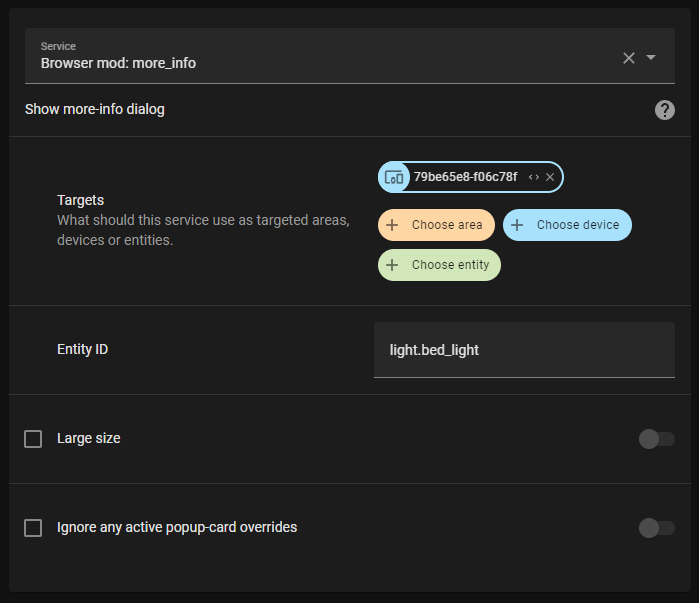
|
|
||||||
|
|
||||||
In yaml, the BrowserID can be used for targeting a specific browser:
|
|
||||||
|
|
||||||
```yaml
|
```yaml
|
||||||
service: browser_mod.more_info
|
type: custom:browser-player
|
||||||
data:
|
|
||||||
entity: light.bed_light
|
|
||||||
browser_id:
|
|
||||||
- 79be65e8-f06c78f
|
|
||||||
```
|
```
|
||||||
|
|
||||||
If no target or `browser_id` is specified, the service will target all registerd Browsers.
|
|
||||||
|
|
||||||
To call a service from a dashboard use the call-service [action](https://www.home-assistant.io/dashboards/actions/) or the special action `fire-dom-event`:
|
# FAQ
|
||||||
|
|
||||||
```yaml
|
### **Why doesn't ANYTHING that used to work with Browser Mod 1.0 work with Browser Mod 2.0?**
|
||||||
tap_action:
|
|
||||||
action: fire-dom-event
|
|
||||||
browser_mod:
|
|
||||||
service: browser_mod.more_info
|
|
||||||
data:
|
|
||||||
entity: light.bed_light
|
|
||||||
```
|
|
||||||
|
|
||||||
Services called via `fire-dom-event` or called as a part of a different service call will (by default) _only_ target the current Browser (even if it's not registered).
|
Browser Mod 2.0 has been rewritten ENTIRELY from the ground up. This allows it to be more stable and less resource intensive. At the same time I took the opportunity to rename a lot of things in ways that are more consistent with Home Assistant nomenclature.
|
||||||
|
|
||||||
Finally, in service calls via `fire-dom-event` or as part of a different service call, the following a parameter `browser_id` with the value `THIS` will be replaced with the current Browsers browser ID.
|
In short, things are hopefully much easier now for new users of Browser Mod at the unfortunate cost of a one-time inconvenience for veteran expert users such as yourself.
|
||||||
|
|
||||||
Ex:
|
### **Why does my Browser ID keep changing?**
|
||||||
|
There's just no way around this. I've used every trick in the book and invented a handful of new ones in order to save the Browser ID as far as possible. It should be much better in Browser Mod 2.0 than earlier, but it's still not perfect. At least it's easy to change it back now...
|
||||||
```yaml
|
|
||||||
tap_action:
|
|
||||||
action: fire-dom-event
|
|
||||||
browser_mod:
|
|
||||||
service: script.print_clicking_browser
|
|
||||||
data:
|
|
||||||
browser_id: THIS
|
|
||||||
```
|
|
||||||
|
|
||||||
with the script:
|
|
||||||
|
|
||||||
```yaml
|
|
||||||
script:
|
|
||||||
print_clicking_browser:
|
|
||||||
sequence:
|
|
||||||
- service: system_log.write
|
|
||||||
data:
|
|
||||||
message: "Button was clicked in {{browser_id}}"
|
|
||||||
```
|
|
||||||
|
|
||||||
Will print `"Button was clicked in 79be65e8-f06c78f" to the Home Assistant log.
|
|
||||||
|
|
||||||
## Services
|
|
||||||
|
|
||||||
### `browser_mod.navigate`
|
|
||||||
|
|
||||||
```yaml
|
|
||||||
service: browser_mod.navigate
|
|
||||||
data:
|
|
||||||
path: <string>
|
|
||||||
[browser_id: <Browser IDs>]
|
|
||||||
```
|
|
||||||
|
|
||||||
This will point the browser to the Home Assistant path given as `path`.
|
|
||||||
E.g. `/lovelace/`, `/my-dashboard/bedroom`, `/browser_mod/`, `/config/devices/device/20911cc5a63b1caafa2089618545eb8a`...
|
|
||||||
|
|
||||||
### `browser_mod.refresh`
|
|
||||||
|
|
||||||
```yaml
|
|
||||||
service: browser_mod.refresh
|
|
||||||
data:
|
|
||||||
[browser_id: <Browser IDs>]
|
|
||||||
```
|
|
||||||
|
|
||||||
This will reload the current page.
|
|
||||||
|
|
||||||
### `browser_mod.more_info`
|
|
||||||
|
|
||||||
```yaml
|
|
||||||
service: browser_mod.more_info
|
|
||||||
data:
|
|
||||||
entity: <string>
|
|
||||||
[large: <true/FALSE>]
|
|
||||||
[ignore_popup_card: <true/FALSE>]
|
|
||||||
[browser_id: <Browser IDs>]
|
|
||||||
```
|
|
||||||
|
|
||||||
This will show the more-info dialog for `entity`. \
|
|
||||||
If `large` is true it will be displayed wider (as if you had clicked the name in the dialog). \
|
|
||||||
If `ignore_popup_card` is true the more-info dialog will be shown even if it is currently overriden by a popup-card.
|
|
||||||
|
|
||||||
### `browser_mod.popup`
|
|
||||||
|
|
||||||
```yaml
|
|
||||||
service: browser_mod.popup
|
|
||||||
data:
|
|
||||||
[title: <string>]
|
|
||||||
content: <string / Dashboard card configuration>
|
|
||||||
[size: <NORMAL/wide/fullscreen>]
|
|
||||||
[right_button: <string>]
|
|
||||||
[right_button_action: <service call>]
|
|
||||||
[left_button: <string>]
|
|
||||||
[left_button_action: <service call>]
|
|
||||||
[dismissable: <TRUE/false>]
|
|
||||||
[dismiss_action: <service call>]
|
|
||||||
[autoclose: <true/FALSE>]
|
|
||||||
[timeout: <number>]
|
|
||||||
[timeout_action: <service call>]
|
|
||||||
[style: <string>]
|
|
||||||
[browser_id: <Browser IDs>]
|
|
||||||
```
|
|
||||||
|
|
||||||
This will display a popup dialog. \
|
|
||||||
`content` may be either some text (including HTML) or a dashboard card configuration. \
|
|
||||||
If `size` is `wide` or `fullscreen` the card will be displayed wider or covering the entire window. \
|
|
||||||
`right_button` and `left_button` specify the text of two action buttons. \
|
|
||||||
When either action button is clicked, the dialog is closed and the service specified as `right_button_action` or `left_button_action` is called. \
|
|
||||||
If `dismissable` is false, the dialog cannot be closed by the user without clicking either action button. If it is true and the dialog is dismissed, `dismiss_action` is called. \
|
|
||||||
If `autoclose` is true the dialog will close automatically when the mouse, screen or keyboard is touched, at which point `dismiss_action` will be called. \
|
|
||||||
If `timeout` is specified the dialog will close automatically after `timeout` milliseconds, at which point `timeout_action` will be called. \
|
|
||||||
Finally, `style` lets you specify some CSS styles to apply to the dialog itself (to style a card in the dialog check out [card-mod](https://github.com/thomasloven/lovelace-card-mod))
|
|
||||||
|
|
||||||
Note that any Browser Mod services performed as `_action`s here will be performed only on the same Browser as initiated the action unless `browser_id` is given.
|
|
||||||
|
|
||||||
Ex:
|
|
||||||
|
|
||||||
```yaml
|
|
||||||
service: browser_mod.popup
|
|
||||||
data:
|
|
||||||
title: The title
|
|
||||||
content: The content
|
|
||||||
right_button: Right button
|
|
||||||
left_button: Left button
|
|
||||||
```
|
|
||||||
|
|
||||||
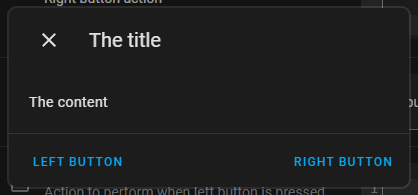
|
|
||||||
|
|
||||||
```yaml
|
|
||||||
service: browser_mod.popup
|
|
||||||
data:
|
|
||||||
title: The title
|
|
||||||
right_button: Right button
|
|
||||||
left_button: Left button
|
|
||||||
content:
|
|
||||||
type: entities
|
|
||||||
entities:
|
|
||||||
- light.bed_light
|
|
||||||
- light.ceiling_lights
|
|
||||||
- light.kitchen_lights
|
|
||||||
```
|
|
||||||
|
|
||||||
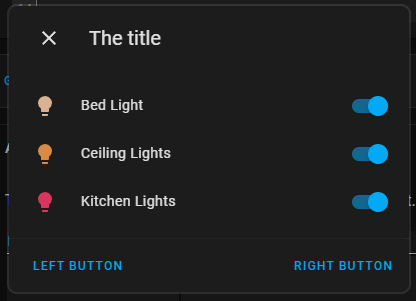
|
|
||||||
|
|
||||||
```yaml
|
|
||||||
service: browser_mod.popup
|
|
||||||
data:
|
|
||||||
content: Do you want to turn the light on?
|
|
||||||
right_button: "Yes"
|
|
||||||
left_button: "No"
|
|
||||||
right_button_action:
|
|
||||||
service: light.turn_on
|
|
||||||
data:
|
|
||||||
entity_id: light.bed_light
|
|
||||||
left_button_action:
|
|
||||||
service: browser_mod.popup
|
|
||||||
data:
|
|
||||||
title: Really?
|
|
||||||
content: Are you sure?
|
|
||||||
right_button: "Yes"
|
|
||||||
left_button: "No"
|
|
||||||
right_button_action:
|
|
||||||
service: browser_mod.popup
|
|
||||||
data:
|
|
||||||
content: Fine, live in darkness.
|
|
||||||
dismissable: false
|
|
||||||
title: Ok
|
|
||||||
timeout: 3000
|
|
||||||
left_button_action:
|
|
||||||
service: light.turn_on
|
|
||||||
data:
|
|
||||||
entity_id: light.bed_light
|
|
||||||
```
|
|
||||||
|
|
||||||
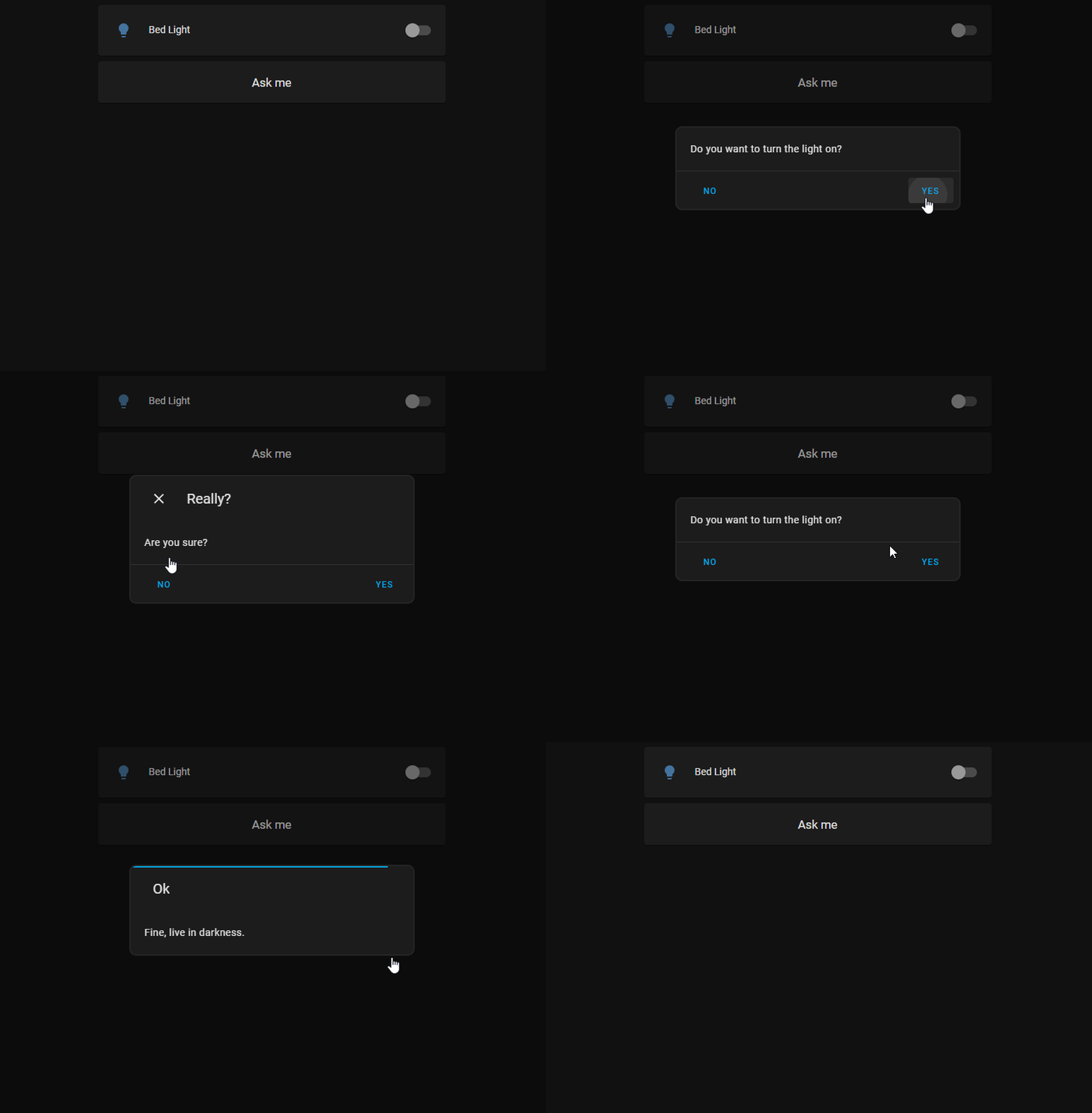
|
|
||||||
|
|
||||||
### `browser_mod.close_popup`
|
|
||||||
|
|
||||||
```yaml
|
|
||||||
service: browser_mod.close_popup
|
|
||||||
data:
|
|
||||||
[browser_id: <Browser IDs>]
|
|
||||||
```
|
|
||||||
|
|
||||||
This will close any currently open popup or more-info dialogs.
|
|
||||||
|
|
||||||
### `browser_mod.sequence`
|
|
||||||
|
|
||||||
```yaml
|
|
||||||
service: browser_mod.sequence
|
|
||||||
data:
|
|
||||||
sequence:
|
|
||||||
- <service call>
|
|
||||||
- <service call>
|
|
||||||
- ...
|
|
||||||
[browser_id: <Browser IDs>]
|
|
||||||
```
|
|
||||||
|
|
||||||
This will perform the listed servie calls one after the other.
|
|
||||||
|
|
||||||
Note that if `browser_id` is omitted in the service calls listed in `sequence` the services will be performed on the Browser that's targeted as a whole rather than all browsers.
|
|
||||||
|
|
||||||
### `browser_mod.delay`
|
|
||||||
|
|
||||||
```yaml
|
|
||||||
service: browser_mod.delay
|
|
||||||
data:
|
|
||||||
time: <number>
|
|
||||||
[browser_id: <Browser IDs>]
|
|
||||||
```
|
|
||||||
|
|
||||||
This will wait for `time` millliseconds. It's probably most useful as part of a `browser_mod.sequence` call...
|
|
||||||
|
|
||||||
### `browsermod.console`
|
|
||||||
|
|
||||||
```yaml
|
|
||||||
service: browser_mod.console
|
|
||||||
data:
|
|
||||||
message: <string>
|
|
||||||
[browser_id: <Browser IDs>]
|
|
||||||
```
|
|
||||||
|
|
||||||
This will print `message` to the console of the target Browser.
|
|
||||||
|
|
||||||
### `browsermod.javascript`
|
|
||||||
|
|
||||||
```yaml
|
|
||||||
service: browser_mod.console
|
|
||||||
data:
|
|
||||||
code: <string>
|
|
||||||
[browser_id: <Browser IDs>]
|
|
||||||
```
|
|
||||||
|
|
||||||
This will run the arbitrary javascript `code` in the target Browser.
|
|
||||||
|
|
||||||
Only use this one if you know what you're doing.
|
|
||||||
|
|
||||||
|
|
||||||
# Popup card
|
|
||||||
|
|
||||||
Add a popup card to a lovelace view (via the GUI) and it will override the more-info dialog for the given entity. Try it. More info to come.
|
|
||||||
|
|
||||||
# Browser Player
|
|
||||||
|
|
||||||
---
|
---
|
||||||
|
|
||||||
|
|||||||
@@ -26,7 +26,9 @@ async def async_setup(hass, config):
|
|||||||
async def async_setup_entry(hass, config_entry):
|
async def async_setup_entry(hass, config_entry):
|
||||||
|
|
||||||
for domain in ["sensor", "binary_sensor", "light", "media_player", "camera"]:
|
for domain in ["sensor", "binary_sensor", "light", "media_player", "camera"]:
|
||||||
await hass.config_entries.async_forward_entry_setup(config_entry, domain)
|
hass.async_create_task(
|
||||||
|
hass.config_entries.async_forward_entry_setup(config_entry, domain)
|
||||||
|
)
|
||||||
|
|
||||||
await async_setup_connection(hass)
|
await async_setup_connection(hass)
|
||||||
await async_setup_view(hass)
|
await async_setup_view(hass)
|
||||||
|
|||||||
@@ -3,6 +3,7 @@ import logging
|
|||||||
from homeassistant.components.websocket_api import event_message
|
from homeassistant.components.websocket_api import event_message
|
||||||
from homeassistant.helpers import device_registry, entity_registry
|
from homeassistant.helpers import device_registry, entity_registry
|
||||||
from homeassistant.helpers.update_coordinator import DataUpdateCoordinator
|
from homeassistant.helpers.update_coordinator import DataUpdateCoordinator
|
||||||
|
from homeassistant.core import callback
|
||||||
|
|
||||||
from .const import DATA_BROWSERS, DOMAIN, DATA_ADDERS
|
from .const import DATA_BROWSERS, DOMAIN, DATA_ADDERS
|
||||||
from .sensor import BrowserSensor
|
from .sensor import BrowserSensor
|
||||||
@@ -130,11 +131,14 @@ class BrowserModBrowser:
|
|||||||
er.async_remove(self.entities["camera"].entity_id)
|
er.async_remove(self.entities["camera"].entity_id)
|
||||||
del self.entities["camera"]
|
del self.entities["camera"]
|
||||||
|
|
||||||
|
hass.create_task(
|
||||||
self.send(
|
self.send(
|
||||||
None, deviceEntities={k: v.entity_id for k, v in self.entities.items()}
|
None, browserEntities={k: v.entity_id for k, v in self.entities.items()}
|
||||||
|
)
|
||||||
)
|
)
|
||||||
|
|
||||||
def send(self, command, **kwargs):
|
@callback
|
||||||
|
async def send(self, command, **kwargs):
|
||||||
"""Send a command to this browser."""
|
"""Send a command to this browser."""
|
||||||
if self.connection is None:
|
if self.connection is None:
|
||||||
return
|
return
|
||||||
@@ -163,6 +167,16 @@ class BrowserModBrowser:
|
|||||||
device = dr.async_get_device({(DOMAIN, self.browserID)})
|
device = dr.async_get_device({(DOMAIN, self.browserID)})
|
||||||
dr.async_remove_device(device.id)
|
dr.async_remove_device(device.id)
|
||||||
|
|
||||||
|
def get_device_id(self, hass):
|
||||||
|
er = entity_registry.async_get(hass)
|
||||||
|
entities = list(self.entities.values())
|
||||||
|
if len(entities):
|
||||||
|
entity = entities[0]
|
||||||
|
entry = er.async_get(entity.entity_id)
|
||||||
|
if entry:
|
||||||
|
return entry.device_id
|
||||||
|
return "default"
|
||||||
|
|
||||||
@property
|
@property
|
||||||
def connection(self):
|
def connection(self):
|
||||||
"""The current websocket connections for this Browser."""
|
"""The current websocket connections for this Browser."""
|
||||||
|
|||||||
File diff suppressed because one or more lines are too long
File diff suppressed because one or more lines are too long
@@ -1,7 +1,10 @@
|
|||||||
|
import logging
|
||||||
from homeassistant import config_entries
|
from homeassistant import config_entries
|
||||||
|
|
||||||
from .const import DOMAIN
|
from .const import DOMAIN
|
||||||
|
|
||||||
|
_LOGGER = logging.getLogger(__name__)
|
||||||
|
|
||||||
|
|
||||||
@config_entries.HANDLERS.register(DOMAIN)
|
@config_entries.HANDLERS.register(DOMAIN)
|
||||||
class BrowserModConfigFlow(config_entries.ConfigFlow):
|
class BrowserModConfigFlow(config_entries.ConfigFlow):
|
||||||
@@ -11,4 +14,5 @@ class BrowserModConfigFlow(config_entries.ConfigFlow):
|
|||||||
async def async_step_user(self, user_input=None):
|
async def async_step_user(self, user_input=None):
|
||||||
if self._async_current_entries():
|
if self._async_current_entries():
|
||||||
return self.async_abort(reason="single_instance_allowed")
|
return self.async_abort(reason="single_instance_allowed")
|
||||||
return self.async_create_entry(title="", data={})
|
_LOGGER.error("Running async_create_entry")
|
||||||
|
return self.async_create_entry(title="Browser Mod", data={})
|
||||||
|
|||||||
@@ -9,6 +9,8 @@ from homeassistant.components.websocket_api import (
|
|||||||
|
|
||||||
from homeassistant.components import websocket_api
|
from homeassistant.components import websocket_api
|
||||||
|
|
||||||
|
from homeassistant.core import callback
|
||||||
|
|
||||||
from .const import (
|
from .const import (
|
||||||
BROWSER_ID,
|
BROWSER_ID,
|
||||||
DATA_STORE,
|
DATA_STORE,
|
||||||
@@ -40,6 +42,7 @@ async def async_setup_connection(hass):
|
|||||||
browserID = msg[BROWSER_ID]
|
browserID = msg[BROWSER_ID]
|
||||||
store = hass.data[DOMAIN][DATA_STORE]
|
store = hass.data[DOMAIN][DATA_STORE]
|
||||||
|
|
||||||
|
@callback
|
||||||
def send_update(data):
|
def send_update(data):
|
||||||
connection.send_message(event_message(msg["id"], {"result": data}))
|
connection.send_message(event_message(msg["id"], {"result": data}))
|
||||||
|
|
||||||
@@ -59,7 +62,9 @@ async def async_setup_connection(hass):
|
|||||||
dev.update_settings(hass, store.get_browser(browserID).asdict())
|
dev.update_settings(hass, store.get_browser(browserID).asdict())
|
||||||
dev.open_connection(connection, msg["id"])
|
dev.open_connection(connection, msg["id"])
|
||||||
await store.set_browser(
|
await store.set_browser(
|
||||||
browserID, last_seen=datetime.now(tz=timezone.utc).isoformat()
|
browserID,
|
||||||
|
last_seen=datetime.now(tz=timezone.utc).isoformat(),
|
||||||
|
meta=dev.get_device_id(hass),
|
||||||
)
|
)
|
||||||
send_update(store.asdict())
|
send_update(store.asdict())
|
||||||
|
|
||||||
|
|||||||
@@ -40,8 +40,8 @@ class BrowserModLight(BrowserModEntity, LightEntity):
|
|||||||
def brightness(self):
|
def brightness(self):
|
||||||
return self._data.get("screen_brightness", 1)
|
return self._data.get("screen_brightness", 1)
|
||||||
|
|
||||||
def turn_on(self, **kwargs):
|
async def async_turn_on(self, **kwargs):
|
||||||
self.browser.send("screen_on", **kwargs)
|
await self.browser.send("screen_on", **kwargs)
|
||||||
|
|
||||||
def turn_off(self, **kwargs):
|
async def async_turn_off(self, **kwargs):
|
||||||
self.browser.send("screen_off")
|
await self.browser.send("screen_off")
|
||||||
|
|||||||
@@ -5,7 +5,7 @@
|
|||||||
"dependencies": ["panel_custom", "websocket_api", "http", "frontend", "lovelace"],
|
"dependencies": ["panel_custom", "websocket_api", "http", "frontend", "lovelace"],
|
||||||
"codeowners": [],
|
"codeowners": [],
|
||||||
"requirements": [],
|
"requirements": [],
|
||||||
"version": "2.0b0",
|
"version": "2.0.0",
|
||||||
"iot_class": "local_push",
|
"iot_class": "local_push",
|
||||||
"config_flow": true
|
"config_flow": true
|
||||||
}
|
}
|
||||||
|
|||||||
@@ -108,11 +108,11 @@ class BrowserModPlayer(BrowserModEntity, MediaPlayerEntity):
|
|||||||
def media_position_updated_at(self):
|
def media_position_updated_at(self):
|
||||||
return dt.utcnow()
|
return dt.utcnow()
|
||||||
|
|
||||||
def set_volume_level(self, volume):
|
async def async_set_volume_level(self, volume):
|
||||||
self.browser.send("player-set-volume", volume_level=volume)
|
await self.browser.send("player-set-volume", volume_level=volume)
|
||||||
|
|
||||||
def mute_volume(self, mute):
|
async def async_mute_volume(self, mute):
|
||||||
self.browser.send("player-mute", mute=mute)
|
await self.browser.send("player-mute", mute=mute)
|
||||||
|
|
||||||
async def async_play_media(self, media_type, media_id, **kwargs):
|
async def async_play_media(self, media_type, media_id, **kwargs):
|
||||||
if media_source.is_media_source_id(media_id):
|
if media_source.is_media_source_id(media_id):
|
||||||
@@ -124,7 +124,7 @@ class BrowserModPlayer(BrowserModEntity, MediaPlayerEntity):
|
|||||||
media_id = async_process_play_media_url(self.hass, media_id)
|
media_id = async_process_play_media_url(self.hass, media_id)
|
||||||
if media_type in (MEDIA_TYPE_URL, MEDIA_TYPE_MUSIC):
|
if media_type in (MEDIA_TYPE_URL, MEDIA_TYPE_MUSIC):
|
||||||
media_id = async_process_play_media_url(self.hass, media_id)
|
media_id = async_process_play_media_url(self.hass, media_id)
|
||||||
self.browser.send(
|
await self.browser.send(
|
||||||
"player-play", media_content_id=media_id, media_type=media_type, **kwargs
|
"player-play", media_content_id=media_id, media_type=media_type, **kwargs
|
||||||
)
|
)
|
||||||
|
|
||||||
@@ -136,20 +136,20 @@ class BrowserModPlayer(BrowserModEntity, MediaPlayerEntity):
|
|||||||
# content_filter=lambda item: item.media_content_type.startswith("audio/"),
|
# content_filter=lambda item: item.media_content_type.startswith("audio/"),
|
||||||
)
|
)
|
||||||
|
|
||||||
def media_play(self):
|
async def async_media_play(self):
|
||||||
self.browser.send("player-play")
|
await self.browser.send("player-play")
|
||||||
|
|
||||||
def media_pause(self):
|
async def async_media_pause(self):
|
||||||
self.browser.send("player-pause")
|
await self.browser.send("player-pause")
|
||||||
|
|
||||||
def media_stop(self):
|
async def async_media_stop(self):
|
||||||
self.browser.send("player-stop")
|
await self.browser.send("player-stop")
|
||||||
|
|
||||||
def media_seek(self, position):
|
async def async_media_seek(self, position):
|
||||||
self.browser.send("player-seek", position=position)
|
await self.browser.send("player-seek", position=position)
|
||||||
|
|
||||||
def turn_off(self):
|
async def async_turn_off(self):
|
||||||
self.browser.send("player-turn-off")
|
await self.browser.send("player-turn-off")
|
||||||
|
|
||||||
def turn_on(self, **kwargs):
|
async def async_turn_on(self, **kwargs):
|
||||||
self.browser.send("player-turn-on", **kwargs)
|
await self.browser.send("player-turn-on", **kwargs)
|
||||||
|
|||||||
@@ -53,9 +53,19 @@ async def async_setup_view(hass):
|
|||||||
add_extra_js_url(hass, r["url"])
|
add_extra_js_url(hass, r["url"])
|
||||||
|
|
||||||
if not frontend_added:
|
if not frontend_added:
|
||||||
|
if getattr(resources, "async_create_item", None):
|
||||||
await resources.async_create_item(
|
await resources.async_create_item(
|
||||||
{
|
{
|
||||||
"res_type": "module",
|
"res_type": "module",
|
||||||
"url": FRONTEND_SCRIPT_URL + "?automatically-added",
|
"url": FRONTEND_SCRIPT_URL + "?automatically-added",
|
||||||
}
|
}
|
||||||
)
|
)
|
||||||
|
elif getattr(resources, "data", None) and getattr(
|
||||||
|
resources.data, "append", None
|
||||||
|
):
|
||||||
|
resources.data.append(
|
||||||
|
{
|
||||||
|
"type": "module",
|
||||||
|
"url": FRONTEND_SCRIPT_URL + "?automatically-added",
|
||||||
|
}
|
||||||
|
)
|
||||||
|
|||||||
@@ -33,7 +33,10 @@ class BrowserSensor(BrowserModEntity, SensorEntity):
|
|||||||
|
|
||||||
@property
|
@property
|
||||||
def native_value(self):
|
def native_value(self):
|
||||||
return self._data.get("browser", {}).get(self.parameter, None)
|
val = self._data.get("browser", {}).get(self.parameter, None)
|
||||||
|
if len(str(val)) > 255:
|
||||||
|
val = str(val)[:250] + "..."
|
||||||
|
return val
|
||||||
|
|
||||||
@property
|
@property
|
||||||
def device_class(self):
|
def device_class(self):
|
||||||
|
|||||||
@@ -27,7 +27,7 @@ async def async_setup_services(hass):
|
|||||||
if target not in browsers:
|
if target not in browsers:
|
||||||
continue
|
continue
|
||||||
browser = browsers[target]
|
browser = browsers[target]
|
||||||
browser.send(service, **data)
|
hass.create_task(browser.send(service, **data))
|
||||||
|
|
||||||
def handle_service(call):
|
def handle_service(call):
|
||||||
service = call.service
|
service = call.service
|
||||||
|
|||||||
@@ -16,6 +16,7 @@ class SettingsStoreData:
|
|||||||
defaultPanel = attr.ib(type=str, default=None)
|
defaultPanel = attr.ib(type=str, default=None)
|
||||||
sidebarPanelOrder = attr.ib(type=list, default=None)
|
sidebarPanelOrder = attr.ib(type=list, default=None)
|
||||||
sidebarHiddenPanels = attr.ib(type=list, default=None)
|
sidebarHiddenPanels = attr.ib(type=list, default=None)
|
||||||
|
sidebarTitle = attr.ib(type=str, default=None)
|
||||||
faviconTemplate = attr.ib(type=str, default=None)
|
faviconTemplate = attr.ib(type=str, default=None)
|
||||||
titleTemplate = attr.ib(type=str, default=None)
|
titleTemplate = attr.ib(type=str, default=None)
|
||||||
|
|
||||||
|
|||||||
109
documentation/configuration-panel.md
Normal file
109
documentation/configuration-panel.md
Normal file
@@ -0,0 +1,109 @@
|
|||||||
|
# The Browser Mod Configuration Panel
|
||||||
|
|
||||||
|
## This browser
|
||||||
|
|
||||||
|
The most important concept for Browser Mod is the _Browser_. A _Browser_ is identified by a unique `BrowserID` stored in the browsers [LocalStorage](https://developer.mozilla.org/en-US/docs/Web/API/Web_Storage_API).
|
||||||
|
|
||||||
|
Browser Mod will initially assigning a random `BrowserID` to each _Browser_ that connects, but you can change this if you want.
|
||||||
|
|
||||||
|
LocalStorage works basically like cookies in that the information is stored locally on your device. Unlike a cookie, though, the information is bound to a URL. Therefore you may get different `BrowserID`s in the same browser if you e.g. access Home Assistant through different URLs inside and outside of your LAN, or through Home Assistant Cloud.
|
||||||
|
|
||||||
|
### Register
|
||||||
|
|
||||||
|
Registering a _Browser_ as a device will create a Home Assistant Device associated with that browser. The device has the following entities:
|
||||||
|
|
||||||
|
- A `media_player` entitiy which will play sound and video through the browser.
|
||||||
|
- A `light` entity will turn the screen on or off and controll the brightness if you are using [Fully Kiosk Browser](https://www.fully-kiosk.com/) (FKB). If you are not using FKB the function will be simulated by covering the screen with a black (or semitransparent) box.
|
||||||
|
- A motion `binary_sensor` which reacts to mouse and/or keyboard activity in the Browser. In FKB this can also react to motion in front of the devices camera.
|
||||||
|
- A number of `sensor` and `binary_sensor` entities providing different bits of information about the Browser which you may or may not find useful.
|
||||||
|
|
||||||
|
Registering a browser also enables it to act as a target for Browser Mod _services_.
|
||||||
|
|
||||||
|
### Browser ID
|
||||||
|
|
||||||
|
This box lets you set the `BrowserID` for the current _Browser_.
|
||||||
|
Note that it is possible to assign the same `BrowserID` to several browsers, but unpredictable things _may_ happen if several of them are open at the same time.
|
||||||
|
There may be benefits to using the same `BrowserID` in some cases, so you'll have to experiment with what works for you.
|
||||||
|
|
||||||
|
Browser Mod is trying hard to keep the Browser ID constant
|
||||||
|
|
||||||
|
### Enable camera
|
||||||
|
|
||||||
|
If your device has a camera, this will allow it to be forwarded as a `camera` entity to Home Assistant.
|
||||||
|
|
||||||
|
## Registered Browsers
|
||||||
|
|
||||||
|
This section shows all currently registered _Browsers_ and allows you to unregister them. This is useful e.g. if a `BrowserID` has changed or if you do not have access to a device anymore.
|
||||||
|
|
||||||
|
### Register CAST browser
|
||||||
|
|
||||||
|
If you are using [Home Assistant Cast](https://www.home-assistant.io/integrations/cast/#home-assistant-cast) to display a lovelace view on a Chromecast device it will get a BrowserID of "`CAST`". Since you can't access the Browser Mod config panel from the device, clicking this button will register the `CAST` browser. Most Browser Mod services will work under Home Assistant Cast.
|
||||||
|
|
||||||
|
## Frontend Settings
|
||||||
|
|
||||||
|
This section is for settings that change the default behavior of the Home Assistant frontend.
|
||||||
|
|
||||||
|
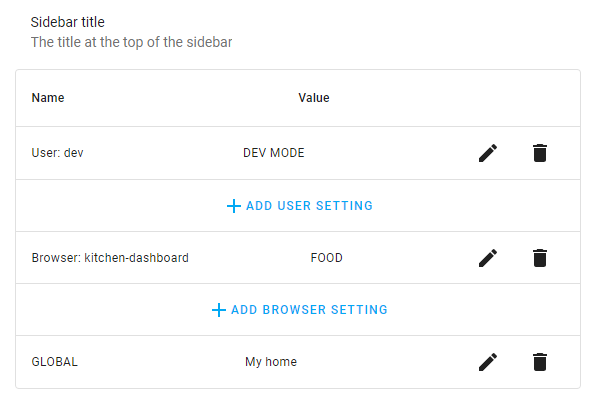
For each option the first applicable value will be applied.
|
||||||
|
|
||||||
|
In the screenshot below, for example, the sidebar title would be set to "My home" - the GLOBAL setting - for any user on any browser (even unregistered). For any user logged in on the "kitchen-dashboard" browser, the sidebar title would instead be set to "FOOD", except for the user "dev" for whom the sidebar title would always be "DEV MODE".
|
||||||
|
|
||||||
|
|
||||||
|
### Title template
|
||||||
|
|
||||||
|
This allows you to set and dynamically update the title text of the browser tab/window by means on a Jinja [template](https://www.home-assistant.io/docs/configuration/templating/).
|
||||||
|
|
||||||
|
> Ex:
|
||||||
|
>
|
||||||
|
> ```jinja
|
||||||
|
> {{ states.persistent_notification | list | count}} - Home Assistant
|
||||||
|
> ```
|
||||||
|
|
||||||
|
### Favicon template
|
||||||
|
|
||||||
|
This allows you to set and dynamically update the favicon of the browser tab/window. I.e. the little icon next to the page title. Favicons can be .png or .ico files and should be placed in your `<config>/www` directory. The box here should then contain a jinja [template](https://www.home-assistant.io/docs/configuration/templating/) which resolves to the path of the icon with `<config>/www/` replaced by `/local/` (see [Hosting files](https://www.home-assistant.io/integrations/http/#hosting-files)).
|
||||||
|
|
||||||
|
> Ex:
|
||||||
|
>
|
||||||
|
> ```jinja
|
||||||
|
> {% if is_state("light.bed_light", "on") %}
|
||||||
|
> /local/icons/green.png
|
||||||
|
> {% else %}
|
||||||
|
> /local/icons/red.png
|
||||||
|
> {% endif %}
|
||||||
|
> ```
|
||||||
|
|
||||||
|
Note that this _only_ applies to the current favicon of the page, not any manifest icons such as the loading icon or the icon you get if you save the page to your smartphones homescreen. For those, please see the [hass-favicon](https://github.com/thomasloven/hass-favicon) custom integration.
|
||||||
|
|
||||||
|
|
||||||
|
### Hide Sidebar
|
||||||
|
|
||||||
|
This will hide the sidebar wit the navigation links. You can still access all the pages via normal links.
|
||||||
|
|
||||||
|
> Tip: add `/browser-mod` to the end of your home assistant URL when you need to turn this off again...
|
||||||
|
|
||||||
|
### Hide header
|
||||||
|
|
||||||
|
This will hide the header bar. Completely. It does not care if there are useful navigation links there or not. It's gone.
|
||||||
|
|
||||||
|
> Tip: See the big yellow warning box at the top of this card? For some reason, it seems to be really easy to forget you turned this on. Please do not bother the Home Assistant team about the header bar missing if you have hidden it yourself. Really, I've forgotten multiple times myself.
|
||||||
|
|
||||||
|
### Default dashboard
|
||||||
|
|
||||||
|
Set the default dashboard that is shown when you access `https://<your home assistant url>/` with nothing after the `/`.
|
||||||
|
|
||||||
|
> *Note:* This also of works with other pages than lovelace dashboards, like e.g. `logbook` or even `history?device_id=f112fd806f2520c76318406f98cd244e&start_date=2022-09-02T16%3A00%3A00.000Z&end_date=2022-09-02T19%3A00%3A00.000Z`.
|
||||||
|
|
||||||
|
### Sidebar order
|
||||||
|
|
||||||
|
Set the order and hidden items of the sidebar. To change this setting:
|
||||||
|
|
||||||
|
- Click the "EDIT" button
|
||||||
|
- Change the sidebar to how you want it
|
||||||
|
- DO NOT click "DONE"
|
||||||
|
- Either add a new User or Browser setting or click one of the pencil icons to overwrite an old layout
|
||||||
|
- Click the "RESTORE" button
|
||||||
|
|
||||||
|
### Sidebar title
|
||||||
|
|
||||||
|
This changes the "Home Assistant" text that is displayed at the top of the sidebar.
|
||||||
|
Accepts Jinja [templates](https://www.home-assistant.io/docs/configuration/templating/).
|
||||||
161
documentation/popups.md
Normal file
161
documentation/popups.md
Normal file
@@ -0,0 +1,161 @@
|
|||||||
|
|
||||||
|
## Anatomy of a popup
|
||||||
|
|
||||||
|
```yaml
|
||||||
|
service: browser_mod.popup
|
||||||
|
data:
|
||||||
|
title: The title
|
||||||
|
content: The content
|
||||||
|
right_button: Right button
|
||||||
|
left_button: Left button
|
||||||
|
```
|
||||||
|
|
||||||
|

|
||||||
|
|
||||||
|
## Size
|
||||||
|
|
||||||
|
The `size` parameter can be set to `normal`, `wide` and `fullscreen` with results as below (background blur has been exagerated for clarity):
|
||||||
|
|
||||||
|

|
||||||
|
|
||||||
|

|
||||||
|
|
||||||
|

|
||||||
|
|
||||||
|
|
||||||
|
## HTML content
|
||||||
|
|
||||||
|
```yaml
|
||||||
|
service: browser_mod.popup
|
||||||
|
data:
|
||||||
|
title: HTML content
|
||||||
|
content: |
|
||||||
|
An <b>HTML</b> string.
|
||||||
|
<p> Pretty much any HTML works: <ha-icon icon="mdi:lamp" style="color: red;"></ha-icon>
|
||||||
|
```
|
||||||
|
|
||||||
|

|
||||||
|
|
||||||
|
## Dashboard card content
|
||||||
|
|
||||||
|
```yaml
|
||||||
|
service: browser_mod.popup
|
||||||
|
data:
|
||||||
|
title: HTML content
|
||||||
|
content:
|
||||||
|
type: entities
|
||||||
|
entities:
|
||||||
|
- light.bed_light
|
||||||
|
- light.ceiling_lights
|
||||||
|
- light.kitchen_lights
|
||||||
|
```
|
||||||
|
|
||||||
|

|
||||||
|
|
||||||
|
## Form content
|
||||||
|
`content` can be a list of ha-form schemas and the popup will then contain a form for user input:
|
||||||
|
|
||||||
|
```
|
||||||
|
<ha-form schema>:
|
||||||
|
name: <string>
|
||||||
|
[label: <string>]
|
||||||
|
[default: <any>]
|
||||||
|
selector: <Home Assistant Selector>
|
||||||
|
```
|
||||||
|
|
||||||
|
| | |
|
||||||
|
|-|-|
|
||||||
|
| `name` | A unique parameter name |
|
||||||
|
| `label` | A description of the parameter |
|
||||||
|
| `default` | The default value for the parameter |
|
||||||
|
| `selector` | A [Home Assistant selector](https://www.home-assistant.io/docs/blueprint/selectors) |
|
||||||
|
|
||||||
|
The data from the form will be forwarded as data for any `right_button_action` or `left_button_action` of the popup.
|
||||||
|
|
||||||
|
```yaml
|
||||||
|
service: browser_mod.popup
|
||||||
|
data:
|
||||||
|
title: Form content
|
||||||
|
content:
|
||||||
|
- name: parameter_name
|
||||||
|
label: Descriptive name
|
||||||
|
selector:
|
||||||
|
text: null
|
||||||
|
- name: another_parameter
|
||||||
|
label: A number
|
||||||
|
default: 5
|
||||||
|
selector:
|
||||||
|
number:
|
||||||
|
min: 0
|
||||||
|
max: 10
|
||||||
|
slider: true
|
||||||
|
```
|
||||||
|
|
||||||
|

|
||||||
|
|
||||||
|
## Actionable popups
|
||||||
|
|
||||||
|
Example of a popup with actions opening more popups or calling Home Assistant services:
|
||||||
|
|
||||||
|
```yaml
|
||||||
|
service: browser_mod.popup
|
||||||
|
data:
|
||||||
|
content: Do you want to turn the light on?
|
||||||
|
right_button: "Yes"
|
||||||
|
left_button: "No"
|
||||||
|
right_button_action:
|
||||||
|
service: light.turn_on
|
||||||
|
data:
|
||||||
|
entity_id: light.bed_light
|
||||||
|
left_button_action:
|
||||||
|
service: browser_mod.popup
|
||||||
|
data:
|
||||||
|
title: Really?
|
||||||
|
content: Are you sure?
|
||||||
|
right_button: "Yes"
|
||||||
|
left_button: "No"
|
||||||
|
right_button_action:
|
||||||
|
service: browser_mod.popup
|
||||||
|
data:
|
||||||
|
content: Fine, live in darkness.
|
||||||
|
dismissable: false
|
||||||
|
title: Ok
|
||||||
|
timeout: 3000
|
||||||
|
left_button_action:
|
||||||
|
service: light.turn_on
|
||||||
|
data:
|
||||||
|
entity_id: light.bed_light
|
||||||
|
```
|
||||||
|
|
||||||
|

|
||||||
|
|
||||||
|
## Forward form data
|
||||||
|
|
||||||
|
The following popup would ask the user for a list of rooms to vacuum and then populate the `params` parameter of the `vacuum.send_command` service call from the result:
|
||||||
|
|
||||||
|
```yaml
|
||||||
|
service: browser_mod.popup
|
||||||
|
data:
|
||||||
|
title: Where to vacuum?
|
||||||
|
right_button: Go!
|
||||||
|
right_button_action:
|
||||||
|
service: vacuum.send_command
|
||||||
|
data:
|
||||||
|
entity_id: vacuum.xiaomi
|
||||||
|
command: app_segment_clean
|
||||||
|
content:
|
||||||
|
- name: params
|
||||||
|
label: Rooms to clean
|
||||||
|
selector:
|
||||||
|
select:
|
||||||
|
multiple: true
|
||||||
|
options:
|
||||||
|
- label: Kitchen
|
||||||
|
value: 11
|
||||||
|
- label: Living room
|
||||||
|
value: 13
|
||||||
|
- label: Bedroom
|
||||||
|
value: 12
|
||||||
|
```
|
||||||
|
|
||||||
|

|
||||||
288
documentation/services.md
Normal file
288
documentation/services.md
Normal file
@@ -0,0 +1,288 @@
|
|||||||
|
|
||||||
|
## Reading guide
|
||||||
|
Service parameters are described using the following conventions:
|
||||||
|
|
||||||
|
- `<type>` in brackets describe the type of a parameter, e.g.
|
||||||
|
|
||||||
|
- `<string>` is a piece of text
|
||||||
|
- `<number>` is a number
|
||||||
|
- `<TRUE/false>` means the value must be either `true` or `false` with `true` being the default
|
||||||
|
- `<service call>` means a full service call specification. Note that this can be any service, not just Browser Mod services
|
||||||
|
- `<Browser IDs>` is a list of BrowserIDs
|
||||||
|
|
||||||
|
- Square brackets `[ ]` indicate that a parameter is optional and can be omitted.
|
||||||
|
|
||||||
|
### `<service call>`
|
||||||
|
|
||||||
|
A service call is a combination of a service and it's data:
|
||||||
|
|
||||||
|
Ex, a `<service call>` for `browser_mod.more_info` with `light.bed_light` as entity:
|
||||||
|
|
||||||
|
```yaml
|
||||||
|
service: browser_mod.more_info
|
||||||
|
data:
|
||||||
|
entity: light.bed_light
|
||||||
|
```
|
||||||
|
|
||||||
|
If `data` contains `browser_id: THIS` then `THIS` will be replaced with the current browser ID.
|
||||||
|
|
||||||
|
|
||||||
|
## A note about targets
|
||||||
|
|
||||||
|
Browser Mod services can be called in two different ways which behave slightly differently.
|
||||||
|
|
||||||
|
The first way is as a *server* call. This is when the service is called from a script or automation, from the dev-services panel or from a dashboard `call-service` action.
|
||||||
|
|
||||||
|
The second way is as a *browser* call. This is when the service is called from a dashboard `fire-dom-event` action, as a part of a `browser_mod.sequence` call or as a `browser_mod.popup` `_action`.
|
||||||
|
|
||||||
|
The notable difference between the two is when no target (`browser_id`) is specified, in which case:
|
||||||
|
- A *server* call will perform the service on ALL REGISTERED BROWSERS.
|
||||||
|
- A *browser* call will perform the service on THE CURRENT BROWSER, i.e. the browser it was called from.
|
||||||
|
|
||||||
|
---
|
||||||
|
|
||||||
|
Finally, in *browser* calls, a parameter `browser_id` with the value `THIS` will be replaced with the current Browsers browser ID.
|
||||||
|
|
||||||
|
Ex:
|
||||||
|
|
||||||
|
```yaml
|
||||||
|
tap_action:
|
||||||
|
action: fire-dom-event
|
||||||
|
browser_mod:
|
||||||
|
service: script.print_clicking_browser
|
||||||
|
data:
|
||||||
|
browser_id: THIS
|
||||||
|
```
|
||||||
|
|
||||||
|
with the script:
|
||||||
|
|
||||||
|
```yaml
|
||||||
|
script:
|
||||||
|
print_clicking_browser:
|
||||||
|
sequence:
|
||||||
|
- service: system_log.write
|
||||||
|
data:
|
||||||
|
message: "Button was clicked in {{browser_id}}"
|
||||||
|
```
|
||||||
|
|
||||||
|
Will print `"Button was clicked in 79be65e8-f06c78f" to the Home Assistant log.
|
||||||
|
|
||||||
|
# Calling services
|
||||||
|
|
||||||
|
Services can be called from the backend using the normal service call procedures. Registered Browsers can be selected as targets through their device:
|
||||||
|

|
||||||
|
|
||||||
|
In yaml, the BrowserID can be used for targeting a specific browser:
|
||||||
|
|
||||||
|
```yaml
|
||||||
|
service: browser_mod.more_info
|
||||||
|
data:
|
||||||
|
entity: light.bed_light
|
||||||
|
browser_id:
|
||||||
|
- 79be65e8-f06c78f
|
||||||
|
```
|
||||||
|
|
||||||
|
If no target or `browser_id` is specified, the service will target all registerd Browsers.
|
||||||
|
|
||||||
|
To call a service from a dashboard use the call-service [action](https://www.home-assistant.io/dashboards/actions/) or the special action `fire-dom-event`:
|
||||||
|
|
||||||
|
```yaml
|
||||||
|
tap_action:
|
||||||
|
action: fire-dom-event
|
||||||
|
browser_mod:
|
||||||
|
service: browser_mod.more_info
|
||||||
|
data:
|
||||||
|
entity: light.bed_light
|
||||||
|
```
|
||||||
|
|
||||||
|
Services called via `fire-dom-event` or called as a part of a different service call will (by default) _only_ target the current Browser (even if it's not registered).
|
||||||
|
|
||||||
|
|
||||||
|
|
||||||
|
# Browser Mod Services
|
||||||
|
|
||||||
|
> Note: Since `browser_id` is common for all services it is not explained further.
|
||||||
|
|
||||||
|
## `browser_mod.navigate`
|
||||||
|
|
||||||
|
Point the browser to the given Home Assistant path.
|
||||||
|
|
||||||
|
```yaml
|
||||||
|
service: browser_mod.navigate
|
||||||
|
data:
|
||||||
|
path: <string>
|
||||||
|
[browser_id: <Browser IDs>]
|
||||||
|
```
|
||||||
|
|
||||||
|
| | |
|
||||||
|
|---|---|
|
||||||
|
|`path` | A Home Assistant path. <br/>E.x. `/lovelace/`, `/my-dashboard/bedroom`, `/browser_mod/`, `/config/devices/device/20911cc5a63b1caafa2089618545eb8a`...|
|
||||||
|
|
||||||
|
## `browser_mod.refresh`
|
||||||
|
|
||||||
|
Reload the current page.
|
||||||
|
|
||||||
|
```yaml
|
||||||
|
service: browser_mod.refresh
|
||||||
|
data:
|
||||||
|
[browser_id: <Browser IDs>]
|
||||||
|
```
|
||||||
|
|
||||||
|
## `browser_mod.more_info`
|
||||||
|
|
||||||
|
Show a more-info dialog.
|
||||||
|
|
||||||
|
```yaml
|
||||||
|
service: browser_mod.more_info
|
||||||
|
data:
|
||||||
|
entity: <string>
|
||||||
|
[large: <true/FALSE>]
|
||||||
|
[ignore_popup_card: <true/FALSE>]
|
||||||
|
[browser_id: <Browser IDs>]
|
||||||
|
```
|
||||||
|
|
||||||
|
| | |
|
||||||
|
|---|---|
|
||||||
|
|`entity`| The entity whose more-info dialog to display. |
|
||||||
|
|`large`| If true, the dialog will be displayed wider, as if you had clicked the title of the dialog. |
|
||||||
|
| `ignore_popup_card` | If true the more-info dialog will be shown even if there's currently a popup-card which would override it. |
|
||||||
|
|
||||||
|
## `browser_mod.popup`
|
||||||
|
|
||||||
|
Display a popup dialog
|
||||||
|
|
||||||
|
```yaml
|
||||||
|
service: browser_mod.popup
|
||||||
|
data:
|
||||||
|
[title: <string>]
|
||||||
|
content: <string / Dashboard card configuration / ha-form schema>
|
||||||
|
[size: <NORMAL/wide/fullscreen>]
|
||||||
|
[right_button: <string>]
|
||||||
|
[right_button_action: <service call>]
|
||||||
|
[left_button: <string>]
|
||||||
|
[left_button_action: <service call>]
|
||||||
|
[dismissable: <TRUE/false>]
|
||||||
|
[dismiss_action: <service call>]
|
||||||
|
[autoclose: <true/FALSE>]
|
||||||
|
[timeout: <number>]
|
||||||
|
[timeout_action: <service call>]
|
||||||
|
[style: <string>]
|
||||||
|
[browser_id: <Browser IDs>]
|
||||||
|
```
|
||||||
|
|
||||||
|
| | |
|
||||||
|
|---|---|
|
||||||
|
|`title` | The title of the popup window.|
|
||||||
|
|`content`| HTML, a dashboard card configuration or ha-form schema to display.|
|
||||||
|
| `size` | `wide` will make the popup window wider. `fullscreen` will make it cover the entire screen. |
|
||||||
|
| `right_button`| The text of the right action button.|
|
||||||
|
| `right_button_action`| Action to perform when the right action button is pressed. |
|
||||||
|
| `left_button`| The text of the left action button.|
|
||||||
|
| `left_button_action`| Action to perform when the left action button is pressed. |
|
||||||
|
| `dismissable`| If false the dialog cannot be closed by the user without clicking an action button. |
|
||||||
|
| `dismiss_action` | An action to perform if the dialog is closed by the user without clicking an action button. |
|
||||||
|
| `autoclose` | If true the dialog will close automatically when the mouse, screen or keyboard is touched. This will perform the `dismiss_action`. |
|
||||||
|
| `timeout` | If set will close the dialog after `timeout` milliseconds. |
|
||||||
|
| `timeout_action` | An action to perform if the dialog is closed by timeout. |
|
||||||
|
| `style` | CSS styles to apply to the dialog. |
|
||||||
|
|
||||||
|
The default value for `style` is as follows:
|
||||||
|
|
||||||
|
```yaml
|
||||||
|
style:
|
||||||
|
--popup-min-width: 400px;
|
||||||
|
--popup-max-width: 600px;
|
||||||
|
--popup-border-width: var(--ha-card-border-width, 2px);
|
||||||
|
--popup-border-color: var(--ha-card-border-color, var(--divider-color, #eee));
|
||||||
|
--popup-border-radius: 8px;
|
||||||
|
--popup-background-color: var(--ha-card-background, var(--card-background-color, white));
|
||||||
|
--popup-header-background-color: var(--popup-background-color, var(--sidebar-background-color));
|
||||||
|
```
|
||||||
|
|
||||||
|
Note that any Browser Mod services performed as `_action`s here will be performed only on the same Browser as initiated the action unless `browser_id` is given.
|
||||||
|
|
||||||
|
If a ha-form schema is used for `content` the resulting data will be inserted into the `data` for any `_action`.
|
||||||
|
|
||||||
|
See [popups.md](popups.md) for more information and usage examples.
|
||||||
|
|
||||||
|
|
||||||
|
## `browser_mod.close_popup`
|
||||||
|
|
||||||
|
Close any currently open popup or more-info dialog.
|
||||||
|
|
||||||
|
```yaml
|
||||||
|
service: browser_mod.close_popup
|
||||||
|
data:
|
||||||
|
[browser_id: <Browser IDs>]
|
||||||
|
```
|
||||||
|
|
||||||
|
## `browser_mod.sequence`
|
||||||
|
|
||||||
|
Perform several services sequentially.
|
||||||
|
|
||||||
|
```yaml
|
||||||
|
service: browser_mod.sequence
|
||||||
|
data:
|
||||||
|
sequence:
|
||||||
|
- <service call>
|
||||||
|
- <service call>
|
||||||
|
- ...
|
||||||
|
[browser_id: <Browser IDs>]
|
||||||
|
```
|
||||||
|
|
||||||
|
| | |
|
||||||
|
|---|---|
|
||||||
|
|`sequence` | List of actions to perform. |
|
||||||
|
|
||||||
|
Note that if `browser_id` is omitted in the service calls listed in `sequence` the services will be performed on the Browser that's targeted as a whole rather than all browsers.
|
||||||
|
|
||||||
|
## `browser_mod.delay`
|
||||||
|
|
||||||
|
Wait for a specified time.
|
||||||
|
|
||||||
|
```yaml
|
||||||
|
service: browser_mod.delay
|
||||||
|
data:
|
||||||
|
time: <number>
|
||||||
|
[browser_id: <Browser IDs>]
|
||||||
|
```
|
||||||
|
|
||||||
|
| | |
|
||||||
|
|---|---|
|
||||||
|
|`time` | Number of milliseconds to wait.|
|
||||||
|
|
||||||
|
This is probably most useful as part of a `browser_mod.sequence` call.
|
||||||
|
|
||||||
|
## `browsermod.console`
|
||||||
|
|
||||||
|
Print a text to the browsers javascript console.
|
||||||
|
|
||||||
|
```yaml
|
||||||
|
service: browser_mod.console
|
||||||
|
data:
|
||||||
|
message: <string>
|
||||||
|
[browser_id: <Browser IDs>]
|
||||||
|
```
|
||||||
|
|
||||||
|
| | |
|
||||||
|
|---|---|
|
||||||
|
|`message` | Text to print. |
|
||||||
|
|
||||||
|
## `browsermod.javascript`
|
||||||
|
|
||||||
|
Run arbitrary javascript code in the browser.
|
||||||
|
|
||||||
|
```yaml
|
||||||
|
service: browser_mod.console
|
||||||
|
data:
|
||||||
|
code: <string>
|
||||||
|
[browser_id: <Browser IDs>]
|
||||||
|
```
|
||||||
|
|
||||||
|
| | |
|
||||||
|
|---|---|
|
||||||
|
|`code` | Code to run. |
|
||||||
|
|
||||||
|
Only use this one if you know what you're doing.
|
||||||
|
|
||||||
|
The `hass` frontend object is available as global variable `hass`.
|
||||||
294
js/config_panel/browser-mod-settings-table.ts
Normal file
294
js/config_panel/browser-mod-settings-table.ts
Normal file
@@ -0,0 +1,294 @@
|
|||||||
|
import { LitElement, html, css } from "lit";
|
||||||
|
import { property } from "lit/decorators.js";
|
||||||
|
import { selectTree } from "../helpers";
|
||||||
|
|
||||||
|
class BrowserModSettingsTable extends LitElement {
|
||||||
|
@property() settingKey;
|
||||||
|
@property() settingSelector = {
|
||||||
|
template: {},
|
||||||
|
};
|
||||||
|
|
||||||
|
@property() hass;
|
||||||
|
@property() default;
|
||||||
|
|
||||||
|
@property() tableData = [];
|
||||||
|
|
||||||
|
_users = undefined;
|
||||||
|
|
||||||
|
firstUpdated() {
|
||||||
|
window.browser_mod.addEventListener("browser-mod-config-update", () =>
|
||||||
|
this.updateTable()
|
||||||
|
);
|
||||||
|
}
|
||||||
|
|
||||||
|
updated(changedProperties) {
|
||||||
|
if (changedProperties.has("settingKey")) this.updateTable();
|
||||||
|
if (
|
||||||
|
changedProperties.has("hass") &&
|
||||||
|
changedProperties.get("hass") === undefined
|
||||||
|
)
|
||||||
|
this.updateTable();
|
||||||
|
}
|
||||||
|
|
||||||
|
async fetchUsers(): Promise<any[]> {
|
||||||
|
if (this._users === undefined)
|
||||||
|
this._users = await this.hass.callWS({ type: "config/auth/list" });
|
||||||
|
return this._users;
|
||||||
|
}
|
||||||
|
|
||||||
|
clearSetting(type, target) {
|
||||||
|
const clearSettingCallback = async () => {
|
||||||
|
if (this.settingKey === "sidebarPanelOrder") {
|
||||||
|
const sideBar: any = await selectTree(
|
||||||
|
document,
|
||||||
|
"home-assistant $ home-assistant-main $ app-drawer-layout app-drawer ha-sidebar"
|
||||||
|
);
|
||||||
|
window.browser_mod.setSetting(type, target, {
|
||||||
|
sidebarHiddenPanels: "[]",
|
||||||
|
sidebarPanelOrder: "[]",
|
||||||
|
});
|
||||||
|
window.browser_mod.setSetting(type, target, {
|
||||||
|
sidebarHiddenPanels: undefined,
|
||||||
|
sidebarPanelOrder: undefined,
|
||||||
|
});
|
||||||
|
return;
|
||||||
|
}
|
||||||
|
if (this.default)
|
||||||
|
window.browser_mod.setSetting(type, target, {
|
||||||
|
[this.settingKey]: this.default,
|
||||||
|
});
|
||||||
|
window.browser_mod.setSetting(type, target, {
|
||||||
|
[this.settingKey]: undefined,
|
||||||
|
});
|
||||||
|
};
|
||||||
|
window.browser_mod?.showPopup(
|
||||||
|
"Are you sure",
|
||||||
|
"Do you wish to clear this setting?",
|
||||||
|
{
|
||||||
|
right_button: "Yes",
|
||||||
|
right_button_action: clearSettingCallback,
|
||||||
|
left_button: "No",
|
||||||
|
}
|
||||||
|
);
|
||||||
|
}
|
||||||
|
|
||||||
|
changeSetting(type, target) {
|
||||||
|
const changeSettingCallback = async (newValue) => {
|
||||||
|
if (this.settingKey === "sidebarPanelOrder") {
|
||||||
|
const sideBar: any = await selectTree(
|
||||||
|
document,
|
||||||
|
"home-assistant $ home-assistant-main $ app-drawer-layout app-drawer ha-sidebar"
|
||||||
|
);
|
||||||
|
|
||||||
|
window.browser_mod.setSetting(type, target, {
|
||||||
|
sidebarHiddenPanels: JSON.stringify(sideBar._hiddenPanels),
|
||||||
|
sidebarPanelOrder: JSON.stringify(sideBar._panelOrder),
|
||||||
|
});
|
||||||
|
|
||||||
|
console.log(sideBar._hiddenPanels, sideBar._panelOrder);
|
||||||
|
return;
|
||||||
|
}
|
||||||
|
let value = newValue.value;
|
||||||
|
window.browser_mod.setSetting(type, target, { [this.settingKey]: value });
|
||||||
|
};
|
||||||
|
|
||||||
|
const settings = window.browser_mod?.getSetting?.(this.settingKey);
|
||||||
|
const def =
|
||||||
|
(type === "global" ? settings.global : settings[type][target]) ??
|
||||||
|
this.default;
|
||||||
|
window.browser_mod?.showPopup(
|
||||||
|
"Change value",
|
||||||
|
(this.settingSelector as any).plaintext ?? [
|
||||||
|
{
|
||||||
|
name: "value",
|
||||||
|
label: (this.settingSelector as any).label ?? "",
|
||||||
|
default: def,
|
||||||
|
selector: this.settingSelector,
|
||||||
|
},
|
||||||
|
],
|
||||||
|
{
|
||||||
|
right_button: "OK",
|
||||||
|
right_button_action: changeSettingCallback,
|
||||||
|
left_button: "Cancel",
|
||||||
|
}
|
||||||
|
);
|
||||||
|
}
|
||||||
|
|
||||||
|
addBrowserSetting() {
|
||||||
|
const settings = window.browser_mod?.getSetting?.(this.settingKey);
|
||||||
|
const allBrowsers = window.browser_mod._data.browsers;
|
||||||
|
const browsers = [];
|
||||||
|
for (const target of Object.keys(allBrowsers)) {
|
||||||
|
if (settings.browser[target] == null) browsers.push(target);
|
||||||
|
}
|
||||||
|
|
||||||
|
if (browsers.length === 0) {
|
||||||
|
window.browser_mod.showPopup(
|
||||||
|
"No browsers to configure",
|
||||||
|
"All registered browsers have already been configured.",
|
||||||
|
{ right_button: "OK" }
|
||||||
|
);
|
||||||
|
return;
|
||||||
|
}
|
||||||
|
|
||||||
|
window.browser_mod.showPopup(
|
||||||
|
"Select browser to configure",
|
||||||
|
[
|
||||||
|
{
|
||||||
|
name: "browser",
|
||||||
|
label: "",
|
||||||
|
selector: {
|
||||||
|
select: { options: browsers },
|
||||||
|
},
|
||||||
|
},
|
||||||
|
],
|
||||||
|
{
|
||||||
|
right_button: "Next",
|
||||||
|
right_button_action: (value) =>
|
||||||
|
this.changeSetting("browser", value.browser),
|
||||||
|
left_button: "Cancel",
|
||||||
|
}
|
||||||
|
);
|
||||||
|
}
|
||||||
|
|
||||||
|
async addUserSetting() {
|
||||||
|
const settings = window.browser_mod?.getSetting?.(this.settingKey);
|
||||||
|
const allUsers = await this.fetchUsers();
|
||||||
|
const users = [];
|
||||||
|
for (const target of allUsers) {
|
||||||
|
if (target.username && settings.user[target.id] == null)
|
||||||
|
users.push({ label: target.name, value: target.id });
|
||||||
|
}
|
||||||
|
|
||||||
|
if (users.length === 0) {
|
||||||
|
window.browser_mod.showPopup(
|
||||||
|
"No users to configure",
|
||||||
|
"All users have already been configured.",
|
||||||
|
{ right_button: "OK" }
|
||||||
|
);
|
||||||
|
return;
|
||||||
|
}
|
||||||
|
|
||||||
|
window.browser_mod.showPopup(
|
||||||
|
"Select user to configure",
|
||||||
|
[
|
||||||
|
{
|
||||||
|
name: "user",
|
||||||
|
label: "",
|
||||||
|
selector: {
|
||||||
|
select: { options: users },
|
||||||
|
},
|
||||||
|
},
|
||||||
|
],
|
||||||
|
{
|
||||||
|
right_button: "Next",
|
||||||
|
right_button_action: (value) => this.changeSetting("user", value.user),
|
||||||
|
left_button: "Cancel",
|
||||||
|
}
|
||||||
|
);
|
||||||
|
}
|
||||||
|
|
||||||
|
async updateTable() {
|
||||||
|
if (this.hass === undefined) return;
|
||||||
|
const users = await this.fetchUsers();
|
||||||
|
const settings = window.browser_mod?.getSetting?.(this.settingKey);
|
||||||
|
const data = [];
|
||||||
|
for (const [k, v] of Object.entries(settings.user)) {
|
||||||
|
const user = users.find((usr) => usr.id === k);
|
||||||
|
data.push({
|
||||||
|
name: `User: ${user.name}`,
|
||||||
|
value: String(v),
|
||||||
|
controls: html`
|
||||||
|
<ha-icon-button @click=${() => this.changeSetting("user", k)}>
|
||||||
|
<ha-icon .icon=${"mdi:pencil"} style="display:flex;"></ha-icon>
|
||||||
|
</ha-icon-button>
|
||||||
|
<ha-icon-button @click=${() => this.clearSetting("user", k)}>
|
||||||
|
<ha-icon .icon=${"mdi:delete"} style="display:flex;"></ha-icon>
|
||||||
|
</ha-icon-button>
|
||||||
|
`,
|
||||||
|
});
|
||||||
|
}
|
||||||
|
|
||||||
|
data.push({
|
||||||
|
name: "",
|
||||||
|
value: html`
|
||||||
|
<mwc-button @click=${() => this.addUserSetting()}>
|
||||||
|
<ha-icon .icon=${"mdi:plus"}></ha-icon>
|
||||||
|
Add user setting
|
||||||
|
</mwc-button>
|
||||||
|
`,
|
||||||
|
});
|
||||||
|
|
||||||
|
for (const [k, v] of Object.entries(settings.browser)) {
|
||||||
|
data.push({
|
||||||
|
name: `Browser: ${k}`,
|
||||||
|
value: String(v),
|
||||||
|
controls: html`
|
||||||
|
<ha-icon-button @click=${() => this.changeSetting("browser", k)}>
|
||||||
|
<ha-icon .icon=${"mdi:pencil"} style="display:flex;"></ha-icon>
|
||||||
|
</ha-icon-button>
|
||||||
|
<ha-icon-button @click=${() => this.clearSetting("browser", k)}>
|
||||||
|
<ha-icon .icon=${"mdi:delete"} style="display:flex;"></ha-icon>
|
||||||
|
</ha-icon-button>
|
||||||
|
`,
|
||||||
|
});
|
||||||
|
}
|
||||||
|
|
||||||
|
data.push({
|
||||||
|
name: "",
|
||||||
|
value: html`
|
||||||
|
<mwc-button @click=${() => this.addBrowserSetting()}>
|
||||||
|
<ha-icon .icon=${"mdi:plus"}></ha-icon>
|
||||||
|
Add browser setting
|
||||||
|
</mwc-button>
|
||||||
|
`,
|
||||||
|
});
|
||||||
|
|
||||||
|
data.push({
|
||||||
|
name: "GLOBAL",
|
||||||
|
value:
|
||||||
|
settings.global != null
|
||||||
|
? String(settings.global)
|
||||||
|
: html`<span style="color: var(--warning-color);">DEFAULT</span>`,
|
||||||
|
controls: html`
|
||||||
|
<ha-icon-button @click=${() => this.changeSetting("global", null)}>
|
||||||
|
<ha-icon .icon=${"mdi:pencil"} style="display:flex;"></ha-icon>
|
||||||
|
</ha-icon-button>
|
||||||
|
<ha-icon-button @click=${() => this.clearSetting("global", null)}>
|
||||||
|
<ha-icon .icon=${"mdi:delete"} style="display:flex;"></ha-icon>
|
||||||
|
</ha-icon-button>
|
||||||
|
`,
|
||||||
|
});
|
||||||
|
this.tableData = data;
|
||||||
|
}
|
||||||
|
|
||||||
|
render() {
|
||||||
|
const global = window.browser_mod?.global_settings?.[this.settingKey];
|
||||||
|
const columns = {
|
||||||
|
name: {
|
||||||
|
title: "Name",
|
||||||
|
grows: true,
|
||||||
|
},
|
||||||
|
value: {
|
||||||
|
title: "Value",
|
||||||
|
grows: true,
|
||||||
|
},
|
||||||
|
controls: {},
|
||||||
|
};
|
||||||
|
|
||||||
|
return html`
|
||||||
|
<ha-data-table .columns=${columns} .data=${this.tableData} auto-height>
|
||||||
|
</ha-data-table>
|
||||||
|
`;
|
||||||
|
}
|
||||||
|
|
||||||
|
static get styles() {
|
||||||
|
return css`
|
||||||
|
:host {
|
||||||
|
display: block;
|
||||||
|
}
|
||||||
|
`;
|
||||||
|
}
|
||||||
|
}
|
||||||
|
|
||||||
|
customElements.define("browser-mod-settings-table", BrowserModSettingsTable);
|
||||||
@@ -93,6 +93,14 @@ class BrowserModRegisteredBrowsersCard extends LitElement {
|
|||||||
@change=${this.toggleCameraEnabled}
|
@change=${this.toggleCameraEnabled}
|
||||||
></ha-switch>
|
></ha-switch>
|
||||||
</ha-settings-row>
|
</ha-settings-row>
|
||||||
|
${window.browser_mod?.cameraError
|
||||||
|
? html`
|
||||||
|
<ha-alert alert-type="error">
|
||||||
|
Setting up the device camera failed. Make sure you have
|
||||||
|
allowed use of the camera in your browser.
|
||||||
|
</ha-alert>
|
||||||
|
`
|
||||||
|
: ""}
|
||||||
${this._renderInteractionAlert()}
|
${this._renderInteractionAlert()}
|
||||||
${this._renderFKBSettingsInfo()}
|
${this._renderFKBSettingsInfo()}
|
||||||
`
|
`
|
||||||
@@ -128,7 +136,7 @@ class BrowserModRegisteredBrowsersCard extends LitElement {
|
|||||||
private _renderInteractionAlert() {
|
private _renderInteractionAlert() {
|
||||||
return html`
|
return html`
|
||||||
<ha-alert title="Interaction requirement">
|
<ha-alert title="Interaction requirement">
|
||||||
For security reasons many browsers require the user to interact with a
|
For privacy reasons many browsers require the user to interact with a
|
||||||
webpage before allowing audio playback or video capture. This may affect
|
webpage before allowing audio playback or video capture. This may affect
|
||||||
the
|
the
|
||||||
<code>media_player</code> and <code>camera</code> components of Browser
|
<code>media_player</code> and <code>camera</code> components of Browser
|
||||||
|
|||||||
@@ -1,38 +1,73 @@
|
|||||||
import { LitElement, html, css } from "lit";
|
import { LitElement, html, css } from "lit";
|
||||||
import { property, state } from "lit/decorators.js";
|
import { property, state } from "lit/decorators.js";
|
||||||
import { loadDeveloperToolsTemplate } from "../helpers";
|
import { loadDeveloperToolsTemplate, selectTree } from "../helpers";
|
||||||
|
|
||||||
|
import "./browser-mod-settings-table";
|
||||||
|
|
||||||
loadDeveloperToolsTemplate();
|
loadDeveloperToolsTemplate();
|
||||||
|
|
||||||
class BrowserModFrontendSettingsCard extends LitElement {
|
class BrowserModFrontendSettingsCard extends LitElement {
|
||||||
@property() hass;
|
@property() hass;
|
||||||
|
|
||||||
@state() _selectedTab = 0;
|
@state() _dashboards = [];
|
||||||
|
|
||||||
|
@state() _editSidebar = false;
|
||||||
|
_savedSidebar = { panelOrder: [], hiddenPanels: [] };
|
||||||
|
|
||||||
firstUpdated() {
|
firstUpdated() {
|
||||||
window.browser_mod.addEventListener("browser-mod-config-update", () =>
|
window.browser_mod.addEventListener("browser-mod-config-update", () =>
|
||||||
this.requestUpdate()
|
this.requestUpdate()
|
||||||
);
|
);
|
||||||
window.browser_mod.addEventListener("browser-mod-favicon-update", () =>
|
|
||||||
this.requestUpdate()
|
|
||||||
);
|
|
||||||
}
|
}
|
||||||
|
|
||||||
_handleSwitchTab(ev: CustomEvent) {
|
updated(changedProperties) {
|
||||||
this._selectedTab = parseInt(ev.detail.index, 10);
|
if (
|
||||||
|
changedProperties.has("hass") &&
|
||||||
|
changedProperties.get("hass") === undefined
|
||||||
|
) {
|
||||||
|
(async () =>
|
||||||
|
(this._dashboards = await this.hass.callWS({
|
||||||
|
type: "lovelace/dashboards/list",
|
||||||
|
})))();
|
||||||
|
}
|
||||||
|
}
|
||||||
|
|
||||||
|
async toggleEditSidebar() {
|
||||||
|
const sideBar: any = await selectTree(
|
||||||
|
document,
|
||||||
|
"home-assistant $ home-assistant-main $ app-drawer-layout app-drawer ha-sidebar"
|
||||||
|
);
|
||||||
|
sideBar.editMode = !sideBar.editMode;
|
||||||
|
this._editSidebar = sideBar.editMode;
|
||||||
|
if (this._editSidebar) {
|
||||||
|
this._savedSidebar = {
|
||||||
|
panelOrder: sideBar._panelOrder,
|
||||||
|
hiddenPanels: sideBar._hiddenPanels,
|
||||||
|
};
|
||||||
|
} else {
|
||||||
|
sideBar._panelOrder = this._savedSidebar.panelOrder ?? [];
|
||||||
|
sideBar._hiddenPanels = this._savedSidebar.hiddenPanels ?? [];
|
||||||
|
this._savedSidebar = { panelOrder: [], hiddenPanels: [] };
|
||||||
|
}
|
||||||
}
|
}
|
||||||
|
|
||||||
render() {
|
render() {
|
||||||
const level = ["user", "browser", "global"][this._selectedTab];
|
const db = this._dashboards.map((d) => {
|
||||||
|
return { value: d.url_path, label: d.title };
|
||||||
|
});
|
||||||
|
const dashboardSelector = {
|
||||||
|
select: {
|
||||||
|
options: [{ value: "lovelace", label: "lovelace (default)" }, ...db],
|
||||||
|
custom_value: true,
|
||||||
|
},
|
||||||
|
};
|
||||||
return html`
|
return html`
|
||||||
<ha-card header="Frontend Settings" outlined>
|
<ha-card header="Frontend Settings" outlined>
|
||||||
<div class="card-content">
|
<div class="card-content">
|
||||||
<ha-alert alert-type="warning">
|
<ha-alert alert-type="warning" title="Please note:">
|
||||||
<p>
|
The settings in this section severely change the way the Home
|
||||||
Please note: The settings in this section severely change the way the Home
|
|
||||||
Assistant frontend works and looks. It is very easy to forget that
|
Assistant frontend works and looks. It is very easy to forget that
|
||||||
you made a setting here when you switch devices or user.
|
you made a setting here when you switch devices or user.
|
||||||
</p>
|
|
||||||
<p>
|
<p>
|
||||||
Do not report any issues to Home Assistant before clearing
|
Do not report any issues to Home Assistant before clearing
|
||||||
<b>EVERY</b> setting here and thouroghly clearing all your browser
|
<b>EVERY</b> setting here and thouroghly clearing all your browser
|
||||||
@@ -41,234 +76,119 @@ class BrowserModFrontendSettingsCard extends LitElement {
|
|||||||
</p>
|
</p>
|
||||||
</ha-alert>
|
</ha-alert>
|
||||||
<p>
|
<p>
|
||||||
Global settings are applied for all users and browsers.</br>
|
Settings below are applied by first match. I.e. if a matching User
|
||||||
User settings are applied to the current user and overrides any Global settings.</br>
|
setting exists, it will be applied. Otherwise any matching Browser
|
||||||
Browser settings are applied for the current browser and overrides any User or Global settings.
|
setting and otherwise the GLOBAL setting if that differs from
|
||||||
|
DEFAULT.
|
||||||
</p>
|
</p>
|
||||||
<mwc-tab-bar
|
|
||||||
.activeIndex=${this._selectedTab}
|
|
||||||
@MDCTabBar:activated=${this._handleSwitchTab}
|
|
||||||
>
|
|
||||||
<mwc-tab .label=${"User (" + this.hass.user.name + ")"}></mwc-tab>
|
|
||||||
<ha-icon .icon=${"mdi:chevron-double-right"}></ha-icon>
|
|
||||||
<mwc-tab .label=${"Browser"}></mwc-tab>
|
|
||||||
<ha-icon .icon=${"mdi:chevron-double-right"}></ha-icon>
|
|
||||||
<mwc-tab .label=${"Global"}></mwc-tab>
|
|
||||||
</mwc-tab-bar>
|
|
||||||
|
|
||||||
${this._render_settings(level)}
|
|
||||||
</div>
|
|
||||||
</ha-card>
|
|
||||||
`;
|
|
||||||
}
|
|
||||||
|
|
||||||
_render_settings(level) {
|
|
||||||
const global = window.browser_mod.global_settings;
|
|
||||||
const browser = window.browser_mod.browser_settings;
|
|
||||||
const user = window.browser_mod.user_settings;
|
|
||||||
const current = { global, browser, user }[level];
|
|
||||||
|
|
||||||
const DESC_BOOLEAN = (val) =>
|
|
||||||
({ true: "Enabled", false: "Disabled", undefined: "Unset" }[String(val)]);
|
|
||||||
const DESC_SET_UNSET = (val) => (val === undefined ? "Unset" : "Set");
|
|
||||||
const OVERRIDDEN = (key) => {
|
|
||||||
if (level !== "browser" && browser[key] !== undefined)
|
|
||||||
return html`<br />Overridden by browser setting`;
|
|
||||||
if (level === "global" && user[key] !== undefined)
|
|
||||||
return html`<br />Overridden by user setting`;
|
|
||||||
};
|
|
||||||
|
|
||||||
return html`
|
|
||||||
<div class="box">
|
|
||||||
<ha-settings-row>
|
|
||||||
<span slot="heading">Favicon template</span>
|
|
||||||
${OVERRIDDEN("faviconTemplate")}
|
|
||||||
<img src="${window.browser_mod._currentFavicon}" class="favicon" />
|
|
||||||
</ha-settings-row>
|
|
||||||
<ha-code-editor
|
|
||||||
.hass=${this.hass}
|
|
||||||
.value=${current.faviconTemplate}
|
|
||||||
@value-changed=${(ev) => {
|
|
||||||
const tpl = ev.detail.value || undefined;
|
|
||||||
window.browser_mod.set_setting("faviconTemplate", tpl, level);
|
|
||||||
}}
|
|
||||||
></ha-code-editor>
|
|
||||||
<ha-settings-row>
|
|
||||||
<mwc-button
|
|
||||||
@click=${() =>
|
|
||||||
window.browser_mod.set_setting(
|
|
||||||
"faviconTemplate",
|
|
||||||
undefined,
|
|
||||||
level
|
|
||||||
)}
|
|
||||||
>
|
|
||||||
Clear
|
|
||||||
</mwc-button>
|
|
||||||
</ha-settings-row>
|
|
||||||
|
|
||||||
<div class="separator"></div>
|
<div class="separator"></div>
|
||||||
|
|
||||||
<ha-settings-row>
|
<ha-settings-row>
|
||||||
<span slot="heading">Title template</span>
|
<span slot="heading">Title template</span>
|
||||||
${OVERRIDDEN("titleTemplate")}
|
<span slot="description">
|
||||||
|
Jinja template for the browser window/tab title
|
||||||
|
</span>
|
||||||
</ha-settings-row>
|
</ha-settings-row>
|
||||||
<ha-code-editor
|
<browser-mod-settings-table
|
||||||
.hass=${this.hass}
|
.hass=${this.hass}
|
||||||
.value=${current.titleTemplate}
|
.settingKey=${"titleTemplate"}
|
||||||
@value-changed=${(ev) => {
|
></browser-mod-settings-table>
|
||||||
const tpl = ev.detail.value || undefined;
|
|
||||||
window.browser_mod.set_setting("titleTemplate", tpl, level);
|
|
||||||
}}
|
|
||||||
></ha-code-editor>
|
|
||||||
<ha-settings-row>
|
|
||||||
<mwc-button
|
|
||||||
@click=${() =>
|
|
||||||
window.browser_mod.set_setting("titleTemplate", undefined, level)}
|
|
||||||
>
|
|
||||||
Clear
|
|
||||||
</mwc-button>
|
|
||||||
</ha-settings-row>
|
|
||||||
|
|
||||||
<div class="separator"></div>
|
<div class="separator"></div>
|
||||||
|
|
||||||
<ha-settings-row>
|
<ha-settings-row>
|
||||||
<span slot="heading">Hide Sidebar</span>
|
<span slot="heading">Favicon template</span>
|
||||||
<span slot="description">Hide the sidebar and hamburger menu</span>
|
<span slot="description">
|
||||||
Currently: ${DESC_BOOLEAN(current.hideSidebar)}
|
Jinja template for the browser favicon
|
||||||
${OVERRIDDEN("hideSidebar")}
|
</span>
|
||||||
</ha-settings-row>
|
|
||||||
<ha-settings-row>
|
|
||||||
<mwc-button
|
|
||||||
@click=${() =>
|
|
||||||
window.browser_mod.set_setting("hideSidebar", true, level)}
|
|
||||||
>
|
|
||||||
Enable
|
|
||||||
</mwc-button>
|
|
||||||
<mwc-button
|
|
||||||
@click=${() =>
|
|
||||||
window.browser_mod.set_setting("hideSidebar", false, level)}
|
|
||||||
>
|
|
||||||
Disable
|
|
||||||
</mwc-button>
|
|
||||||
<mwc-button
|
|
||||||
@click=${() =>
|
|
||||||
window.browser_mod.set_setting("hideSidebar", undefined, level)}
|
|
||||||
>
|
|
||||||
Clear
|
|
||||||
</mwc-button>
|
|
||||||
</ha-settings-row>
|
</ha-settings-row>
|
||||||
|
<browser-mod-settings-table
|
||||||
|
.hass=${this.hass}
|
||||||
|
.settingKey=${"faviconTemplate"}
|
||||||
|
></browser-mod-settings-table>
|
||||||
|
|
||||||
<div class="separator"></div>
|
<div class="separator"></div>
|
||||||
|
|
||||||
<ha-settings-row>
|
<ha-settings-row>
|
||||||
<span slot="heading">Hide Header</span>
|
<span slot="heading">Hide sidebar</span>
|
||||||
<span slot="description">Hide the header on all pages</span>
|
<span slot="description">
|
||||||
Currently: ${DESC_BOOLEAN(current.hideHeader)}
|
Completely remove the sidebar from all panels
|
||||||
${OVERRIDDEN("hideHeader")}
|
</span>
|
||||||
</ha-settings-row>
|
</ha-settings-row>
|
||||||
|
<browser-mod-settings-table
|
||||||
|
.hass=${this.hass}
|
||||||
|
.settingKey=${"hideSidebar"}
|
||||||
|
.settingSelector=${{ boolean: {}, label: "Hide sidebar" }}
|
||||||
|
></browser-mod-settings-table>
|
||||||
|
|
||||||
|
<div class="separator"></div>
|
||||||
|
|
||||||
<ha-settings-row>
|
<ha-settings-row>
|
||||||
<mwc-button
|
<span slot="heading">Hide header</span>
|
||||||
@click=${() =>
|
<span slot="description">
|
||||||
window.browser_mod.set_setting("hideHeader", true, level)}
|
Completely remove the header from all panels
|
||||||
>
|
</span>
|
||||||
Enable
|
|
||||||
</mwc-button>
|
|
||||||
<mwc-button
|
|
||||||
@click=${() =>
|
|
||||||
window.browser_mod.set_setting("hideHeader", false, level)}
|
|
||||||
>
|
|
||||||
Disable
|
|
||||||
</mwc-button>
|
|
||||||
<mwc-button
|
|
||||||
@click=${() =>
|
|
||||||
window.browser_mod.set_setting("hideHeader", undefined, level)}
|
|
||||||
>
|
|
||||||
Clear
|
|
||||||
</mwc-button>
|
|
||||||
</ha-settings-row>
|
</ha-settings-row>
|
||||||
|
<browser-mod-settings-table
|
||||||
|
.hass=${this.hass}
|
||||||
|
.settingKey=${"hideHeader"}
|
||||||
|
.settingSelector=${{ boolean: {}, label: "Hide header" }}
|
||||||
|
></browser-mod-settings-table>
|
||||||
|
|
||||||
|
<div class="separator"></div>
|
||||||
|
|
||||||
|
<ha-settings-row>
|
||||||
|
<span slot="heading">Default dashboard</span>
|
||||||
|
<span slot="description">
|
||||||
|
The dashboard that is showed when navigating to
|
||||||
|
${location.origin}/
|
||||||
|
</span>
|
||||||
|
</ha-settings-row>
|
||||||
|
<browser-mod-settings-table
|
||||||
|
.hass=${this.hass}
|
||||||
|
.settingKey=${"defaultPanel"}
|
||||||
|
.settingSelector=${dashboardSelector}
|
||||||
|
.default=${"lovelace"}
|
||||||
|
></browser-mod-settings-table>
|
||||||
|
|
||||||
<div class="separator"></div>
|
<div class="separator"></div>
|
||||||
|
|
||||||
<ha-settings-row>
|
<ha-settings-row>
|
||||||
<span slot="heading">Sidebar order</span>
|
<span slot="heading">Sidebar order</span>
|
||||||
<span slot="description">
|
<span slot="description">
|
||||||
Order and visibility of sidebar buttons
|
Order and visibility of sidebar items. <br />Click EDIT and set
|
||||||
|
the sidebar up as you want. Then save the settings and finally
|
||||||
|
click RESTORE.
|
||||||
</span>
|
</span>
|
||||||
Currently: ${DESC_SET_UNSET(current.sidebarPanelOrder)}
|
<mwc-button @click=${() => this.toggleEditSidebar()}>
|
||||||
${OVERRIDDEN("sidebarPanelOrder")}
|
${this._editSidebar ? "Restore" : "Edit"}
|
||||||
</ha-settings-row>
|
|
||||||
<ha-settings-row>
|
|
||||||
<span slot="description">
|
|
||||||
Clearing this does NOT restore the original default order.
|
|
||||||
</span>
|
|
||||||
<mwc-button
|
|
||||||
@click=${() => {
|
|
||||||
window.browser_mod.set_setting(
|
|
||||||
"sidebarPanelOrder",
|
|
||||||
localStorage.getItem("sidebarPanelOrder"),
|
|
||||||
level
|
|
||||||
);
|
|
||||||
window.browser_mod.set_setting(
|
|
||||||
"sidebarHiddenPanels",
|
|
||||||
localStorage.getItem("sidebarHiddenPanels"),
|
|
||||||
level
|
|
||||||
);
|
|
||||||
}}
|
|
||||||
>
|
|
||||||
Set
|
|
||||||
</mwc-button>
|
|
||||||
<mwc-button
|
|
||||||
@click=${() => {
|
|
||||||
window.browser_mod.set_setting(
|
|
||||||
"sidebarPanelOrder",
|
|
||||||
undefined,
|
|
||||||
level
|
|
||||||
);
|
|
||||||
window.browser_mod.set_setting(
|
|
||||||
"sidebarHiddenPanels",
|
|
||||||
undefined,
|
|
||||||
level
|
|
||||||
);
|
|
||||||
}}
|
|
||||||
>
|
|
||||||
Clear
|
|
||||||
</mwc-button>
|
</mwc-button>
|
||||||
</ha-settings-row>
|
</ha-settings-row>
|
||||||
|
<browser-mod-settings-table
|
||||||
|
.hass=${this.hass}
|
||||||
|
.settingKey=${"sidebarPanelOrder"}
|
||||||
|
.settingSelector=${{
|
||||||
|
plaintext: "Press OK to store the current sidebar order",
|
||||||
|
}}
|
||||||
|
.default=${"lovelace"}
|
||||||
|
></browser-mod-settings-table>
|
||||||
|
|
||||||
<div class="separator"></div>
|
<div class="separator"></div>
|
||||||
|
|
||||||
<ha-settings-row>
|
<ha-settings-row>
|
||||||
<span slot="heading">Default dashboard</span>
|
<span slot="heading">Sidebar title</span>
|
||||||
<span slot="description"
|
|
||||||
>The dashboard that's displayed by default</span
|
|
||||||
>
|
|
||||||
Currently: ${DESC_SET_UNSET(current.defaultPanel)}
|
|
||||||
${OVERRIDDEN("defaultPanel")}
|
|
||||||
</ha-settings-row>
|
|
||||||
<ha-settings-row>
|
|
||||||
<span slot="description">
|
<span slot="description">
|
||||||
Clearing this does NOT restore the original default dashboard.
|
The title at the top of the sidebar
|
||||||
</span>
|
</span>
|
||||||
<mwc-button
|
|
||||||
@click=${() => {
|
|
||||||
window.browser_mod.set_setting(
|
|
||||||
"defaultPanel",
|
|
||||||
localStorage.getItem("defaultPanel"),
|
|
||||||
level
|
|
||||||
);
|
|
||||||
}}
|
|
||||||
>
|
|
||||||
Set
|
|
||||||
</mwc-button>
|
|
||||||
<mwc-button
|
|
||||||
@click=${() => {
|
|
||||||
window.browser_mod.set_setting("defaultPanel", undefined, level);
|
|
||||||
}}
|
|
||||||
>
|
|
||||||
Clear
|
|
||||||
</mwc-button>
|
|
||||||
</ha-settings-row>
|
</ha-settings-row>
|
||||||
|
<browser-mod-settings-table
|
||||||
|
.hass=${this.hass}
|
||||||
|
.settingKey=${"sidebarTitle"}
|
||||||
|
.settingSelector=${{ text: {} }}
|
||||||
|
></browser-mod-settings-table>
|
||||||
</div>
|
</div>
|
||||||
|
</ha-card>
|
||||||
`;
|
`;
|
||||||
}
|
}
|
||||||
|
|
||||||
@@ -280,7 +200,7 @@ class BrowserModFrontendSettingsCard extends LitElement {
|
|||||||
}
|
}
|
||||||
.separator {
|
.separator {
|
||||||
border-bottom: 1px solid var(--divider-color);
|
border-bottom: 1px solid var(--divider-color);
|
||||||
margin: 0 -8px;
|
margin: 16px -16px 0px;
|
||||||
}
|
}
|
||||||
img.favicon {
|
img.favicon {
|
||||||
width: 64px;
|
width: 64px;
|
||||||
|
|||||||
@@ -15,12 +15,13 @@ loadConfigDashboard().then(() => {
|
|||||||
@property() connection;
|
@property() connection;
|
||||||
|
|
||||||
firstUpdated() {
|
firstUpdated() {
|
||||||
window.browser_mod.addEventListener("browser-mod-config-update", () =>
|
window.addEventListener("browser-mod-config-update", () =>
|
||||||
this.requestUpdate()
|
this.requestUpdate()
|
||||||
);
|
);
|
||||||
}
|
}
|
||||||
|
|
||||||
render() {
|
render() {
|
||||||
|
if (!window.browser_mod) return html``;
|
||||||
return html`
|
return html`
|
||||||
<ha-app-layout>
|
<ha-app-layout>
|
||||||
<app-header slot="header" fixed>
|
<app-header slot="header" fixed>
|
||||||
|
|||||||
@@ -14,9 +14,7 @@ class BrowserModRegisteredBrowsersCard extends LitElement {
|
|||||||
const browserID = ev.currentTarget.browserID;
|
const browserID = ev.currentTarget.browserID;
|
||||||
|
|
||||||
const unregisterCallback = () => {
|
const unregisterCallback = () => {
|
||||||
console.log(browserID, window.browser_mod.browserID);
|
|
||||||
if (browserID === window.browser_mod.browserID) {
|
if (browserID === window.browser_mod.browserID) {
|
||||||
console.log("Unregister self");
|
|
||||||
window.browser_mod.registered = false;
|
window.browser_mod.registered = false;
|
||||||
} else {
|
} else {
|
||||||
window.browser_mod.connection.sendMessage({
|
window.browser_mod.connection.sendMessage({
|
||||||
@@ -48,21 +46,31 @@ class BrowserModRegisteredBrowsersCard extends LitElement {
|
|||||||
return html`
|
return html`
|
||||||
<ha-card header="Registered Browsers" outlined>
|
<ha-card header="Registered Browsers" outlined>
|
||||||
<div class="card-content">
|
<div class="card-content">
|
||||||
${Object.keys(window.browser_mod.browsers).map(
|
${Object.keys(window.browser_mod.browsers).map((d) => {
|
||||||
(d) => html` <ha-settings-row>
|
const browser = window.browser_mod.browsers[d];
|
||||||
|
return html` <ha-settings-row>
|
||||||
<span slot="heading"> ${d} </span>
|
<span slot="heading"> ${d} </span>
|
||||||
<span slot="description">
|
<span slot="description">
|
||||||
Last connected:
|
Last connected:
|
||||||
<ha-relative-time
|
<ha-relative-time
|
||||||
.hass=${this.hass}
|
.hass=${this.hass}
|
||||||
.datetime=${window.browser_mod.browsers[d].last_seen}
|
.datetime=${browser.last_seen}
|
||||||
></ha-relative-time>
|
></ha-relative-time>
|
||||||
</span>
|
</span>
|
||||||
|
${browser.meta && browser.meta !== "default"
|
||||||
|
? html`
|
||||||
|
<a href="config/devices/device/${browser.meta}">
|
||||||
|
<ha-icon-button>
|
||||||
|
<ha-icon .icon=${"mdi:devices"}></ha-icon>
|
||||||
|
</ha-icon-button>
|
||||||
|
</a>
|
||||||
|
`
|
||||||
|
: ""}
|
||||||
<ha-icon-button .browserID=${d} @click=${this.unregister_browser}>
|
<ha-icon-button .browserID=${d} @click=${this.unregister_browser}>
|
||||||
<ha-icon .icon=${"mdi:delete"}></ha-icon>
|
<ha-icon .icon=${"mdi:delete"}></ha-icon>
|
||||||
</ha-icon-button>
|
</ha-icon-button>
|
||||||
</ha-settings-row>`
|
</ha-settings-row>`;
|
||||||
)}
|
})}
|
||||||
</div>
|
</div>
|
||||||
${window.browser_mod.browsers["CAST"] === undefined
|
${window.browser_mod.browsers["CAST"] === undefined
|
||||||
? html`
|
? html`
|
||||||
@@ -81,6 +89,7 @@ class BrowserModRegisteredBrowsersCard extends LitElement {
|
|||||||
return css`
|
return css`
|
||||||
ha-icon-button > * {
|
ha-icon-button > * {
|
||||||
display: flex;
|
display: flex;
|
||||||
|
color: var(--primary-text-color);
|
||||||
}
|
}
|
||||||
`;
|
`;
|
||||||
}
|
}
|
||||||
|
|||||||
@@ -1,9 +1,17 @@
|
|||||||
const TIMEOUT_ERROR = "SELECTTREE-TIMEOUT";
|
const TIMEOUT_ERROR = "SELECTTREE-TIMEOUT";
|
||||||
|
|
||||||
async function _await_el(el) {
|
export async function await_element(el, hard = false) {
|
||||||
if (el.localName?.includes("-"))
|
if (el.localName?.includes("-"))
|
||||||
await customElements.whenDefined(el.localName);
|
await customElements.whenDefined(el.localName);
|
||||||
if (el.updateComplete) await el.updateComplete;
|
if (el.updateComplete) await el.updateComplete;
|
||||||
|
if (hard) {
|
||||||
|
if (el.pageRendered) await el.pageRendered;
|
||||||
|
if (el._panelState) {
|
||||||
|
let rounds = 0;
|
||||||
|
while (el._panelState !== "loaded" && rounds++ < 5)
|
||||||
|
await new Promise((r) => setTimeout(r, 100));
|
||||||
|
}
|
||||||
|
}
|
||||||
}
|
}
|
||||||
|
|
||||||
async function _selectTree(root, path, all = false) {
|
async function _selectTree(root, path, all = false) {
|
||||||
@@ -18,7 +26,7 @@ async function _selectTree(root, path, all = false) {
|
|||||||
|
|
||||||
if (!p.trim().length) continue;
|
if (!p.trim().length) continue;
|
||||||
|
|
||||||
_await_el(e);
|
await_element(e);
|
||||||
el = p === "$" ? [e.shadowRoot] : e.querySelectorAll(p);
|
el = p === "$" ? [e.shadowRoot] : e.querySelectorAll(p);
|
||||||
}
|
}
|
||||||
return all ? el : el[0];
|
return all ? el : el[0];
|
||||||
@@ -81,9 +89,9 @@ export const loadHaForm = async () => {
|
|||||||
await loadLoadCardHelpers();
|
await loadLoadCardHelpers();
|
||||||
const helpers = await window.loadCardHelpers();
|
const helpers = await window.loadCardHelpers();
|
||||||
if (!helpers) return;
|
if (!helpers) return;
|
||||||
const card = await helpers.createCardElement({ type: "entity" });
|
const card = await helpers.createCardElement({ type: "button" });
|
||||||
if (!card) return;
|
if (!card) return;
|
||||||
await card.getConfigElement();
|
await card.constructor.getConfigElement();
|
||||||
};
|
};
|
||||||
|
|
||||||
// Loads in ha-config-dashboard which is used to copy styling
|
// Loads in ha-config-dashboard which is used to copy styling
|
||||||
@@ -102,6 +110,7 @@ export const loadConfigDashboard = async () => {
|
|||||||
const configRouter: any = document.createElement("ha-panel-config");
|
const configRouter: any = document.createElement("ha-panel-config");
|
||||||
await configRouter?.routerOptions?.routes?.dashboard?.load?.(); // Load ha-config-dashboard
|
await configRouter?.routerOptions?.routes?.dashboard?.load?.(); // Load ha-config-dashboard
|
||||||
await configRouter?.routerOptions?.routes?.cloud?.load?.(); // Load ha-settings-row
|
await configRouter?.routerOptions?.routes?.cloud?.load?.(); // Load ha-settings-row
|
||||||
|
await configRouter?.routerOptions?.routes?.entities?.load?.(); // Load ha-data-table
|
||||||
await customElements.whenDefined("ha-config-dashboard");
|
await customElements.whenDefined("ha-config-dashboard");
|
||||||
};
|
};
|
||||||
|
|
||||||
@@ -120,3 +129,44 @@ export const loadDeveloperToolsTemplate = async () => {
|
|||||||
await dtRouter?.routerOptions?.routes?.template?.load?.();
|
await dtRouter?.routerOptions?.routes?.template?.load?.();
|
||||||
await customElements.whenDefined("developer-tools-template");
|
await customElements.whenDefined("developer-tools-template");
|
||||||
};
|
};
|
||||||
|
|
||||||
|
export function throttle(timeout) {
|
||||||
|
return function (target, propertyKey, descriptor) {
|
||||||
|
const fn = descriptor.value;
|
||||||
|
let cooldown = undefined;
|
||||||
|
descriptor.value = function (...rest) {
|
||||||
|
if (cooldown) return;
|
||||||
|
cooldown = setTimeout(() => (cooldown = undefined), timeout);
|
||||||
|
return fn.bind(this)(...rest);
|
||||||
|
};
|
||||||
|
};
|
||||||
|
}
|
||||||
|
|
||||||
|
export function runOnce(restart = false) {
|
||||||
|
return function (target, propertyKey, descriptor) {
|
||||||
|
const fn = descriptor.value;
|
||||||
|
let running = undefined;
|
||||||
|
const newfn = function (...rest) {
|
||||||
|
if (restart && running === false) running = true;
|
||||||
|
if (running !== undefined) return;
|
||||||
|
running = false;
|
||||||
|
|
||||||
|
const retval = fn.bind(this)(...rest);
|
||||||
|
if (running) {
|
||||||
|
running = undefined;
|
||||||
|
return newfn.bind(this)(...rest);
|
||||||
|
} else {
|
||||||
|
running = undefined;
|
||||||
|
return retval;
|
||||||
|
}
|
||||||
|
};
|
||||||
|
descriptor.value = newfn;
|
||||||
|
};
|
||||||
|
}
|
||||||
|
|
||||||
|
export async function waitRepeat(fn, times, delay) {
|
||||||
|
while (times--) {
|
||||||
|
fn();
|
||||||
|
await new Promise((r) => setTimeout(r, delay));
|
||||||
|
}
|
||||||
|
}
|
||||||
|
|||||||
@@ -7,11 +7,11 @@ class BrowserPlayerEditor extends LitElement {
|
|||||||
}
|
}
|
||||||
}
|
}
|
||||||
|
|
||||||
(async () => {
|
// (async () => {
|
||||||
while (!window.browser_mod) {
|
// while (!window.browser_mod) {
|
||||||
await new Promise((resolve) => setTimeout(resolve, 1000));
|
// await new Promise((resolve) => setTimeout(resolve, 1000));
|
||||||
}
|
// }
|
||||||
await window.browser_mod.connectionPromise;
|
// await window.browser_mod.connectionPromise;
|
||||||
|
|
||||||
if (!customElements.get("browser-player-editor")) {
|
if (!customElements.get("browser-player-editor")) {
|
||||||
customElements.define("browser-player-editor", BrowserPlayerEditor);
|
customElements.define("browser-player-editor", BrowserPlayerEditor);
|
||||||
@@ -22,4 +22,4 @@ class BrowserPlayerEditor extends LitElement {
|
|||||||
preview: true,
|
preview: true,
|
||||||
});
|
});
|
||||||
}
|
}
|
||||||
})();
|
// })();
|
||||||
|
|||||||
@@ -7,8 +7,7 @@ import "./types";
|
|||||||
|
|
||||||
class BrowserPlayer extends LitElement {
|
class BrowserPlayer extends LitElement {
|
||||||
@property() hass;
|
@property() hass;
|
||||||
|
@property({ attribute: "edit-mode", reflect: true }) editMode;
|
||||||
player;
|
|
||||||
|
|
||||||
static getConfigElement() {
|
static getConfigElement() {
|
||||||
return document.createElement("browser-player-editor");
|
return document.createElement("browser-player-editor");
|
||||||
@@ -17,11 +16,21 @@ class BrowserPlayer extends LitElement {
|
|||||||
return {};
|
return {};
|
||||||
}
|
}
|
||||||
|
|
||||||
|
async connectedCallback() {
|
||||||
|
super.connectedCallback();
|
||||||
|
if (!window.browser_mod?.registered) {
|
||||||
|
if (this.parentElement.localName === "hui-card-preview") {
|
||||||
|
this.removeAttribute("hidden");
|
||||||
|
} else {
|
||||||
|
this.setAttribute("hidden", "");
|
||||||
|
}
|
||||||
|
}
|
||||||
|
}
|
||||||
|
|
||||||
async setConfig(config) {
|
async setConfig(config) {
|
||||||
while (!window.browser_mod) {
|
while (!window.browser_mod) {
|
||||||
await new Promise((resolve) => setTimeout(resolve, 1000));
|
await new Promise((resolve) => setTimeout(resolve, 1000));
|
||||||
}
|
}
|
||||||
this.player = window.browser_mod.player;
|
|
||||||
|
|
||||||
for (const event of [
|
for (const event of [
|
||||||
"play",
|
"play",
|
||||||
@@ -31,14 +40,19 @@ class BrowserPlayer extends LitElement {
|
|||||||
"canplay",
|
"canplay",
|
||||||
"loadeddata",
|
"loadeddata",
|
||||||
])
|
])
|
||||||
this.player.addEventListener(event, () => this.requestUpdate());
|
window.browser_mod?._audio_player?.addEventListener(event, () =>
|
||||||
|
this.requestUpdate()
|
||||||
|
);
|
||||||
|
window.browser_mod?._video_player?.addEventListener(event, () =>
|
||||||
|
this.requestUpdate()
|
||||||
|
);
|
||||||
}
|
}
|
||||||
handleMute(ev) {
|
handleMute(ev) {
|
||||||
this.player.muted = !this.player.muted;
|
window.browser_mod.player.muted = !window.browser_mod.player.muted;
|
||||||
}
|
}
|
||||||
handleVolumeChange(ev) {
|
handleVolumeChange(ev) {
|
||||||
const volume_level = parseFloat(ev.target.value);
|
const volume_level = parseFloat(ev.target.value);
|
||||||
this.player.volume = volume_level;
|
window.browser_mod.player.volume = volume_level;
|
||||||
}
|
}
|
||||||
handleMoreInfo(ev) {
|
handleMoreInfo(ev) {
|
||||||
this.dispatchEvent(
|
this.dispatchEvent(
|
||||||
@@ -53,9 +67,16 @@ class BrowserPlayer extends LitElement {
|
|||||||
);
|
);
|
||||||
}
|
}
|
||||||
handlePlayPause(ev) {
|
handlePlayPause(ev) {
|
||||||
if (!this.player.src || this.player.paused || this.player.ended)
|
if (
|
||||||
this.player.play();
|
!window.browser_mod.player.src ||
|
||||||
else this.player.pause();
|
window.browser_mod.player.paused ||
|
||||||
|
window.browser_mod.player.ended
|
||||||
|
) {
|
||||||
|
window.browser_mod.player.play();
|
||||||
|
window.browser_mod._show_video_player();
|
||||||
|
} else {
|
||||||
|
window.browser_mod.player.pause();
|
||||||
|
}
|
||||||
}
|
}
|
||||||
|
|
||||||
render() {
|
render() {
|
||||||
@@ -63,20 +84,29 @@ class BrowserPlayer extends LitElement {
|
|||||||
window.setTimeout(() => this.requestUpdate(), 100);
|
window.setTimeout(() => this.requestUpdate(), 100);
|
||||||
return html``;
|
return html``;
|
||||||
}
|
}
|
||||||
|
if (!window.browser_mod?.registered) {
|
||||||
|
return html`
|
||||||
|
<ha-card>
|
||||||
|
<ha-alert> This browser is not registered to Browser Mod. </ha-alert>
|
||||||
|
</ha-card>
|
||||||
|
`;
|
||||||
|
}
|
||||||
return html`
|
return html`
|
||||||
<ha-card>
|
<ha-card>
|
||||||
<div class="card-content">
|
<div class="card-content">
|
||||||
<ha-icon-button @click=${this.handleMute}>
|
<ha-icon-button @click=${this.handleMute}>
|
||||||
<ha-icon
|
<ha-icon
|
||||||
.icon=${this.player.muted ? "mdi:volume-off" : "mdi:volume-high"}
|
.icon=${window.browser_mod.player.muted
|
||||||
|
? "mdi:volume-off"
|
||||||
|
: "mdi:volume-high"}
|
||||||
></ha-icon>
|
></ha-icon>
|
||||||
</ha-icon-button>
|
</ha-icon-button>
|
||||||
<ha-slider
|
<ha-slider
|
||||||
min="0"
|
min="0"
|
||||||
max="1"
|
max="1"
|
||||||
step="0.01"
|
step="0.01"
|
||||||
?disabled=${this.player.muted}
|
?disabled=${window.browser_mod.player.muted}
|
||||||
value=${this.player.volume}
|
value=${window.browser_mod.player.volume}
|
||||||
@change=${this.handleVolumeChange}
|
@change=${this.handleVolumeChange}
|
||||||
></ha-slider>
|
></ha-slider>
|
||||||
|
|
||||||
@@ -85,9 +115,9 @@ class BrowserPlayer extends LitElement {
|
|||||||
: html`
|
: html`
|
||||||
<ha-icon-button @click=${this.handlePlayPause} highlight>
|
<ha-icon-button @click=${this.handlePlayPause} highlight>
|
||||||
<ha-icon
|
<ha-icon
|
||||||
.icon=${!this.player.src ||
|
.icon=${!window.browser_mod.player.src ||
|
||||||
this.player.ended ||
|
window.browser_mod.player.ended ||
|
||||||
this.player.paused
|
window.browser_mod.player.paused
|
||||||
? "mdi:play"
|
? "mdi:play"
|
||||||
: "mdi:pause"}
|
: "mdi:pause"}
|
||||||
></ha-icon>
|
></ha-icon>
|
||||||
@@ -105,6 +135,12 @@ class BrowserPlayer extends LitElement {
|
|||||||
|
|
||||||
static get styles() {
|
static get styles() {
|
||||||
return css`
|
return css`
|
||||||
|
:host(["hidden"]) {
|
||||||
|
display: none;
|
||||||
|
}
|
||||||
|
:host([edit-mode="true"]) {
|
||||||
|
display: block !important;
|
||||||
|
}
|
||||||
paper-icon-button[highlight] {
|
paper-icon-button[highlight] {
|
||||||
color: var(--accent-color);
|
color: var(--accent-color);
|
||||||
}
|
}
|
||||||
@@ -132,12 +168,12 @@ class BrowserPlayer extends LitElement {
|
|||||||
}
|
}
|
||||||
}
|
}
|
||||||
|
|
||||||
(async () => {
|
// (async () => {
|
||||||
while (!window.browser_mod) {
|
// while (!window.browser_mod) {
|
||||||
await new Promise((resolve) => setTimeout(resolve, 1000));
|
// await new Promise((resolve) => setTimeout(resolve, 1000));
|
||||||
}
|
// }
|
||||||
await window.browser_mod.connectionPromise;
|
// await window.browser_mod.connectionPromise;
|
||||||
|
|
||||||
if (!customElements.get("browser-player"))
|
if (!customElements.get("browser-player"))
|
||||||
customElements.define("browser-player", BrowserPlayer);
|
customElements.define("browser-player", BrowserPlayer);
|
||||||
})();
|
// })();
|
||||||
|
|||||||
@@ -3,6 +3,7 @@ export const CameraMixin = (SuperClass) => {
|
|||||||
private _video;
|
private _video;
|
||||||
private _canvas;
|
private _canvas;
|
||||||
private _framerate;
|
private _framerate;
|
||||||
|
public cameraError;
|
||||||
|
|
||||||
// TODO: Enable WebRTC?
|
// TODO: Enable WebRTC?
|
||||||
// https://levelup.gitconnected.com/establishing-the-webrtc-connection-videochat-with-javascript-step-3-48d4ae0e9ea4
|
// https://levelup.gitconnected.com/establishing-the-webrtc-connection-videochat-with-javascript-step-3-48d4ae0e9ea4
|
||||||
@@ -10,6 +11,7 @@ export const CameraMixin = (SuperClass) => {
|
|||||||
constructor() {
|
constructor() {
|
||||||
super();
|
super();
|
||||||
this._framerate = 2;
|
this._framerate = 2;
|
||||||
|
this.cameraError = false;
|
||||||
|
|
||||||
this._setup_camera();
|
this._setup_camera();
|
||||||
}
|
}
|
||||||
@@ -45,6 +47,7 @@ export const CameraMixin = (SuperClass) => {
|
|||||||
|
|
||||||
if (!navigator.mediaDevices) return;
|
if (!navigator.mediaDevices) return;
|
||||||
|
|
||||||
|
try {
|
||||||
const stream = await navigator.mediaDevices.getUserMedia({
|
const stream = await navigator.mediaDevices.getUserMedia({
|
||||||
video: true,
|
video: true,
|
||||||
audio: false,
|
audio: false,
|
||||||
@@ -53,6 +56,13 @@ export const CameraMixin = (SuperClass) => {
|
|||||||
video.srcObject = stream;
|
video.srcObject = stream;
|
||||||
video.play();
|
video.play();
|
||||||
this.update_camera();
|
this.update_camera();
|
||||||
|
} catch (e) {
|
||||||
|
if (e.name !== "NotAllowedError") throw e;
|
||||||
|
else {
|
||||||
|
this.cameraError = true;
|
||||||
|
this.fireEvent("browser-mod-config-update");
|
||||||
|
}
|
||||||
|
}
|
||||||
}
|
}
|
||||||
|
|
||||||
async update_camera() {
|
async update_camera() {
|
||||||
|
|||||||
@@ -13,7 +13,7 @@ export const ConnectionMixin = (SuperClass) => {
|
|||||||
public browserEntities = {};
|
public browserEntities = {};
|
||||||
|
|
||||||
LOG(...args) {
|
LOG(...args) {
|
||||||
return;
|
if (window.browser_mod_log === undefined) return;
|
||||||
const dt = new Date();
|
const dt = new Date();
|
||||||
console.log(`${dt.toLocaleTimeString()}`, ...args);
|
console.log(`${dt.toLocaleTimeString()}`, ...args);
|
||||||
|
|
||||||
@@ -24,7 +24,7 @@ export const ConnectionMixin = (SuperClass) => {
|
|||||||
}
|
}
|
||||||
|
|
||||||
private fireEvent(event, detail = undefined) {
|
private fireEvent(event, detail = undefined) {
|
||||||
this.dispatchEvent(new CustomEvent(event, { detail }));
|
this.dispatchEvent(new CustomEvent(event, { detail, bubbles: true }));
|
||||||
}
|
}
|
||||||
|
|
||||||
private incoming_message(msg) {
|
private incoming_message(msg) {
|
||||||
@@ -37,6 +37,7 @@ export const ConnectionMixin = (SuperClass) => {
|
|||||||
this.update_config(msg.result);
|
this.update_config(msg.result);
|
||||||
}
|
}
|
||||||
this._connectionResolve?.();
|
this._connectionResolve?.();
|
||||||
|
this._connectionResolve = undefined;
|
||||||
}
|
}
|
||||||
|
|
||||||
private update_config(cfg) {
|
private update_config(cfg) {
|
||||||
@@ -125,7 +126,7 @@ export const ConnectionMixin = (SuperClass) => {
|
|||||||
|
|
||||||
get global_settings() {
|
get global_settings() {
|
||||||
const settings = {};
|
const settings = {};
|
||||||
const global = this._data.settings ?? {};
|
const global = this._data?.settings ?? {};
|
||||||
for (const [k, v] of Object.entries(global)) {
|
for (const [k, v] of Object.entries(global)) {
|
||||||
if (v !== null) settings[k] = v;
|
if (v !== null) settings[k] = v;
|
||||||
}
|
}
|
||||||
@@ -133,7 +134,7 @@ export const ConnectionMixin = (SuperClass) => {
|
|||||||
}
|
}
|
||||||
get user_settings() {
|
get user_settings() {
|
||||||
const settings = {};
|
const settings = {};
|
||||||
const user = this._data.user_settings[this.hass.user.id] ?? {};
|
const user = this._data?.user_settings?.[this.hass?.user?.id] ?? {};
|
||||||
for (const [k, v] of Object.entries(user)) {
|
for (const [k, v] of Object.entries(user)) {
|
||||||
if (v !== null) settings[k] = v;
|
if (v !== null) settings[k] = v;
|
||||||
}
|
}
|
||||||
@@ -141,7 +142,7 @@ export const ConnectionMixin = (SuperClass) => {
|
|||||||
}
|
}
|
||||||
get browser_settings() {
|
get browser_settings() {
|
||||||
const settings = {};
|
const settings = {};
|
||||||
const browser = this.browsers[this.browserID]?.settings ?? {};
|
const browser = this.browsers?.[this.browserID]?.settings ?? {};
|
||||||
for (const [k, v] of Object.entries(browser)) {
|
for (const [k, v] of Object.entries(browser)) {
|
||||||
if (v !== null) settings[k] = v;
|
if (v !== null) settings[k] = v;
|
||||||
}
|
}
|
||||||
|
|||||||
@@ -1,25 +1,38 @@
|
|||||||
import { selectTree } from "../helpers";
|
import { await_element, waitRepeat, runOnce, selectTree } from "../helpers";
|
||||||
|
|
||||||
export const AutoSettingsMixin = (SuperClass) => {
|
export const AutoSettingsMixin = (SuperClass) => {
|
||||||
return class AutoSettingsMixinClass extends SuperClass {
|
class AutoSettingsMixinClass extends SuperClass {
|
||||||
_faviconTemplateSubscription;
|
_faviconTemplateSubscription;
|
||||||
_titleTemplateSubscription;
|
_titleTemplateSubscription;
|
||||||
|
_sidebarTitleSubscription;
|
||||||
__currentTitle = undefined;
|
__currentTitle = undefined;
|
||||||
|
|
||||||
|
@runOnce()
|
||||||
|
async runHideHeader() {
|
||||||
|
while (!(await this._hideHeader()))
|
||||||
|
await new Promise((r) => setTimeout(r, 500));
|
||||||
|
}
|
||||||
|
|
||||||
|
@runOnce(true)
|
||||||
|
async runUpdateTitle() {
|
||||||
|
await waitRepeat(() => this._updateTitle(), 3, 500);
|
||||||
|
}
|
||||||
|
|
||||||
constructor() {
|
constructor() {
|
||||||
super();
|
super();
|
||||||
|
|
||||||
this._auto_settings_setup();
|
const runUpdates = async () => {
|
||||||
this.addEventListener("browser-mod-config-update", () =>
|
this.runUpdateTitle();
|
||||||
this._auto_settings_setup()
|
this.runHideHeader();
|
||||||
);
|
};
|
||||||
|
|
||||||
window.addEventListener("location-changed", () => {
|
this._auto_settings_setup();
|
||||||
this._updateTitle();
|
this.addEventListener("browser-mod-config-update", () => {
|
||||||
setTimeout(() => this._updateTitle(), 500);
|
this._auto_settings_setup();
|
||||||
setTimeout(() => this._updateTitle(), 1000);
|
runUpdates();
|
||||||
setTimeout(() => this._updateTitle(), 5000);
|
|
||||||
});
|
});
|
||||||
|
|
||||||
|
window.addEventListener("location-changed", runUpdates);
|
||||||
}
|
}
|
||||||
|
|
||||||
async _auto_settings_setup() {
|
async _auto_settings_setup() {
|
||||||
@@ -40,7 +53,7 @@ export const AutoSettingsMixin = (SuperClass) => {
|
|||||||
|
|
||||||
// Default panel
|
// Default panel
|
||||||
if (settings.defaultPanel) {
|
if (settings.defaultPanel) {
|
||||||
localStorage.setItem("defaultPanel", settings.defaultPanel);
|
localStorage.setItem("defaultPanel", `"${settings.defaultPanel}"`);
|
||||||
}
|
}
|
||||||
|
|
||||||
// Hide sidebar
|
// Hide sidebar
|
||||||
@@ -55,17 +68,23 @@ export const AutoSettingsMixin = (SuperClass) => {
|
|||||||
).then((el) => el?.remove?.());
|
).then((el) => el?.remove?.());
|
||||||
}
|
}
|
||||||
|
|
||||||
// Hide header
|
// Sidebar title
|
||||||
if (settings.hideHeader === true) {
|
if (settings.sidebarTitle) {
|
||||||
customElements.whenDefined("app-header-layout").then(() => {
|
(async () => {
|
||||||
const appHeader = customElements.get("app-header").prototype;
|
if (this._sidebarTitleSubscription) {
|
||||||
const _attached = appHeader.attached;
|
this._sidebarTitleSubscription();
|
||||||
appHeader.attached = function () {
|
|
||||||
_attached.bind(this)();
|
|
||||||
this.style.setProperty("display", "none");
|
|
||||||
};
|
|
||||||
});
|
|
||||||
}
|
}
|
||||||
|
this._sidebarTitleSubscription = undefined;
|
||||||
|
this._sidebarTitleSubscription =
|
||||||
|
await this.connection.subscribeMessage(this._updateSidebarTitle, {
|
||||||
|
type: "render_template",
|
||||||
|
template: settings.sidebarTitle,
|
||||||
|
variables: {},
|
||||||
|
});
|
||||||
|
})();
|
||||||
|
}
|
||||||
|
|
||||||
|
// Hide header
|
||||||
|
|
||||||
// Favicon template
|
// Favicon template
|
||||||
if (settings.faviconTemplate !== undefined) {
|
if (settings.faviconTemplate !== undefined) {
|
||||||
@@ -103,6 +122,15 @@ export const AutoSettingsMixin = (SuperClass) => {
|
|||||||
}
|
}
|
||||||
}
|
}
|
||||||
|
|
||||||
|
_updateSidebarTitle({ result }) {
|
||||||
|
selectTree(
|
||||||
|
document,
|
||||||
|
"home-assistant $ home-assistant-main $ app-drawer-layout app-drawer ha-sidebar $ .title"
|
||||||
|
).then((el) => {
|
||||||
|
if (el) (el as HTMLElement).innerHTML = result;
|
||||||
|
});
|
||||||
|
}
|
||||||
|
|
||||||
get _currentFavicon() {
|
get _currentFavicon() {
|
||||||
const link: any = document.head.querySelector("link[rel~='icon']");
|
const link: any = document.head.querySelector("link[rel~='icon']");
|
||||||
return link?.href;
|
return link?.href;
|
||||||
@@ -111,7 +139,6 @@ export const AutoSettingsMixin = (SuperClass) => {
|
|||||||
_updateFavicon({ result }) {
|
_updateFavicon({ result }) {
|
||||||
const link: any = document.head.querySelector("link[rel~='icon']");
|
const link: any = document.head.querySelector("link[rel~='icon']");
|
||||||
link.href = result;
|
link.href = result;
|
||||||
window.browser_mod.fireEvent("browser-mod-favicon-update");
|
|
||||||
}
|
}
|
||||||
|
|
||||||
get _currentTitle() {
|
get _currentTitle() {
|
||||||
@@ -121,7 +148,77 @@ export const AutoSettingsMixin = (SuperClass) => {
|
|||||||
_updateTitle(data = undefined) {
|
_updateTitle(data = undefined) {
|
||||||
if (data) this.__currentTitle = data.result;
|
if (data) this.__currentTitle = data.result;
|
||||||
if (this.__currentTitle) document.title = this.__currentTitle;
|
if (this.__currentTitle) document.title = this.__currentTitle;
|
||||||
window.browser_mod.fireEvent("browser-mod-favicon-update");
|
|
||||||
}
|
}
|
||||||
};
|
|
||||||
|
async _hideHeader() {
|
||||||
|
if (this.settings.hideHeader !== true) return true;
|
||||||
|
let el = await selectTree(
|
||||||
|
document,
|
||||||
|
"home-assistant $ home-assistant-main $ app-drawer-layout partial-panel-resolver"
|
||||||
|
);
|
||||||
|
if (!el) return false;
|
||||||
|
let steps = 0;
|
||||||
|
while (el && el.localName !== "ha-app-layout" && steps++ < 5) {
|
||||||
|
await await_element(el, true);
|
||||||
|
const next =
|
||||||
|
el.querySelector("ha-app-layout") ??
|
||||||
|
el.firstElementChild ??
|
||||||
|
el.shadowRoot;
|
||||||
|
el = next;
|
||||||
|
}
|
||||||
|
if (el?.localName !== "ha-app-layout") return false;
|
||||||
|
if (el.header) {
|
||||||
|
el.header.style.setProperty("display", "none");
|
||||||
|
setTimeout(() => el._updateLayoutStates(), 0);
|
||||||
|
return true;
|
||||||
|
}
|
||||||
|
return false;
|
||||||
|
}
|
||||||
|
|
||||||
|
getSetting(key) {
|
||||||
|
const retval = { global: undefined, browser: {}, user: {} };
|
||||||
|
retval.global = this._data.settings?.[key];
|
||||||
|
for (const [k, v] of Object.entries(this._data.browsers ?? {})) {
|
||||||
|
if ((v as any).settings?.[key] != null)
|
||||||
|
retval.browser[k] = (v as any).settings[key];
|
||||||
|
}
|
||||||
|
for (const [k, v] of Object.entries(this._data.user_settings ?? {})) {
|
||||||
|
if (v[key] != null) retval.user[k] = v[key];
|
||||||
|
}
|
||||||
|
return retval;
|
||||||
|
}
|
||||||
|
|
||||||
|
setSetting(type, target, settings) {
|
||||||
|
if (type === "global") {
|
||||||
|
for (const [key, value] of Object.entries(settings))
|
||||||
|
this.connection.sendMessage({
|
||||||
|
type: "browser_mod/settings",
|
||||||
|
key,
|
||||||
|
value,
|
||||||
|
});
|
||||||
|
} else if (type === "browser") {
|
||||||
|
const browser = this._data.browsers[target];
|
||||||
|
const newsettings = { ...browser.settings, ...settings };
|
||||||
|
console.log(newsettings);
|
||||||
|
this.connection.sendMessage({
|
||||||
|
type: "browser_mod/register",
|
||||||
|
browserID: target,
|
||||||
|
data: {
|
||||||
|
...browser,
|
||||||
|
settings: newsettings,
|
||||||
|
},
|
||||||
|
});
|
||||||
|
} else if (type === "user") {
|
||||||
|
const user = target;
|
||||||
|
for (const [key, value] of Object.entries(settings))
|
||||||
|
this.connection.sendMessage({
|
||||||
|
type: "browser_mod/settings",
|
||||||
|
user,
|
||||||
|
key,
|
||||||
|
value,
|
||||||
|
});
|
||||||
|
}
|
||||||
|
}
|
||||||
|
}
|
||||||
|
return AutoSettingsMixinClass;
|
||||||
};
|
};
|
||||||
|
|||||||
@@ -1,6 +1,5 @@
|
|||||||
import "./browser-player";
|
import "./browser-player";
|
||||||
|
|
||||||
// import { BrowserModConnection } from "./connection";
|
|
||||||
import { ConnectionMixin } from "./connection";
|
import { ConnectionMixin } from "./connection";
|
||||||
import { ScreenSaverMixin } from "./screensaver";
|
import { ScreenSaverMixin } from "./screensaver";
|
||||||
import { MediaPlayerMixin } from "./mediaPlayer";
|
import { MediaPlayerMixin } from "./mediaPlayer";
|
||||||
@@ -19,7 +18,8 @@ import { BrowserIDMixin } from "./browserID";
|
|||||||
|
|
||||||
/*
|
/*
|
||||||
TODO:
|
TODO:
|
||||||
- Fix nomenclature
|
- More pictures for documentation
|
||||||
|
x Fix nomenclature
|
||||||
x Command -> Service
|
x Command -> Service
|
||||||
x Device -> Browser
|
x Device -> Browser
|
||||||
- Popups
|
- Popups
|
||||||
@@ -28,6 +28,8 @@ import { BrowserIDMixin } from "./browserID";
|
|||||||
X Timeout
|
X Timeout
|
||||||
X Fullscreen
|
X Fullscreen
|
||||||
x Popup-card
|
x Popup-card
|
||||||
|
x Auto-close
|
||||||
|
x Forms that are forwarded to service calls
|
||||||
x Motion/occupancy tracker
|
x Motion/occupancy tracker
|
||||||
x Information about interaction requirement
|
x Information about interaction requirement
|
||||||
x Information about fullykiosk
|
x Information about fullykiosk
|
||||||
@@ -39,39 +41,38 @@ import { BrowserIDMixin } from "./browserID";
|
|||||||
x ll-custom handling
|
x ll-custom handling
|
||||||
- Commands
|
- Commands
|
||||||
x popup
|
x popup
|
||||||
x Auto-close
|
|
||||||
x close_popup
|
x close_popup
|
||||||
x more-info
|
x more-info
|
||||||
x navigate
|
x navigate
|
||||||
- lovelace-reload?
|
o lovelace-reload?
|
||||||
- Not needed
|
o Not needed
|
||||||
x window-reload
|
x window-reload
|
||||||
- screensaver ?
|
o screensaver ?
|
||||||
- Refer to automations instead
|
o Refer to automations instead
|
||||||
x sequence
|
x sequence
|
||||||
x delay
|
x delay
|
||||||
x javascript eval
|
x javascript eval
|
||||||
- toast?
|
o toast?
|
||||||
- Replaced with popups with timeout
|
o Replaced with popups with timeout
|
||||||
x Redesign services to target devices
|
x Redesign services to target devices
|
||||||
x frontend editor for popup cards
|
x frontend editor for popup cards
|
||||||
- also screensavers
|
o also screensavers
|
||||||
- Saved frontend settings
|
x Saved frontend settings
|
||||||
X Framework
|
X Framework
|
||||||
x Save sidebar
|
x Save sidebar
|
||||||
x Kiosk mode
|
x Kiosk mode
|
||||||
x Default dashboard
|
x Default dashboard
|
||||||
- Screensaver?
|
o Screensaver?
|
||||||
x Favicon templates
|
x Favicon templates
|
||||||
x Title templates
|
x Title templates
|
||||||
- Tweaks
|
- Tweaks
|
||||||
- Quickbar tweaks (ctrl+enter)?
|
- Quickbar tweaks (ctrl+enter)?
|
||||||
x Card-mod preload
|
x Card-mod preload
|
||||||
x Video player?
|
x Video player
|
||||||
x Media_seek
|
x Media_seek
|
||||||
- Screensavers
|
o Screensavers
|
||||||
x IMPORTANT: FIX DEFAULT HIDING OF ENTITIES
|
x IMPORTANT: FIX DEFAULT HIDING OF ENTITIES
|
||||||
- NOFIX. Home Assistant bug
|
o NOFIX. Home Assistant bug
|
||||||
X Check functionality with CAST - may need to add frontend part as a lovelace resource
|
X Check functionality with CAST - may need to add frontend part as a lovelace resource
|
||||||
*/
|
*/
|
||||||
export class BrowserMod extends ServicesMixin(
|
export class BrowserMod extends ServicesMixin(
|
||||||
|
|||||||
@@ -1,12 +1,11 @@
|
|||||||
import { selectTree } from "../helpers";
|
import { selectTree, throttle } from "../helpers";
|
||||||
|
|
||||||
export const MediaPlayerMixin = (SuperClass) => {
|
export const MediaPlayerMixin = (SuperClass) => {
|
||||||
return class MediaPlayerMixinClass extends SuperClass {
|
class MediaPlayerMixinClass extends SuperClass {
|
||||||
public player;
|
public player;
|
||||||
private _audio_player;
|
private _audio_player;
|
||||||
private _video_player;
|
private _video_player;
|
||||||
private _player_enabled;
|
private _player_enabled;
|
||||||
private _player_update_cooldown;
|
|
||||||
|
|
||||||
constructor() {
|
constructor() {
|
||||||
super();
|
super();
|
||||||
@@ -24,10 +23,10 @@ export const MediaPlayerMixin = (SuperClass) => {
|
|||||||
}
|
}
|
||||||
for (const ev of ["timeupdate"]) {
|
for (const ev of ["timeupdate"]) {
|
||||||
this._audio_player.addEventListener(ev, () =>
|
this._audio_player.addEventListener(ev, () =>
|
||||||
this._player_update_choked()
|
this._player_update_throttled()
|
||||||
);
|
);
|
||||||
this._video_player.addEventListener(ev, () =>
|
this._video_player.addEventListener(ev, () =>
|
||||||
this._player_update_choked()
|
this._player_update_throttled()
|
||||||
);
|
);
|
||||||
}
|
}
|
||||||
|
|
||||||
@@ -99,12 +98,8 @@ export const MediaPlayerMixin = (SuperClass) => {
|
|||||||
}
|
}
|
||||||
}
|
}
|
||||||
|
|
||||||
private _player_update_choked() {
|
@throttle(3000)
|
||||||
if (this._player_update_cooldown) return;
|
_player_update_throttled() {
|
||||||
this._player_update_cooldown = window.setTimeout(
|
|
||||||
() => (this._player_update_cooldown = undefined),
|
|
||||||
3000
|
|
||||||
);
|
|
||||||
this._player_update();
|
this._player_update();
|
||||||
}
|
}
|
||||||
|
|
||||||
@@ -129,5 +124,7 @@ export const MediaPlayerMixin = (SuperClass) => {
|
|||||||
},
|
},
|
||||||
});
|
});
|
||||||
}
|
}
|
||||||
};
|
}
|
||||||
|
|
||||||
|
return MediaPlayerMixinClass;
|
||||||
};
|
};
|
||||||
|
|||||||
@@ -256,7 +256,7 @@ class PopupCardEditor extends LitElement {
|
|||||||
}
|
}
|
||||||
await window.browser_mod.connectionPromise;
|
await window.browser_mod.connectionPromise;
|
||||||
|
|
||||||
if (!customElements.get("popup-card-editor"))
|
if (!customElements.get("popup-card-editor")) {
|
||||||
customElements.define("popup-card-editor", PopupCardEditor);
|
customElements.define("popup-card-editor", PopupCardEditor);
|
||||||
(window as any).customCards = (window as any).customCards || [];
|
(window as any).customCards = (window as any).customCards || [];
|
||||||
(window as any).customCards.push({
|
(window as any).customCards.push({
|
||||||
@@ -266,4 +266,5 @@ class PopupCardEditor extends LitElement {
|
|||||||
description:
|
description:
|
||||||
"Replace the more-info dialog for a given entity in the view that includes this card. (Browser Mod)",
|
"Replace the more-info dialog for a given entity in the view that includes this card. (Browser Mod)",
|
||||||
});
|
});
|
||||||
|
}
|
||||||
})();
|
})();
|
||||||
|
|||||||
@@ -43,6 +43,9 @@ class PopupCard extends LitElement {
|
|||||||
|
|
||||||
if (this.parentElement.localName === "hui-card-preview") {
|
if (this.parentElement.localName === "hui-card-preview") {
|
||||||
this.editMode = true;
|
this.editMode = true;
|
||||||
|
this.removeAttribute("hidden");
|
||||||
|
} else {
|
||||||
|
this.setAttribute("hidden", "");
|
||||||
}
|
}
|
||||||
}
|
}
|
||||||
|
|
||||||
|
|||||||
@@ -2,6 +2,7 @@ import { LitElement, html, css } from "lit";
|
|||||||
import { property, query } from "lit/decorators.js";
|
import { property, query } from "lit/decorators.js";
|
||||||
import { unsafeHTML } from "lit/directives/unsafe-html.js";
|
import { unsafeHTML } from "lit/directives/unsafe-html.js";
|
||||||
import { provideHass, loadLoadCardHelpers, hass_base_el } from "../helpers";
|
import { provideHass, loadLoadCardHelpers, hass_base_el } from "../helpers";
|
||||||
|
import { loadHaForm } from "../helpers";
|
||||||
|
|
||||||
class BrowserModPopup extends LitElement {
|
class BrowserModPopup extends LitElement {
|
||||||
@property() open;
|
@property() open;
|
||||||
@@ -23,9 +24,11 @@ class BrowserModPopup extends LitElement {
|
|||||||
_timeoutStart;
|
_timeoutStart;
|
||||||
_timeoutTimer;
|
_timeoutTimer;
|
||||||
_resolveClosed;
|
_resolveClosed;
|
||||||
|
_formdata;
|
||||||
|
|
||||||
async closeDialog() {
|
async closeDialog() {
|
||||||
this.open = false;
|
this.open = false;
|
||||||
|
this.card = undefined;
|
||||||
clearInterval(this._timeoutTimer);
|
clearInterval(this._timeoutTimer);
|
||||||
if (this._autocloseListener) {
|
if (this._autocloseListener) {
|
||||||
window.browser_mod.removeEventListener(
|
window.browser_mod.removeEventListener(
|
||||||
@@ -76,10 +79,30 @@ class BrowserModPopup extends LitElement {
|
|||||||
autoclose = false,
|
autoclose = false,
|
||||||
} = {}
|
} = {}
|
||||||
) {
|
) {
|
||||||
|
this._formdata = undefined;
|
||||||
this.title = title;
|
this.title = title;
|
||||||
if (content && content instanceof HTMLElement) {
|
|
||||||
this.card = undefined;
|
this.card = undefined;
|
||||||
|
if (content && content instanceof HTMLElement) {
|
||||||
this.content = content;
|
this.content = content;
|
||||||
|
} else if (content && Array.isArray(content)) {
|
||||||
|
loadHaForm();
|
||||||
|
const form: any = document.createElement("ha-form");
|
||||||
|
form.schema = content;
|
||||||
|
form.computeLabel = (s) => s.label ?? s.name;
|
||||||
|
form.hass = window.browser_mod.hass;
|
||||||
|
this._formdata = {};
|
||||||
|
for (const i of content) {
|
||||||
|
if (i.name && i.default !== undefined) {
|
||||||
|
this._formdata[i.name] = i.default;
|
||||||
|
}
|
||||||
|
}
|
||||||
|
form.data = this._formdata;
|
||||||
|
provideHass(form);
|
||||||
|
form.addEventListener("value-changed", (ev) => {
|
||||||
|
this._formdata = { ...ev.detail.value };
|
||||||
|
form.data = this._formdata;
|
||||||
|
});
|
||||||
|
this.content = form;
|
||||||
} else if (content && typeof content === "object") {
|
} else if (content && typeof content === "object") {
|
||||||
// Create a card from config in content
|
// Create a card from config in content
|
||||||
this.card = true;
|
this.card = true;
|
||||||
@@ -90,7 +113,6 @@ class BrowserModPopup extends LitElement {
|
|||||||
this.content = card;
|
this.content = card;
|
||||||
} else {
|
} else {
|
||||||
// Basic HTML content
|
// Basic HTML content
|
||||||
this.card = undefined;
|
|
||||||
this.content = unsafeHTML(content);
|
this.content = unsafeHTML(content);
|
||||||
}
|
}
|
||||||
|
|
||||||
@@ -115,12 +137,12 @@ class BrowserModPopup extends LitElement {
|
|||||||
async _primary() {
|
async _primary() {
|
||||||
if (this._actions?.dismiss_action) this._actions.dismiss_action = undefined;
|
if (this._actions?.dismiss_action) this._actions.dismiss_action = undefined;
|
||||||
this.dialog?.close();
|
this.dialog?.close();
|
||||||
this._actions?.right_button_action?.();
|
this._actions?.right_button_action?.(this._formdata);
|
||||||
}
|
}
|
||||||
async _secondary() {
|
async _secondary() {
|
||||||
if (this._actions?.dismiss_action) this._actions.dismiss_action = undefined;
|
if (this._actions?.dismiss_action) this._actions.dismiss_action = undefined;
|
||||||
this.dialog?.close();
|
this.dialog?.close();
|
||||||
this._actions?.left_button_action?.();
|
this._actions?.left_button_action?.(this._formdata);
|
||||||
}
|
}
|
||||||
async _dismiss(ev?) {
|
async _dismiss(ev?) {
|
||||||
this.dialog?.close();
|
this.dialog?.close();
|
||||||
@@ -150,16 +172,21 @@ class BrowserModPopup extends LitElement {
|
|||||||
: ""}
|
: ""}
|
||||||
${this.title
|
${this.title
|
||||||
? html`
|
? html`
|
||||||
<app-toolbar slot="heading">
|
<div slot="heading">
|
||||||
|
<ha-header-bar>
|
||||||
${this.dismissable
|
${this.dismissable
|
||||||
? html`
|
? html`
|
||||||
<ha-icon-button dialogAction="cancel">
|
<ha-icon-button
|
||||||
|
dialogAction="cancel"
|
||||||
|
slot="navigationIcon"
|
||||||
|
>
|
||||||
<ha-icon .icon=${"mdi:close"}></ha-icon>
|
<ha-icon .icon=${"mdi:close"}></ha-icon>
|
||||||
</ha-icon-button>
|
</ha-icon-button>
|
||||||
`
|
`
|
||||||
: ""}
|
: ""}
|
||||||
<div class="main-title">${this.title}</div>
|
<div slot="title" class="main-title">${this.title}</div>
|
||||||
</app-toolbar>
|
</ha-header-bar>
|
||||||
|
</div>
|
||||||
`
|
`
|
||||||
: html``}
|
: html``}
|
||||||
|
|
||||||
@@ -171,6 +198,7 @@ class BrowserModPopup extends LitElement {
|
|||||||
slot="primaryAction"
|
slot="primaryAction"
|
||||||
.label=${this.right_button}
|
.label=${this.right_button}
|
||||||
@click=${this._primary}
|
@click=${this._primary}
|
||||||
|
class="action-button"
|
||||||
></mwc-button>
|
></mwc-button>
|
||||||
`
|
`
|
||||||
: ""}
|
: ""}
|
||||||
@@ -180,6 +208,7 @@ class BrowserModPopup extends LitElement {
|
|||||||
slot="secondaryAction"
|
slot="secondaryAction"
|
||||||
.label=${this.left_button}
|
.label=${this.left_button}
|
||||||
@click=${this._secondary}
|
@click=${this._secondary}
|
||||||
|
class="action-button"
|
||||||
></mwc-button>
|
></mwc-button>
|
||||||
`
|
`
|
||||||
: ""}
|
: ""}
|
||||||
@@ -202,13 +231,12 @@ class BrowserModPopup extends LitElement {
|
|||||||
--mdc-dialog-content-ink-color: var(--primary-text-color);
|
--mdc-dialog-content-ink-color: var(--primary-text-color);
|
||||||
--justify-action-buttons: space-between;
|
--justify-action-buttons: space-between;
|
||||||
|
|
||||||
--mdc-dialog-box-shadow: 0px 0px 0px
|
--dialog-box-shadow: 0px 0px 0px
|
||||||
var(--popup-border-width, var(--ha-card-border-width, 2px))
|
var(--popup-border-width, var(--ha-card-border-width, 2px))
|
||||||
var(
|
var(
|
||||||
--popup-border-color,
|
--popup-border-color,
|
||||||
var(--ha-card-border-color, var(--divider-color, #e0e0e0))
|
var(--ha-card-border-color, var(--divider-color, #e0e0e0))
|
||||||
);
|
);
|
||||||
--ha-dialog-border-radius: var(--popup-border-radius, 8px);
|
|
||||||
--mdc-theme-surface: var(
|
--mdc-theme-surface: var(
|
||||||
--popup-background-color,
|
--popup-background-color,
|
||||||
var(--ha-card-background, var(--card-background-color, white))
|
var(--ha-card-background, var(--card-background-color, white))
|
||||||
@@ -224,6 +252,7 @@ class BrowserModPopup extends LitElement {
|
|||||||
--mdc-dialog-max-height: 100%;
|
--mdc-dialog-max-height: 100%;
|
||||||
--mdc-shape-medium: 0px;
|
--mdc-shape-medium: 0px;
|
||||||
--vertial-align-dialog: flex-end;
|
--vertial-align-dialog: flex-end;
|
||||||
|
--ha-dialog-border-radius: 0px;
|
||||||
}
|
}
|
||||||
.progress::before {
|
.progress::before {
|
||||||
content: "";
|
content: "";
|
||||||
@@ -236,23 +265,20 @@ class BrowserModPopup extends LitElement {
|
|||||||
z-index: 10;
|
z-index: 10;
|
||||||
}
|
}
|
||||||
|
|
||||||
app-toolbar {
|
ha-header-bar {
|
||||||
|
--mdc-theme-on-primary: var(--primary-text-color);
|
||||||
|
--mdc-theme-primary: var(--mdc-theme-surface);
|
||||||
flex-shrink: 0;
|
flex-shrink: 0;
|
||||||
color: var(--primary-text-color);
|
display: block;
|
||||||
background-color: var(
|
|
||||||
--popup-header-background-color,
|
|
||||||
var(--popup-background-color, --sidebar-background-color)
|
|
||||||
);
|
|
||||||
}
|
}
|
||||||
|
|
||||||
ha-icon-button > * {
|
ha-icon-button > * {
|
||||||
display: flex;
|
display: flex;
|
||||||
}
|
}
|
||||||
.main-title {
|
.main-title {
|
||||||
margin-left: 16px;
|
|
||||||
line-height: 1.3em;
|
|
||||||
max-height: 2.6em;
|
|
||||||
overflow: hidden;
|
overflow: hidden;
|
||||||
text-overflow: ellipsis;
|
text-overflow: ellipsis;
|
||||||
|
cursor: default;
|
||||||
}
|
}
|
||||||
.content {
|
.content {
|
||||||
--padding-x: 24px;
|
--padding-x: 24px;
|
||||||
@@ -269,9 +295,11 @@ class BrowserModPopup extends LitElement {
|
|||||||
:host([card]) .content {
|
:host([card]) .content {
|
||||||
--padding-x: 0px;
|
--padding-x: 0px;
|
||||||
--padding-y: 0px;
|
--padding-y: 0px;
|
||||||
|
--ha-card-box-shadow: none;
|
||||||
}
|
}
|
||||||
:host([actions]) .content {
|
:host([actions]) .content {
|
||||||
border-bottom: 1px solid var(--popup-border-color, var(--divider-color));
|
xborder-bottom: 2px solid
|
||||||
|
var(--popup-border-color, var(--divider-color));
|
||||||
--footer-height: 54px;
|
--footer-height: 54px;
|
||||||
}
|
}
|
||||||
:host([wide]) .content {
|
:host([wide]) .content {
|
||||||
@@ -280,18 +308,19 @@ class BrowserModPopup extends LitElement {
|
|||||||
:host([fullscreen]) .content {
|
:host([fullscreen]) .content {
|
||||||
height: calc(
|
height: calc(
|
||||||
100vh - var(--header-height) - var(--footer-height) - 2 *
|
100vh - var(--header-height) - var(--footer-height) - 2 *
|
||||||
var(--padding-y)
|
var(--padding-y) - 16px
|
||||||
);
|
);
|
||||||
}
|
}
|
||||||
|
|
||||||
|
.action-button {
|
||||||
|
margin-bottom: -24px;
|
||||||
|
}
|
||||||
|
|
||||||
@media all and (max-width: 450px), all and (max-height: 500px) {
|
@media all and (max-width: 450px), all and (max-height: 500px) {
|
||||||
ha-dialog {
|
ha-dialog {
|
||||||
--mdc-dialog-min-width: 100vw;
|
--mdc-dialog-min-width: 100vw;
|
||||||
--mdc-dialog-max-width: 100vw;
|
--mdc-dialog-max-width: 100vw;
|
||||||
--mdc-dialog-min-height: 100%;
|
|
||||||
--mdc-dialog-max-height: 100%;
|
|
||||||
--mdc-shape-medium: 0px;
|
--mdc-shape-medium: 0px;
|
||||||
--vertial-align-dialog: flex-end;
|
|
||||||
}
|
}
|
||||||
}
|
}
|
||||||
`;
|
`;
|
||||||
@@ -313,6 +342,13 @@ export const PopupMixin = (SuperClass) => {
|
|||||||
this._popupEl = document.createElement("browser-mod-popup");
|
this._popupEl = document.createElement("browser-mod-popup");
|
||||||
document.body.append(this._popupEl);
|
document.body.append(this._popupEl);
|
||||||
|
|
||||||
|
this._popupEl.addEventListener("hass-more-info", async (ev) => {
|
||||||
|
const base = await hass_base_el();
|
||||||
|
console.log("More info", ev, base);
|
||||||
|
this._popupEl.closeDialog();
|
||||||
|
base.dispatchEvent(ev);
|
||||||
|
});
|
||||||
|
|
||||||
// const historyListener = async (ev) => {
|
// const historyListener = async (ev) => {
|
||||||
// const popupState = ev.state?.browserModPopup;
|
// const popupState = ev.state?.browserModPopup;
|
||||||
// if (popupState) {
|
// if (popupState) {
|
||||||
|
|||||||
@@ -57,14 +57,23 @@ export const RequireInteractMixin = (SuperClass) => {
|
|||||||
vPlay
|
vPlay
|
||||||
.then(() => {
|
.then(() => {
|
||||||
this._interactionResolve();
|
this._interactionResolve();
|
||||||
|
video.pause();
|
||||||
})
|
})
|
||||||
.catch((e) => {
|
.catch((e) => {
|
||||||
if (e.name === "AbortError") this._interactionResolve();
|
if (e.name === "AbortError") {
|
||||||
|
this._interactionResolve();
|
||||||
|
}
|
||||||
});
|
});
|
||||||
video.pause();
|
video.pause();
|
||||||
}
|
}
|
||||||
|
|
||||||
window.addEventListener("pointerdown", this._interactionResolve);
|
window.addEventListener(
|
||||||
|
"pointerdown",
|
||||||
|
() => {
|
||||||
|
this._interactionResolve();
|
||||||
|
},
|
||||||
|
{ once: true }
|
||||||
|
);
|
||||||
|
|
||||||
// if (this.fully) this._interactionResolve();
|
// if (this.fully) this._interactionResolve();
|
||||||
|
|
||||||
|
|||||||
@@ -128,7 +128,13 @@ export const ServicesMixin = (SuperClass) => {
|
|||||||
const { title, content, ...d } = data;
|
const { title, content, ...d } = data;
|
||||||
for (const [k, v] of Object.entries(d)) {
|
for (const [k, v] of Object.entries(d)) {
|
||||||
if (k.endsWith("_action")) {
|
if (k.endsWith("_action")) {
|
||||||
d[k] = () => this._service_action(v as any);
|
d[k] = (ext_data?) => {
|
||||||
|
const { service, data } = v as any;
|
||||||
|
this._service_action({
|
||||||
|
service,
|
||||||
|
data: { ...data, ...ext_data },
|
||||||
|
});
|
||||||
|
};
|
||||||
}
|
}
|
||||||
}
|
}
|
||||||
this.showPopup(title, content, d);
|
this.showPopup(title, content, d);
|
||||||
@@ -147,18 +153,21 @@ export const ServicesMixin = (SuperClass) => {
|
|||||||
break;
|
break;
|
||||||
|
|
||||||
case "console":
|
case "console":
|
||||||
console.log(data.message);
|
if (
|
||||||
|
Object.keys(data).length > 1 ||
|
||||||
|
(data && data.message === undefined)
|
||||||
|
)
|
||||||
|
console.dir(data);
|
||||||
|
else console.log(data.message);
|
||||||
break;
|
break;
|
||||||
|
|
||||||
case "javascript":
|
case "javascript":
|
||||||
const code = `
|
const code = `
|
||||||
"use strict";
|
"use strict";
|
||||||
// Insert global definitions here
|
|
||||||
const hass = (document.querySelector("home-assistant") || document.querySelector("hc-main")).hass;
|
|
||||||
${data.code}
|
${data.code}
|
||||||
`;
|
`;
|
||||||
const fn = new Function(code);
|
const fn = new Function("hass", "data", code);
|
||||||
fn();
|
fn(this.hass, data);
|
||||||
break;
|
break;
|
||||||
}
|
}
|
||||||
}
|
}
|
||||||
|
|||||||
@@ -32,6 +32,7 @@ interface FullyKiosk {
|
|||||||
declare global {
|
declare global {
|
||||||
interface Window {
|
interface Window {
|
||||||
browser_mod?: BrowserMod;
|
browser_mod?: BrowserMod;
|
||||||
|
browser_mod_log?: any;
|
||||||
fully?: FullyKiosk;
|
fully?: FullyKiosk;
|
||||||
hassConnection?: Promise<any>;
|
hassConnection?: Promise<any>;
|
||||||
customCards?: [{}?];
|
customCards?: [{}?];
|
||||||
|
|||||||
877
package-lock.json
generated
877
package-lock.json
generated
File diff suppressed because it is too large
Load Diff
21
package.json
21
package.json
@@ -1,28 +1,25 @@
|
|||||||
{
|
{
|
||||||
"name": "browser_mod",
|
"name": "browser_mod",
|
||||||
"private": true,
|
"private": true,
|
||||||
"version": "2.0.0b0",
|
"version": "2.0.0",
|
||||||
"description": "",
|
"description": "",
|
||||||
"scripts": {
|
"scripts": {
|
||||||
"build": "rollup -c",
|
"build": "rollup -c",
|
||||||
"watch": "rollup -c --watch",
|
"watch": "rollup -c --watch"
|
||||||
"update-card-tools": "npm uninstall card-tools && npm install thomasloven/lovelace-card-tools"
|
|
||||||
},
|
},
|
||||||
"keywords": [],
|
"keywords": [],
|
||||||
"author": "Thomas Lovén",
|
"author": "Thomas Lovén",
|
||||||
"license": "MIT",
|
"license": "MIT",
|
||||||
"devDependencies": {
|
"devDependencies": {
|
||||||
"@babel/core": "^7.17.9",
|
"@babel/core": "^7.18.9",
|
||||||
"@rollup/plugin-babel": "^5.3.1",
|
"@rollup/plugin-babel": "^5.3.1",
|
||||||
"@rollup/plugin-json": "^4.1.0",
|
"@rollup/plugin-json": "^4.1.0",
|
||||||
"@rollup/plugin-node-resolve": "^13.2.1",
|
"@rollup/plugin-node-resolve": "^13.3.0",
|
||||||
"lit": "^2.2.2",
|
"lit": "^2.2.8",
|
||||||
"rollup": "^2.70.2",
|
"rollup": "^2.77.2",
|
||||||
"rollup-plugin-terser": "^7.0.2",
|
"rollup-plugin-terser": "^7.0.2",
|
||||||
"rollup-plugin-typescript2": "^0.31.2",
|
"rollup-plugin-typescript2": "^0.32.1",
|
||||||
"typescript": "^4.6.3"
|
"typescript": "^4.7.4"
|
||||||
},
|
},
|
||||||
"dependencies": {
|
"dependencies": {}
|
||||||
"card-tools": "github:thomasloven/lovelace-card-tools"
|
|
||||||
}
|
|
||||||
}
|
}
|
||||||
|
|||||||
25
test/automations.yaml
Normal file
25
test/automations.yaml
Normal file
@@ -0,0 +1,25 @@
|
|||||||
|
- id: "1660669793583"
|
||||||
|
alias: Toggle bed light
|
||||||
|
description: ""
|
||||||
|
trigger:
|
||||||
|
- platform: time_pattern
|
||||||
|
seconds: /3
|
||||||
|
condition: []
|
||||||
|
action:
|
||||||
|
- type: toggle
|
||||||
|
device_id: 98861bdf58b3c79183c03be06da14f27
|
||||||
|
entity_id: light.bed_light
|
||||||
|
domain: light
|
||||||
|
mode: single
|
||||||
|
|
||||||
|
- alias: Popup when kitchen light togggled
|
||||||
|
trigger:
|
||||||
|
- platform: state
|
||||||
|
entity_id: light.kitchen_lights
|
||||||
|
action:
|
||||||
|
- service: browser_mod.popup
|
||||||
|
data:
|
||||||
|
title: automation
|
||||||
|
content:
|
||||||
|
type: markdown
|
||||||
|
content: "{%raw%}{{states('light.bed_light')}}{%endraw%}"
|
||||||
@@ -1,18 +1,21 @@
|
|||||||
default_config:
|
default_config:
|
||||||
|
|
||||||
|
automation: !include test/automations.yaml
|
||||||
|
|
||||||
demo:
|
demo:
|
||||||
|
|
||||||
http:
|
http:
|
||||||
use_x_forwarded_for: true
|
use_x_forwarded_for: true
|
||||||
trusted_proxies:
|
trusted_proxies:
|
||||||
- 172.17.0.4
|
- 172.17.0.0/24
|
||||||
# Update this as needed for testing with Cast
|
|
||||||
|
|
||||||
logger:
|
logger:
|
||||||
default: warning
|
default: warning
|
||||||
logs:
|
logs:
|
||||||
custom_components.browser_mod: info
|
custom_components.browser_mod: info
|
||||||
|
|
||||||
|
# debugpy:
|
||||||
|
|
||||||
# browser_mod:
|
# browser_mod:
|
||||||
# devices:
|
# devices:
|
||||||
# camdevice:
|
# camdevice:
|
||||||
|
|||||||
@@ -32,6 +32,7 @@ views:
|
|||||||
action: more-info
|
action: more-info
|
||||||
|
|
||||||
- !include views/popup.yaml
|
- !include views/popup.yaml
|
||||||
|
- !include views/frontend-backend.yaml
|
||||||
|
|
||||||
- title: Popup card
|
- title: Popup card
|
||||||
popup_cards:
|
popup_cards:
|
||||||
|
|||||||
30
test/views/frontend-backend.yaml
Normal file
30
test/views/frontend-backend.yaml
Normal file
@@ -0,0 +1,30 @@
|
|||||||
|
title: frontend vs backend
|
||||||
|
|
||||||
|
cards:
|
||||||
|
- type: entities
|
||||||
|
entities:
|
||||||
|
- light.bed_light
|
||||||
|
- light.kitchen_lights
|
||||||
|
|
||||||
|
- type: button
|
||||||
|
name: fire-dom-event
|
||||||
|
tap_action:
|
||||||
|
action: fire-dom-event
|
||||||
|
browser_mod:
|
||||||
|
service: browser_mod.popup
|
||||||
|
data:
|
||||||
|
title: fire-dom-event
|
||||||
|
content:
|
||||||
|
type: markdown
|
||||||
|
content: "{{states('light.bed_light')}}"
|
||||||
|
|
||||||
|
- type: button
|
||||||
|
name: call-service
|
||||||
|
tap_action:
|
||||||
|
action: call-service
|
||||||
|
service: browser_mod.popup
|
||||||
|
data:
|
||||||
|
title: call-service
|
||||||
|
content:
|
||||||
|
type: markdown
|
||||||
|
content: "{{states('light.bed_light')}}"
|
||||||
Reference in New Issue
Block a user