Initial commit
This commit is contained in:
 thomas committed
commit
c84ea8e09c
6 files changed
+586
No files matched your search
@@ -0,0 +1,4 @@
|
|||||||
|
node_modules/
|
||||||
|
package-lock.json
|
||||||
|
package.json
|
||||||
|
webpack.config.js
|
||||||
@@ -0,0 +1,42 @@
|
|||||||
|
AUTHOR := Thomas Lovén
|
||||||
|
CARD_TOOLS := $(PWD)/../card-tools
|
||||||
|
|
||||||
|
PACKAGE := $(shell basename $(CURDIR))
|
||||||
|
PACKAGE := $(PACKAGE:lovelace-%=%)
|
||||||
|
DOCKER_CMD:=docker run --rm -v $(CARD_TOOLS):/card-tools:ro -v $(PWD):/usr/src/$(PACKAGE) -w="/usr/src/$(PACKAGE)" node:11
|
||||||
|
|
||||||
|
build: setup
|
||||||
|
$(DOCKER_CMD) npm run build
|
||||||
|
|
||||||
|
dev: setup
|
||||||
|
$(DOCKER_CMD) npm run watch
|
||||||
|
|
||||||
|
setup: package.json package-lock.json webpack.config.js
|
||||||
|
|
||||||
|
clean:
|
||||||
|
rm package.json package-lock.json webpack.config.js
|
||||||
|
rm -r node_modules
|
||||||
|
rm $(PACKAGE).js
|
||||||
|
|
||||||
|
define WEBPACK_CONFIG
|
||||||
|
const path = require('path');
|
||||||
|
|
||||||
|
module.exports = {
|
||||||
|
entry: './src/main.js',
|
||||||
|
mode: 'production',
|
||||||
|
output: {
|
||||||
|
filename: '$(PACKAGE).js',
|
||||||
|
path: path.resolve(__dirname)
|
||||||
|
}
|
||||||
|
};
|
||||||
|
endef
|
||||||
|
export WEBPACK_CONFIG
|
||||||
|
webpack.config.js:
|
||||||
|
echo "$$WEBPACK_CONFIG" >> $@
|
||||||
|
|
||||||
|
package-lock.json:
|
||||||
|
$(DOCKER_CMD) npm install webpack webpack-cli --save-dev
|
||||||
|
|
||||||
|
package.json:
|
||||||
|
$(DOCKER_CMD) /bin/bash -c "npm set init.license 'MIT' && npm set init.author.name '$(AUTHOR)' && npm init -y"
|
||||||
|
$(DOCKER_CMD) sed -E -i -e '/^ +"main"/d' -e '/^ +"scripts"/a\ "build": "webpack",' -e '/^ +"scripts"/a\ "watch": "webpack --watch --mode=development",' -e '2a\ "private": true,' $@
|
||||||
@@ -0,0 +1,144 @@
|
|||||||
|
card-mod
|
||||||
|
========
|
||||||
|
|
||||||
|
Allows you to add css styles to any lovelace card.
|
||||||
|
|
||||||
|
For installation instructions [see this guide](https://github.com/thomasloven/hass-config/wiki/Lovelace-Plugins).
|
||||||
|
|
||||||
|
Install `card-mod.js` as a `module`.
|
||||||
|
|
||||||
|
## Usage
|
||||||
|
This is *not* a new card. Instead it *changes the way pretty much any other card works*.
|
||||||
|
|
||||||
|
Specifically, it looks for `style:` in any cards configuration, and applies the [CSS](https://www.w3schools.com/css/) specified there to the card.
|
||||||
|
|
||||||
|
The basis of all lovelace cards there's a `ha-card` element, so that's probably where you'd want to start.
|
||||||
|
|
||||||
|
---
|
||||||
|
|
||||||
|
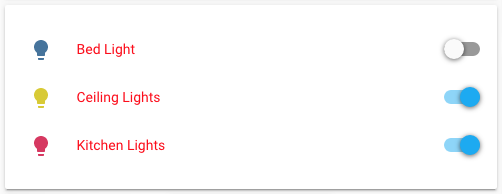
**Example:**\
|
||||||
|
Change the text color of an `entities` card to red.
|
||||||
|
|
||||||
|
```yaml
|
||||||
|
type: entities
|
||||||
|
style: |
|
||||||
|
ha-card {
|
||||||
|
color: red;
|
||||||
|
}
|
||||||
|
entities:
|
||||||
|
- light.bed_light
|
||||||
|
- light.ceiling_lights
|
||||||
|
- light.kitchen_lights
|
||||||
|
```
|
||||||
|
|
||||||
|
|
||||||
|
|
||||||
|
---
|
||||||
|
|
||||||
|
By using the element inspector of your browser ([chrome](https://developers.google.com/web/tools/chrome-devtools/inspect-styles/), [firefox](https://developer.mozilla.org/en-US/docs/Tools/Page_Inspector/How_to/Open_the_Inspector), [safari](https://discussions.apple.com/thread/5508711), [explorer](https://docs.microsoft.com/en-us/previous-versions/windows/internet-explorer/ie-developer/samples/gg589500(v=vs.85))) you can find out how cards are built up and what styles they are using.
|
||||||
|
|
||||||
|
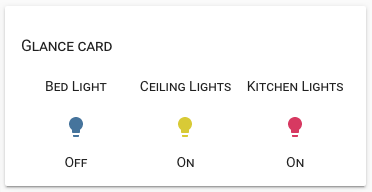
**Example** \
|
||||||
|
Make a `glance` card use smallcaps and change the font size of the title
|
||||||
|
|
||||||
|
```yaml
|
||||||
|
type: entities
|
||||||
|
style: |
|
||||||
|
ha-card {
|
||||||
|
font-variant: small-caps;
|
||||||
|
}
|
||||||
|
.card-header {
|
||||||
|
font-size: 16px;
|
||||||
|
}
|
||||||
|
entities:
|
||||||
|
- light.bed_light
|
||||||
|
- light.ceiling_lights
|
||||||
|
- light.kitchen_lights
|
||||||
|
```
|
||||||
|
|
||||||
|
|
||||||
|
|
||||||
|
You can also use [templates](https://github.com/thomasloven/hass-config/wiki/Mod-plugin-templates) to change the styles dynamically.
|
||||||
|
|
||||||
|
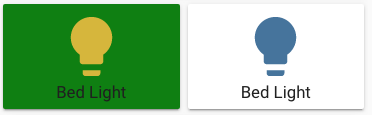
**Example** \
|
||||||
|
Make an `entity-button` card green when the light is on
|
||||||
|
|
||||||
|
```yaml
|
||||||
|
type: entity-button
|
||||||
|
entity: light.bed_light
|
||||||
|
style: |
|
||||||
|
ha-card {
|
||||||
|
background: [[ if(light.bed_light == "on", "green", "") ]];
|
||||||
|
}
|
||||||
|
```
|
||||||
|
|
||||||
|
|
||||||
|
|
||||||
|
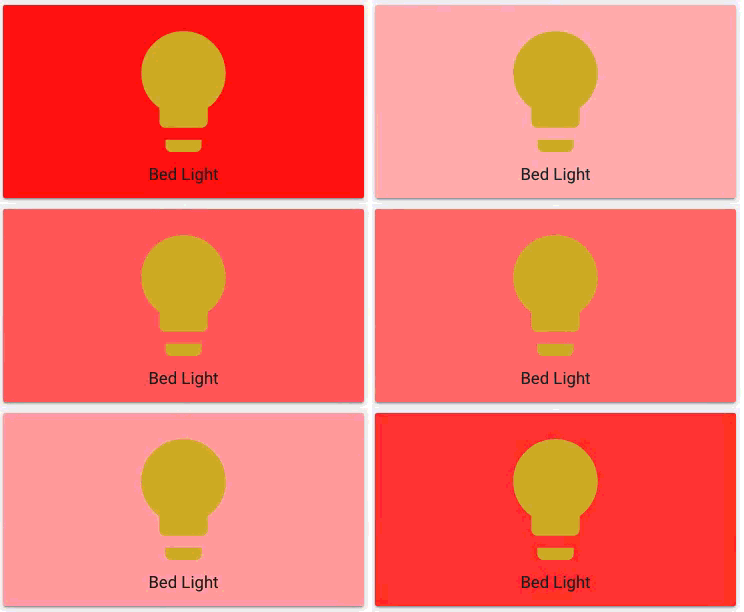
Anything you add in `style:` will be put in a `<style>` tag, so you can also use things like css keyframes
|
||||||
|
|
||||||
|
**Example** \
|
||||||
|
Make a blinking button
|
||||||
|
|
||||||
|
```yaml
|
||||||
|
type: entity-button
|
||||||
|
entity: light.bed_light
|
||||||
|
style: |
|
||||||
|
@keyframes blink {
|
||||||
|
50% {
|
||||||
|
background: red;
|
||||||
|
}
|
||||||
|
}
|
||||||
|
ha-card {
|
||||||
|
animation: blink 2s linear infinite;
|
||||||
|
}
|
||||||
|
```
|
||||||
|
|
||||||
|
|
||||||
|
|
||||||
|
|
||||||
|
## More examples
|
||||||
|
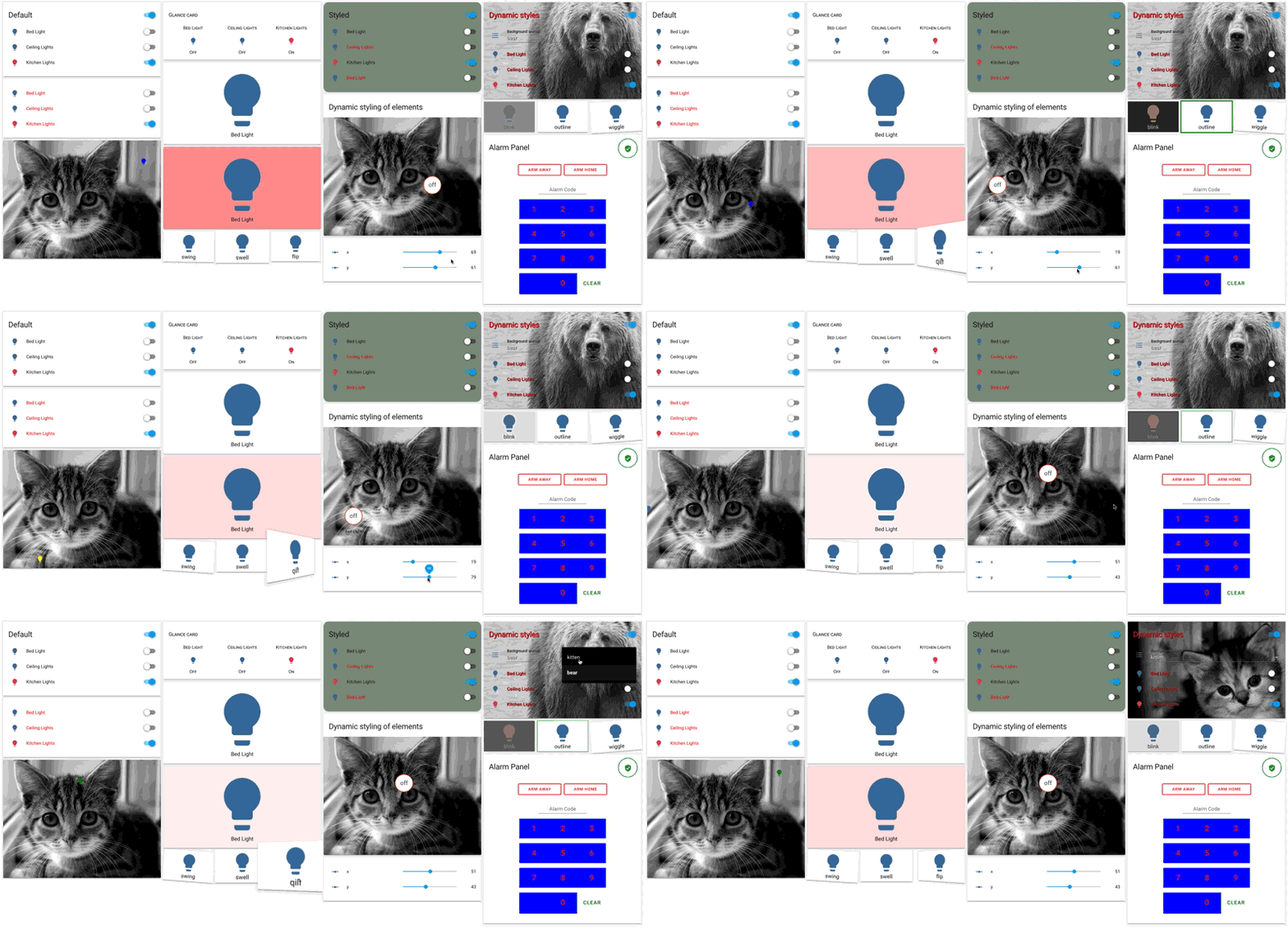
More examples are available [here](https://github.com/thomasloven/lovelace-card-mod/blob/master/src/example.yaml).
|
||||||
|
|
||||||
|
|
||||||
|
|
||||||
|
|
||||||
|
## Advanced usage
|
||||||
|
|
||||||
|
When exploring the cards using the element inspector, you might run into something called a `shadow-root` and notice that you can't apply styles to anything inside that.
|
||||||
|
|
||||||
|
In this case, you can make `style:` a dictionary instead of a string, where each key is a [`querySelector` string](https://developer.mozilla.org/en-US/docs/Web/API/Document/querySelector) and it's value styles to apply to it - *recursively*. A key of `$` means go into a `shadow-root` and a key of `.` the current element.
|
||||||
|
|
||||||
|
This is not for the faint of heart.
|
||||||
|
|
||||||
|
**Example**:
|
||||||
|
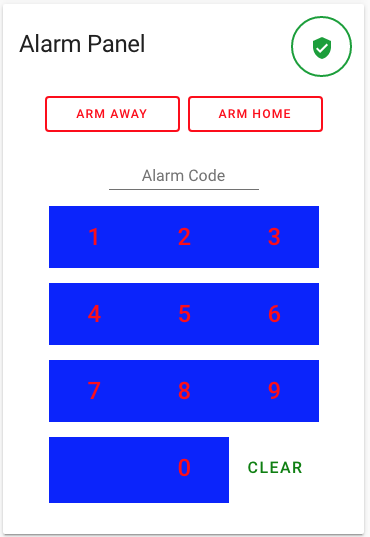
Change some things in an `alarm-panel` card.
|
||||||
|
|
||||||
|
```yaml
|
||||||
|
type: alarm-panel
|
||||||
|
card_icon: mdi:bell
|
||||||
|
name: Alarm Panel
|
||||||
|
style:
|
||||||
|
.: |
|
||||||
|
ha-card {
|
||||||
|
--mdc-theme-primary: red;
|
||||||
|
}
|
||||||
|
"#keypad mwc-button":
|
||||||
|
$: |
|
||||||
|
:host {
|
||||||
|
background: blue;
|
||||||
|
}
|
||||||
|
button {
|
||||||
|
font-size: 24px !important;
|
||||||
|
}
|
||||||
|
"#keypad mwc-button:nth-of-type(12)":
|
||||||
|
$: |
|
||||||
|
button {
|
||||||
|
font-size: 16px !important;
|
||||||
|
--mdc-theme-primary: green;
|
||||||
|
}
|
||||||
|
entity: alarm_control_panel.alarm
|
||||||
|
```
|
||||||
|
|
||||||
|
|
||||||
|
|
||||||
|
---
|
||||||
|
<a href="https://www.buymeacoffee.com/uqD6KHCdJ" target="_blank"><img src="https://www.buymeacoffee.com/assets/img/custom_images/white_img.png" alt="Buy Me A Coffee" style="height: auto !important;width: auto !important;" ></a>
|
||||||
@@ -0,0 +1 @@
|
|||||||
|
!function(e){var t={};function r(s){if(t[s])return t[s].exports;var a=t[s]={i:s,l:!1,exports:{}};return e[s].call(a.exports,a,a.exports,r),a.l=!0,a.exports}r.m=e,r.c=t,r.d=function(e,t,s){r.o(e,t)||Object.defineProperty(e,t,{enumerable:!0,get:s})},r.r=function(e){"undefined"!=typeof Symbol&&Symbol.toStringTag&&Object.defineProperty(e,Symbol.toStringTag,{value:"Module"}),Object.defineProperty(e,"__esModule",{value:!0})},r.t=function(e,t){if(1&t&&(e=r(e)),8&t)return e;if(4&t&&"object"==typeof e&&e&&e.__esModule)return e;var s=Object.create(null);if(r.r(s),Object.defineProperty(s,"default",{enumerable:!0,value:e}),2&t&&"string"!=typeof e)for(var a in e)r.d(s,a,function(t){return e[t]}.bind(null,a));return s},r.n=function(e){var t=e&&e.__esModule?function(){return e.default}:function(){return e};return r.d(t,"a",t),t},r.o=function(e,t){return Object.prototype.hasOwnProperty.call(e,t)},r.p="",r(r.s=3)}([function(e,t,r){"use strict";function s(){return document.querySelector("home-assistant").hass}r.d(t,"a",function(){return s})},function(module,__webpack_exports__,__webpack_require__){"use strict";__webpack_require__.d(__webpack_exports__,"a",function(){return parseTemplate});var _hass_js__WEBPACK_IMPORTED_MODULE_0__=__webpack_require__(0),_deviceID_js__WEBPACK_IMPORTED_MODULE_1__=__webpack_require__(2);function hasTemplate(e){return/\[\[\s+.*\s+\]\]/.test(e)}function parseTemplateString(str,specialData={}){if("string"!=typeof str)return text;const FUNCTION=/^[a-zA-Z0-9_]+\(.*\)$/,EXPR=/([^=<>!]+)\s*(==|!=|<|>|<=|>=)\s*([^=<>!]+)/,SPECIAL=/^\{.+\}$/,STRING=/^"[^"]*"|'[^']*'$/;"string"==typeof specialData&&(specialData={}),specialData=Object.assign({user:Object(_hass_js__WEBPACK_IMPORTED_MODULE_0__.a)().user.name,browser:_deviceID_js__WEBPACK_IMPORTED_MODULE_1__.a,hash:location.hash.substr(1)||" "},specialData);const _parse_function=e=>{let t=[e.substr(0,e.indexOf("(")).trim()];for(e=e.substr(e.indexOf("(")+1);e;){let r=0,s=0,a=!1;for(;e[r];){let t=e[r++];if(t===a&&r>1&&"\\"!==e[r-2]?a=!1:"\"'".includes(t)&&(a=t),!a){if("("===t)s+=1;else if(")"===t){s-=1;continue}if(!(s>0)&&",)".includes(t))break}}t.push(e.substr(0,r-1).trim()),e=e.substr(r)}return t},_parse_special=e=>(e=e.substr(1,e.length-2),specialData[e]||`{${e}}`),_parse_entity=e=>{let t;if((e=e.split("."))[0].match(SPECIAL))t=_parse_special(e.shift()),t=Object(_hass_js__WEBPACK_IMPORTED_MODULE_0__.a)().states[t]||t;else if(t=Object(_hass_js__WEBPACK_IMPORTED_MODULE_0__.a)().states[`${e.shift()}.${e.shift()}`],!e.length)return t.state;return e.forEach(e=>t=t[e]),t},_eval_expr=str=>{if(str=EXPR.exec(str),null===str)return!1;const lhs=parseTemplateString(str[1]),rhs=parseTemplateString(str[3]);var expr="";return expr=parseFloat(lhs)!=lhs?`"${lhs}" ${str[2]} "${rhs}"`:`${parseFloat(lhs)} ${str[2]} ${parseFloat(rhs)}`,eval(expr)},_eval_function=e=>{if("if"===e[0])return _eval_expr(e[1])?parseTemplateString(e[2]):parseTemplateString(e[3])};try{return str=str.trim(),str.match(STRING)?str.substr(1,str.length-2):str.match(SPECIAL)?_parse_special(str):str.match(FUNCTION)?_eval_function(_parse_function(str)):str.includes(".")?_parse_entity(str):str}catch(e){return`[[ Template matching failed: ${str} ]]`}}function parseTemplate(e,t={}){if("string"!=typeof e)return e;return e=e.replace(/\[\[\s(.*?)\s\]\]/g,(e,r,s,a)=>parseTemplateString(r,t))}},function(e,t,r){"use strict";r.d(t,"a",function(){return s});let s=function(){if(window.fully&&"function"==typeof fully.getDeviceId)return fully.getDeviceId();if(!localStorage["lovelace-player-device-id"]){const e=()=>Math.floor(1e5*(1+Math.random())).toString(16).substring(1);localStorage["lovelace-player-device-id"]=`${e()}${e()}-${e()}${e()}`}return localStorage["lovelace-player-device-id"]}()},function(e,t,r){"use strict";r.r(t);const s=Object.getPrototypeOf(customElements.get("home-assistant-main"));s.prototype.html,s.prototype.css;var a=r(1);const n=customElements.get("ha-card"),o=function(e){return e.config?e.config:e._config?e._config:e.host?o(e.host):e.parentElement?o(e.parentElement):e.parentNode?o(e.parentNode):null},i=function(e,t){if(e&&t)if("string"==typeof t){e.querySelector(":scope >.card-mod-style")&&e.removeChild(e.querySelector(":scope > .card-mod-style"));const r=document.createElement("style");r.classList="card-mod-style",r.innerHTML=Object(a.a)(t),e.appendChild(r)}else Object.keys(t).forEach(r=>"."===r?i(e,t[r]):"$"===r?i(e.shadowRoot,t[r]):void e.querySelectorAll(`:scope > ${r}`).forEach(e=>{i(e,t[r])}))};n.prototype.updated=function(e){const t=o(this);t&&t.style&&i(this,t.style)},n.prototype.firstUpdated=function(){const e=this.shadowRoot.querySelector(".card-header");e&&this.insertBefore(e,this.children[0]),document.querySelector("home-assistant").provideHass(this),window.addEventListener("location-changed",()=>this._requestUpdate())},Object.defineProperty(n.prototype,"hass",{get(){return this._hass},set(e){if(e!==this._hass){const t=this._hass;this._hass=e,this._requestUpdate("hass",t)}}}),function(e,tLine truncated
|
||||||
@@ -0,0 +1,313 @@
|
|||||||
|
title: card-mod
|
||||||
|
cards:
|
||||||
|
- type: entities
|
||||||
|
title: Default
|
||||||
|
entities:
|
||||||
|
- light.bed_light
|
||||||
|
- light.ceiling_lights
|
||||||
|
- light.kitchen_lights
|
||||||
|
|
||||||
|
- type: entities
|
||||||
|
style: |
|
||||||
|
ha-card {
|
||||||
|
color: red;
|
||||||
|
}
|
||||||
|
entities:
|
||||||
|
- light.bed_light
|
||||||
|
- light.ceiling_lights
|
||||||
|
- light.kitchen_lights
|
||||||
|
|
||||||
|
- type: glance
|
||||||
|
title: Glance card
|
||||||
|
style: |
|
||||||
|
ha-card {
|
||||||
|
font-variant: small-caps;
|
||||||
|
}
|
||||||
|
.card-header {
|
||||||
|
font-size: 16px;
|
||||||
|
}
|
||||||
|
entities:
|
||||||
|
- light.bed_light
|
||||||
|
- light.ceiling_lights
|
||||||
|
- light.kitchen_lights
|
||||||
|
|
||||||
|
- type: entity-button
|
||||||
|
entity: light.bed_light
|
||||||
|
style: |
|
||||||
|
ha-card {
|
||||||
|
background: [[ if(light.bed_light == "on", "green", "") ]];
|
||||||
|
}
|
||||||
|
|
||||||
|
- type: entity-button
|
||||||
|
entity: light.bed_light
|
||||||
|
style: |
|
||||||
|
@keyframes blink {
|
||||||
|
50% {
|
||||||
|
background: red;
|
||||||
|
}
|
||||||
|
}
|
||||||
|
ha-card {
|
||||||
|
animation: blink 2s linear infinite;
|
||||||
|
}
|
||||||
|
|
||||||
|
- type: entities
|
||||||
|
title: Styled
|
||||||
|
style: |
|
||||||
|
ha-card {
|
||||||
|
background: rgba(0,50,0,0.5);
|
||||||
|
border-radius: 15px;
|
||||||
|
}
|
||||||
|
#states div:nth-of-type(2n+0) {
|
||||||
|
color: red;
|
||||||
|
}
|
||||||
|
entities:
|
||||||
|
- light.bed_light
|
||||||
|
- light.ceiling_lights
|
||||||
|
- light.kitchen_lights
|
||||||
|
- light.bed_light
|
||||||
|
|
||||||
|
- type: entities
|
||||||
|
title: Dynamic styles
|
||||||
|
style: |
|
||||||
|
ha-card {
|
||||||
|
background: url(http://place[[ input_select.background.state ]].com/g/600/400);
|
||||||
|
--primary-text-color: rgb(250,250,250);
|
||||||
|
color: [[ if(light.bed_light == "on", "rgb(250,250,250)", "red") ]];
|
||||||
|
--paper-listbox-background-color: black;
|
||||||
|
text-shadow: 1px 1px 0 #000;
|
||||||
|
}
|
||||||
|
entities:
|
||||||
|
- input_select.background
|
||||||
|
- light.bed_light
|
||||||
|
- light.ceiling_lights
|
||||||
|
- light.kitchen_lights
|
||||||
|
|
||||||
|
- type: vertical-stack
|
||||||
|
cards:
|
||||||
|
- type: picture-elements
|
||||||
|
style: |
|
||||||
|
ha-card {
|
||||||
|
--top: [[ input_number.y_pos.state ]]%;
|
||||||
|
--left: [[ input_number.x_pos.state ]]%;
|
||||||
|
}
|
||||||
|
title: Dynamic styling of elements
|
||||||
|
image: "http://placekitten.com/g/800/600"
|
||||||
|
elements:
|
||||||
|
- type: custom:hui-state-badge-element
|
||||||
|
entity: light.bed_light
|
||||||
|
style:
|
||||||
|
top: "var(--top)"
|
||||||
|
left: "var(--left)"
|
||||||
|
- type: entities
|
||||||
|
entities:
|
||||||
|
- input_number.x_pos
|
||||||
|
- input_number.y_pos
|
||||||
|
|
||||||
|
- type: horizontal-stack
|
||||||
|
cards:
|
||||||
|
- type: entity-button
|
||||||
|
entity: light.bed_light
|
||||||
|
name: blink
|
||||||
|
style: |
|
||||||
|
ha-card {
|
||||||
|
animation: blink 3s linear infinite;
|
||||||
|
}
|
||||||
|
@keyframes blink {
|
||||||
|
50% {
|
||||||
|
filter: invert(100%);
|
||||||
|
}
|
||||||
|
}
|
||||||
|
- type: entity-button
|
||||||
|
name: outline
|
||||||
|
entity: light.bed_light
|
||||||
|
style: |
|
||||||
|
ha-card {
|
||||||
|
outline: 0px none green;
|
||||||
|
animation: blink 3s linear infinite;
|
||||||
|
}
|
||||||
|
@keyframes blink {
|
||||||
|
24% {
|
||||||
|
outline: 0px none white;
|
||||||
|
}
|
||||||
|
25% {
|
||||||
|
outline: 0px solid green;
|
||||||
|
}
|
||||||
|
50% {
|
||||||
|
outline: 5px solid green;
|
||||||
|
}
|
||||||
|
75% {
|
||||||
|
outline: 0px solid green;
|
||||||
|
}
|
||||||
|
76% {
|
||||||
|
outline: 0px none white;
|
||||||
|
}
|
||||||
|
}
|
||||||
|
- type: entity-button
|
||||||
|
name: wiggle
|
||||||
|
entity: light.bed_light
|
||||||
|
style: |
|
||||||
|
ha-card {
|
||||||
|
animation: wiggle 2s linear infinite alternate;
|
||||||
|
}
|
||||||
|
@keyframes wiggle {
|
||||||
|
0% {
|
||||||
|
-webkit-transform: rotate(5deg);
|
||||||
|
transform: rotate(5deg);
|
||||||
|
}
|
||||||
|
100% {
|
||||||
|
-webkit-transform: rotate(-5deg);
|
||||||
|
transform: rotate(-5deg);
|
||||||
|
}
|
||||||
|
}
|
||||||
|
|
||||||
|
|
||||||
|
|
||||||
|
- type: horizontal-stack
|
||||||
|
cards:
|
||||||
|
- type: entity-button
|
||||||
|
entity: light.bed_light
|
||||||
|
name: swing
|
||||||
|
style: |
|
||||||
|
ha-card {
|
||||||
|
animation: swing 1s linear infinite alternate;
|
||||||
|
}
|
||||||
|
@keyframes swing {
|
||||||
|
0% {
|
||||||
|
-webkit-transform: rotate(5deg);
|
||||||
|
transform: rotate(5deg);
|
||||||
|
}
|
||||||
|
100% {
|
||||||
|
-webkit-transform: rotate(-5deg);
|
||||||
|
transform: rotate(-5deg);
|
||||||
|
}
|
||||||
|
}
|
||||||
|
|
||||||
|
- type: entity-button
|
||||||
|
entity: light.bed_light
|
||||||
|
name: swell
|
||||||
|
style: |
|
||||||
|
ha-card {
|
||||||
|
animation: pulse 3s linear infinite alternate;
|
||||||
|
}
|
||||||
|
@keyframes blinka {
|
||||||
|
50% { background: white; }
|
||||||
|
100% { background: blue; }
|
||||||
|
}
|
||||||
|
@keyframes pulse {
|
||||||
|
0% {
|
||||||
|
-webkit-transform: scaleX(1);
|
||||||
|
transform: scaleX(1);
|
||||||
|
}
|
||||||
|
50% {
|
||||||
|
-webkit-transform: scale3d(1.15,1.15,1.15);
|
||||||
|
transform: scale3d(1.15,1.15,1.15);
|
||||||
|
}
|
||||||
|
100% {
|
||||||
|
-webkit-transform: scaleX(1);
|
||||||
|
transform: scaleX(1);
|
||||||
|
}
|
||||||
|
- type: entity-button
|
||||||
|
entity: light.bed_light
|
||||||
|
name: flip
|
||||||
|
style: |
|
||||||
|
ha-card {
|
||||||
|
animation: flip 5s linear infinite
|
||||||
|
}
|
||||||
|
@keyframes blinka {
|
||||||
|
50% { background: white; }
|
||||||
|
100% { background: red; }
|
||||||
|
}
|
||||||
|
@keyframes flip {
|
||||||
|
0% {
|
||||||
|
-webkit-animation-timing-function: ease-out;
|
||||||
|
-webkit-transform: perspective(400px) scaleX(1) translateZ(0) rotateY(-1turn);
|
||||||
|
animation-timing-function: ease-out;
|
||||||
|
transform: perspective(400px) scaleX(1) translateZ(0) rotateY(-1turn)
|
||||||
|
}
|
||||||
|
|
||||||
|
40% {
|
||||||
|
-webkit-animation-timing-function: ease-out;
|
||||||
|
-webkit-transform: perspective(400px) scaleX(1) translateZ(150px) rotateY(-190deg);
|
||||||
|
animation-timing-function: ease-out;
|
||||||
|
transform: perspective(400px) scaleX(1) translateZ(150px) rotateY(-190deg)
|
||||||
|
}
|
||||||
|
|
||||||
|
50% {
|
||||||
|
-webkit-animation-timing-function: ease-in;
|
||||||
|
-webkit-transform: perspective(400px) scaleX(1) translateZ(150px) rotateY(-170deg);
|
||||||
|
animation-timing-function: ease-in;
|
||||||
|
transform: perspective(400px) scaleX(1) translateZ(150px) rotateY(-170deg)
|
||||||
|
}
|
||||||
|
|
||||||
|
80% {
|
||||||
|
-webkit-animation-timing-function: ease-in;
|
||||||
|
-webkit-transform: perspective(400px) scale3d(.95,.95,.95) translateZ(0) rotateY(0deg);
|
||||||
|
animation-timing-function: ease-in;
|
||||||
|
transform: perspective(400px) scale3d(.95,.95,.95) translateZ(0) rotateY(0deg)
|
||||||
|
}
|
||||||
|
|
||||||
|
to {
|
||||||
|
-webkit-animation-timing-function: ease-in;
|
||||||
|
-webkit-transform: perspective(400px) scaleX(1) translateZ(0) rotateY(0deg);
|
||||||
|
animation-timing-function: ease-in;
|
||||||
|
transform: perspective(400px) scaleX(1) translateZ(0) rotateY(0deg)
|
||||||
|
}
|
||||||
|
}
|
||||||
|
|
||||||
|
- type: picture-elements
|
||||||
|
style: |
|
||||||
|
@keyframes dvd {
|
||||||
|
0% {
|
||||||
|
left: 0%;
|
||||||
|
top: 50%;
|
||||||
|
--paper-item-icon-color: red;
|
||||||
|
}
|
||||||
|
30% {
|
||||||
|
left: 75%;
|
||||||
|
top: 0%;
|
||||||
|
--paper-item-icon-color: green;
|
||||||
|
}
|
||||||
|
50% {
|
||||||
|
left: 95%;
|
||||||
|
top: 25%;
|
||||||
|
--paper-item-icon-color: blue;
|
||||||
|
}
|
||||||
|
80% {
|
||||||
|
left: 25%;
|
||||||
|
top: 95%;
|
||||||
|
--paper-item-icon-color: yellow;
|
||||||
|
}
|
||||||
|
}
|
||||||
|
image: "http://placekitten.com/g/800/600"
|
||||||
|
elements:
|
||||||
|
- type: state-icon
|
||||||
|
entity: light.bed_light
|
||||||
|
tap_action:
|
||||||
|
action: toggle
|
||||||
|
style:
|
||||||
|
animation: dvd 10s linear infinite
|
||||||
|
left: 0%
|
||||||
|
top: 50%
|
||||||
|
- type: alarm-panel
|
||||||
|
card_icon: mdi:bell
|
||||||
|
name: Alarm Panel
|
||||||
|
style:
|
||||||
|
.: |
|
||||||
|
ha-card {
|
||||||
|
--mdc-theme-primary: red;
|
||||||
|
}
|
||||||
|
"#keypad mwc-button":
|
||||||
|
$: |
|
||||||
|
:host {
|
||||||
|
background: blue;
|
||||||
|
}
|
||||||
|
button {
|
||||||
|
font-size: 24px !important;
|
||||||
|
}
|
||||||
|
"#keypad mwc-button:nth-of-type(12)":
|
||||||
|
$: |
|
||||||
|
button {
|
||||||
|
font-size: 16px !important;
|
||||||
|
--mdc-theme-primary: green;
|
||||||
|
}
|
||||||
|
entity: alarm_control_panel.alarm
|
||||||
+82
@@ -0,0 +1,82 @@
|
|||||||
|
import {html, css} from "/card-tools/lit-element.js";
|
||||||
|
import {fireEvent} from "/card-tools/event.js";
|
||||||
|
import {parseTemplate} from "/card-tools/templates.js";
|
||||||
|
|
||||||
|
const HaCard = customElements.get('ha-card');
|
||||||
|
|
||||||
|
const findConfig = function(node) {
|
||||||
|
if(node.config)
|
||||||
|
return node.config;
|
||||||
|
if(node._config)
|
||||||
|
return node._config;
|
||||||
|
if(node.host)
|
||||||
|
return findConfig(node.host);
|
||||||
|
if(node.parentElement)
|
||||||
|
return findConfig(node.parentElement);
|
||||||
|
if(node.parentNode)
|
||||||
|
return findConfig(node.parentNode);
|
||||||
|
return null;
|
||||||
|
};
|
||||||
|
|
||||||
|
const applyStyle = function(root, style) {
|
||||||
|
if(!root || !style) return;
|
||||||
|
|
||||||
|
if(typeof style === "string") {
|
||||||
|
// Remove old styles if we're updating
|
||||||
|
if(root.querySelector(":scope >.card-mod-style"))
|
||||||
|
root.removeChild(root.querySelector(":scope > .card-mod-style"));
|
||||||
|
|
||||||
|
// Add new style tag to the root element
|
||||||
|
const styleEl = document.createElement('style');
|
||||||
|
styleEl.classList = "card-mod-style";
|
||||||
|
styleEl.innerHTML = parseTemplate(style);
|
||||||
|
root.appendChild(styleEl);
|
||||||
|
} else {
|
||||||
|
Object.keys(style).forEach((k) => {
|
||||||
|
if(k === ".")
|
||||||
|
return applyStyle(root, style[k]);
|
||||||
|
else if(k === "$")
|
||||||
|
return applyStyle(root.shadowRoot, style[k]);
|
||||||
|
else {
|
||||||
|
root.querySelectorAll(`:scope > ${k}`).forEach((el) => {
|
||||||
|
applyStyle(el, style[k]);
|
||||||
|
});
|
||||||
|
return;
|
||||||
|
}
|
||||||
|
});
|
||||||
|
}
|
||||||
|
}
|
||||||
|
|
||||||
|
HaCard.prototype.updated = function(_) {
|
||||||
|
// Apply styles after updates, if specified
|
||||||
|
const config = findConfig(this);
|
||||||
|
if(config && config.style)
|
||||||
|
applyStyle(this, config.style);
|
||||||
|
}
|
||||||
|
|
||||||
|
HaCard.prototype.firstUpdated = function() {
|
||||||
|
// Move the header inside the slot instead of in the shadowDOM
|
||||||
|
// makes it easier to style it consistently
|
||||||
|
const header = this.shadowRoot.querySelector(".card-header");
|
||||||
|
if(header)
|
||||||
|
{
|
||||||
|
this.insertBefore(header, this.children[0]);
|
||||||
|
}
|
||||||
|
// Listen for changes to hass or the location and update
|
||||||
|
document.querySelector("home-assistant").provideHass(this);
|
||||||
|
window.addEventListener("location-changed", () => this._requestUpdate());
|
||||||
|
}
|
||||||
|
Object.defineProperty(HaCard.prototype, 'hass', {
|
||||||
|
get() {
|
||||||
|
return this._hass;
|
||||||
|
},
|
||||||
|
set(value) {
|
||||||
|
if(value !== this._hass) {
|
||||||
|
const oldval = this._hass;
|
||||||
|
this._hass = value;
|
||||||
|
this._requestUpdate('hass', oldval);
|
||||||
|
}
|
||||||
|
},
|
||||||
|
});
|
||||||
|
|
||||||
|
fireEvent('ll-rebuild', {});
|
||||||
Reference in new issue
Block a user